
タッチ!あそベビー 赤ちゃんが喜ぶ子供向けのアプリ 知育無料

タッチ!あそベビー 赤ちゃんが喜ぶ子供向けのアプリ 知育無料

Education

| WAO CORPORATION

Play on PC with BlueStacks or from our cloud

  • Overview
  • How to Download

Page Modified On: October 23, 2025

Run タッチ!あそベビー 赤ちゃんが喜ぶ子供向けのアプリ 知育無料 on PC or Mac

Multitask effortlessly on your PC or Mac as you try out タッチ!あそベビー 赤ちゃんが喜ぶ子供向けのアプリ 知育無料, a Education app by WAO CORPORATION on BlueStacks.

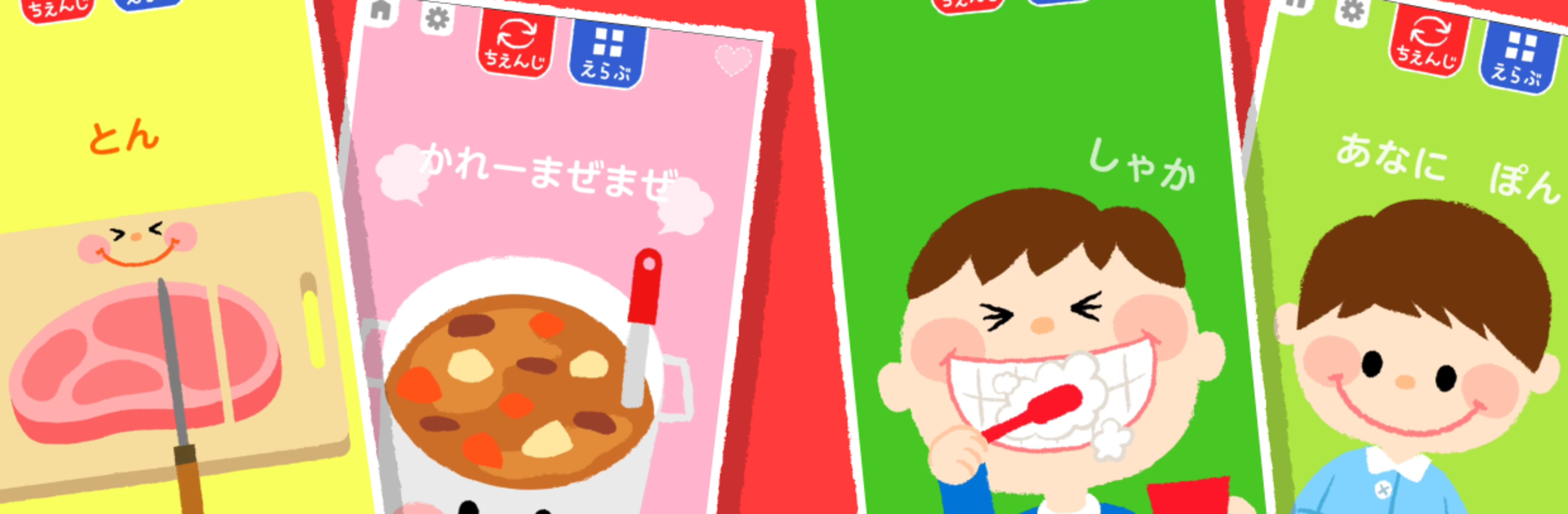
This is a super simple tap-and-play app for very young kids, the kind where every touch makes colors pop, shapes change, and little sounds chirp back. It leans into pretend play that toddlers already love, like brushing teeth, cooking, riding trains, visiting shops, cleaning up, even playing with instruments. Everything runs on the idea that a kid taps the screen and something obvious happens, so it feels rewarding without needing instructions. There are no banner ads on the game screens, so accidental touches are not a worry, and it starts fast from launch, which is great when a child is fussy and waiting for something.

The base pack gives a handful of mini activities for free, and there are tons of optional packs after that. Cars and trains, princess sparkle stuff, cooking, music, festivals, animals, space, Japan themes, fairgrounds, shops, drawing and clay, even little chores like sorting laundry or washing hands. Each pack is buy-once, no subscription, and kids tend to loop the same favorites happily because the cause and effect feels clear. Sounds are cheerful without being harsh, and the visuals are bright but simple. Parents can jump in by naming things out loud or celebrating what just happened, since the app is built around that copy-and-try stage.

On a PC with BlueStacks, the bigger screen makes taps easy to see, and mouse clicks work like clean, precise touches. It is nice for sitting side by side, since switching between activities is quick and there is not much to fiddle with. It runs light, loads fast, and the absence of fidgety ads means fewer oops moments. Some packs have a lot of variety, others are more bite-sized, which actually suits short attention spans. If toddlers enjoy tapping to make things react and copying everyday routines, this hits that sweet spot without getting complicated.

Ready to experience タッチ!あそベビー 赤ちゃんが喜ぶ子供向けのアプリ 知育無料 on a bigger screen, in all its glory? Download BlueStacks now.


How to Download and Run タッチ!あそベビー 赤ちゃんが喜ぶ子供向けのアプリ 知育無料 on PC or Mac

  • Download and install BlueStacks on your PC or Mac

  • Complete Google sign-in to access the Play Store, or do it later

  • Look for タッチ!あそベビー 赤ちゃんが喜ぶ子供向けのアプリ 知育無料 in the search bar at the top right corner

  • Click to install タッチ!あそベビー 赤ちゃんが喜ぶ子供向けのアプリ 知育無料 from the search results

  • Complete Google sign-in (if you skipped step 2) to install タッチ!あそベビー 赤ちゃんが喜ぶ子供向けのアプリ 知育無料

  • Click the タッチ!あそベビー 赤ちゃんが喜ぶ子供向けのアプリ 知育無料 icon on the home screen to start playing

video
Watch Video

Minimum System Requirements

With BlueStacks 5, you can get started on a PC that fulfills the following requirements.

  • Operating System

    Microsoft Windows 7 or above, macOS 11 (Big Sur) or above

  • Processor

    Intel, AMD or Apple Silicon Processor

  • RAM

    at least 4GB

  • HDD

    10GB Free Disk Space

Note:

* You must be an Administrator on your PC. Up to date graphics drivers from Microsoft or the chipset vendor.

タッチ!あそベビー 赤ちゃんが喜ぶ子供向けのアプリ 知育無料 - FAQs

  • How to Run タッチ!あそベビー 赤ちゃんが喜ぶ子供向けのアプリ 知育無料 on Windows PC & Mac?

    Run タッチ!あそベビー 赤ちゃんが喜ぶ子供向けのアプリ 知育無料 on your PC or Mac by following these simple steps.

    • Click on ‘Download タッチ!あそベビー 赤ちゃんが喜ぶ子供向けのアプリ 知育無料 on PC’ to download BlueStacks
    • Install it and log-in to Google Play Store
    • Launch and run the app.
  • Why is BlueStacks the fastest and safest platform to play games on PC?

    BlueStacks respects your privacy and is always safe and secure to use. It does not carry any malware, spyware, or any sort of additional software that could harm your PC.

    It is engineered to optimize speed and performance for a seamless gaming experience.

  • What are タッチ!あそベビー 赤ちゃんが喜ぶ子供向けのアプリ 知育無料 PC requirements?

    Minimum requirement to run タッチ!あそベビー 赤ちゃんが喜ぶ子供向けのアプリ 知育無料 on your PC

    • OS: Microsoft Windows 7 and above:
    • Processor: Intel or AMD Processor:
    • RAM: Your PC must have at least 2GB of RAM. (Note that having 2GB or more disk space is not a substitute for RAM):
    • HDD: 5GB Free Disk Space.
    • You must be an Administrator on your PC.



