


NiceLock Pro for Samsung
Jogue no PC com BlueStacks - A Plataforma de Jogos Android, confiada por mais de 500 milhões de jogadores.

Página modificada em: Feb 25, 2025
Play NiceLock Pro for Samsung on PC
NiceLock is a launcher application for goodlock customization modules for Samsung devices.
Good Lock is an incredible official app by Samsung for customizing Samsung devices. It consists of modules which edit and change many things in the UI such as task changer, notification panel, lockscreen, split screen and more. Unfortunately it is only available in a few countries. Even if you install them manually, most of them does not appear in your app drawer. That is where NiceLock comes into play, by acting as a launcher for all of your modules, allows you to access them.
NiceLock Pro is adfree and paid version of NiceLock.
Important Note:
•NiceLock does not install Good Lock modules due to Google Play Store rules, and you need to install these modules manually if you are outside Korea, the United States, UK, Singapore, Australia, and Canada.
Features:
•Adding shortcuts to homescreen
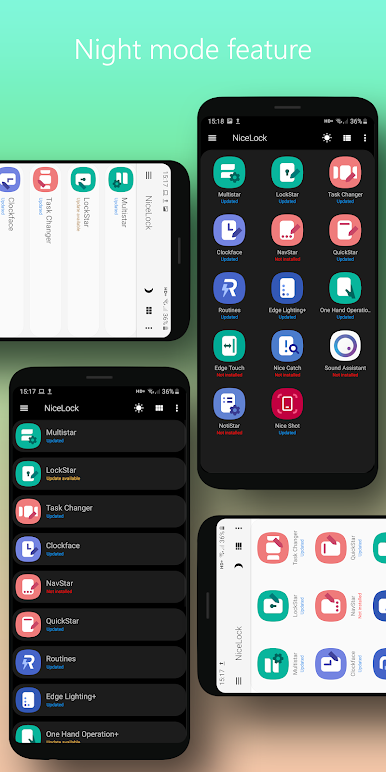
•Night Mode
NiceLock has a Night Mode option to be easier on your eyes and if you just prefer darker layouts.
•Cloud Database
When opened, NiceLock checks its own database to see if your modules have updates available.
•Cloud Rollout
When a new module is published, you will be able to see it on NiceLock instantly without even needing to update NiceLock!
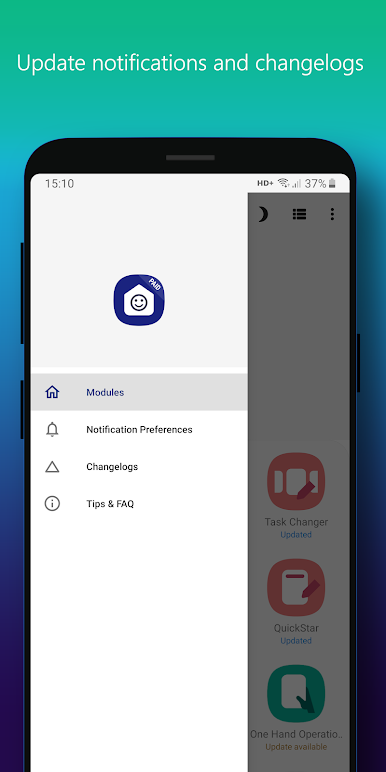
•Push Notifications
When a module update is available, NiceLock will send you push notifications.
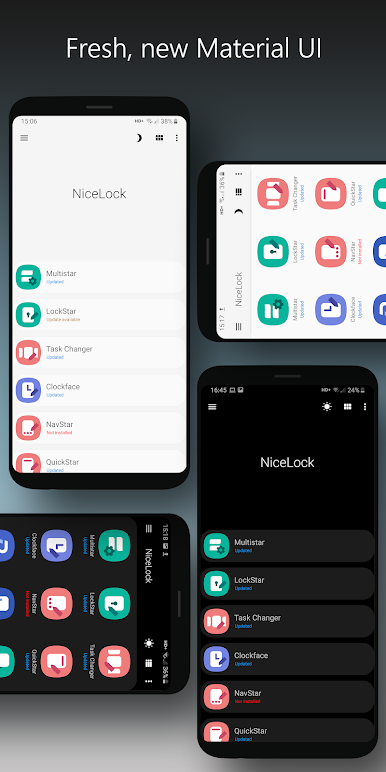
•Material Design UI
NiceLock is updated with a fresh, clean Material Design UI.
Good Lock © is a trademark of Samsung.

Jogue NiceLock Pro for Samsung no PC. É fácil começar.
-
Baixe e instale o BlueStacks no seu PC
-
Conclua o login do Google para acessar a Play Store ou faça isso mais tarde
-
Procure por NiceLock Pro for Samsung na barra de pesquisa no canto superior direito
-
Clique para instalar NiceLock Pro for Samsung a partir dos resultados da pesquisa
-
Conclua o login do Google (caso você pulou a etapa 2) para instalar o NiceLock Pro for Samsung
-
Clique no ícone do NiceLock Pro for Samsung na tela inicial para começar a jogar

