


Flash Alert & Led Flashlight
5억명 이상의 게이머가 신뢰하는 안드로이드 게임 플랫폼 BlueStacks으로 PC에서 플레이하세요.

Run Flash Alert & Led Flashlight on PC or Mac
Get freedom from your phone’s obvious limitations. Use Flash Alert & Led Flashlight, made by Go Technology Global, a Productivity app on your PC or Mac with BlueStacks, and level up your experience.
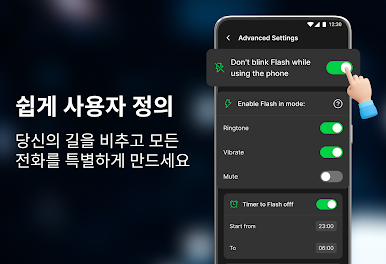
Flash Alert & Led Flashlight is basically a smart flasher for calls and notifications, the kind of tool that sounds simple but ends up being super handy. It lets the camera flash blink when there is an incoming call, a text, or alerts from apps like WhatsApp or Messenger. There are two blink styles and a bunch of speed levels, so the light can pulse slow and calm or go rapid if something is urgent. There is a quick test option inside, and the layout is clean, big toggles and labels, so setup takes a minute, not half an afternoon. It even has a smart mode so the light does not blink when the screen is on or the phone is being used, which helps save battery and avoids awkward flashes in the middle of scrolling.
There are a couple fun extras too. DJ lights turns the flash into a little party effect, and there is an SOS pattern that is loud and clear if someone needs attention in a pinch. On a PC with BlueStacks, it feels more like a control panel for dialing in the patterns and choosing which apps trigger the blink. The LED on a laptop obviously will not flash, but it is still easy to simulate alerts, tweak speeds, and then use the same setup on a phone. If silent mode keeps causing missed calls, this solves that without adding any fuss.
Ready to experience Flash Alert & Led Flashlight on a bigger screen, in all its glory? Download BlueStacks now.




PC에서 Flash Alert & Led Flashlight 플레이해보세요.
-
BlueStacks 다운로드하고 설치
-
Google Play 스토어에 로그인 하기(나중에 진행가능)
-
오른쪽 상단 코너에 Flash Alert & Led Flashlight 검색
-
검색 결과 중 Flash Alert & Led Flashlight 선택하여 설치
-
구글 로그인 진행(만약 2단계를 지나갔을 경우) 후 Flash Alert & Led Flashlight 설치
-
메인 홈화면에서 Flash Alert & Led Flashlight 선택하여 실행

