


Wunderfind: 找到丟失的設備 - 耳機和健身追踪器
在電腦上使用BlueStacks –受到5億以上的遊戲玩家所信任的Android遊戲平台。

Run Wunderfind: Find Lost Device - Headphones on PC or Mac
Get freedom from your phone’s obvious limitations. Use Wunderfind: Find Lost Device – Headphones, made by Hendrik Folkerts, a Tools app on your PC or Mac with BlueStacks, and level up your experience.
About the App
Ever spent ages hunting for a missing earbud or trying to remember where you last left your fitness tracker? Wunderfind: Find Lost Device – Headphones, created by Hendrik Folkerts, is all about making those moments way less stressful. This handy little Tools app gives you a straightforward way to track down your lost gadgets, whether that’s AirPods, a Fitbit® tracker, or even your iPhone—no more crawling under couches or giving up hope entirely.
App Features
-
Easy Device Radar
There’s a nifty radar view that shows which devices are hanging out nearby—you’ll spot your lost stuff without having to tear the house apart. -
Distance Score for Hot/Cold Clues
Pick the gadget you’re missing, then watch the distance score update as you move around. The number changes as you get closer, offering real-time feedback, kind of like playing hot and cold for grown-ups. -
Works With Tons of Devices
Supports loads of popular devices: AirPods, Apple Pencil, iPhone, iPad, Apple Watch, portable speakers, fitness trackers including Fitbit® devices, and more. Perfect if you’re the proud owner of a bunch of gear. -
Simple Steps, No Headaches
Fire up Wunderfind, choose what’s gone missing, walk around, and let the app do its thing. Super straightforward—no complicated setup or tech headaches. -
Good Fit for Multiple Platforms
Works well with a bunch of different devices, and if you’re using BlueStacks on desktop, managing your search becomes even more convenient.
Wunderfind: Find Lost Device – Headphones is the kind of app you’ll be glad to have, even if you’re usually good at keeping track of your stuff.
Eager to take your app experience to the next level? Start right away by downloading BlueStacks on your PC or Mac.



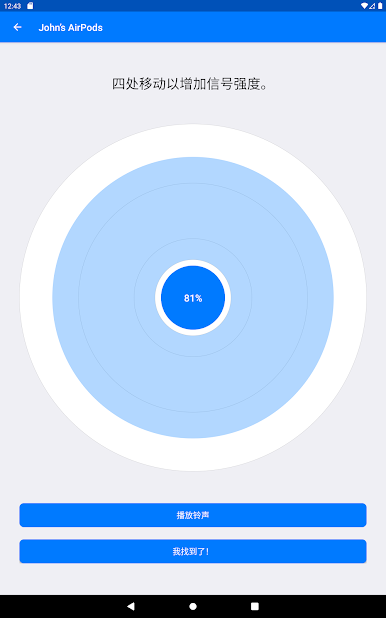



在電腦上遊玩Wunderfind: 找到丟失的設備 - 耳機和健身追踪器 . 輕易上手.
-
在您的電腦上下載並安裝BlueStacks
-
完成Google登入後即可訪問Play商店,或等你需要訪問Play商店十再登入
-
在右上角的搜索欄中尋找 Wunderfind: 找到丟失的設備 - 耳機和健身追踪器
-
點擊以從搜索結果中安裝 Wunderfind: 找到丟失的設備 - 耳機和健身追踪器
-
完成Google登入(如果您跳過了步驟2),以安裝 Wunderfind: 找到丟失的設備 - 耳機和健身追踪器
-
在首頁畫面中點擊 Wunderfind: 找到丟失的設備 - 耳機和健身追踪器 圖標來啟動遊戲

