


戦国武将名辞書
生產力 | JustSystems Corporation
在電腦上使用BlueStacks –受到5億以上的遊戲玩家所信任的Android遊戲平台。

Play 戦国武将名辞書 on PC
◆ Sengoku contents of the warlords name dictionary
Warring States era of warlords name has been recorded.
· [Kenshin Uesugi] Kenshin Uesugi
· [Yukimura Sanada] Yukimura Sanada
· [Shingen Takeda] Shingen Takeda
· [Naoe inherit I guess] Naoe Kanetsugu
· [Motonari Mori] Motonari Mori
◆ and ATOK extended dictionary
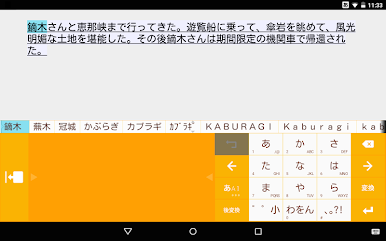
Using together and ATOK, added the words that can be converted will be the input is more comfortable.
ATOK number of extended dictionary that can be used in the body are as follows.
· ATOK for Android: 10 pieces
· ATOK for Android Passport version: 10
· ATOK for Android trial version: two
· ATOK for Android medical dictionary set: 10
· ATOK for Android medical dictionary set trial version: two
· ATOK for au (au Smart Pass): 10
· ATOK for amazing obtained (Dokomosugo obtained content): 10
· ATOK for App Pass (Softbank App Pass): 10 pieces
※ Pre-Installed ATOK, you can not use the ATOK for Android [Professional].
※ In the ATOK extended dictionary alone will not work.
◆ use the ATOK extended dictionary
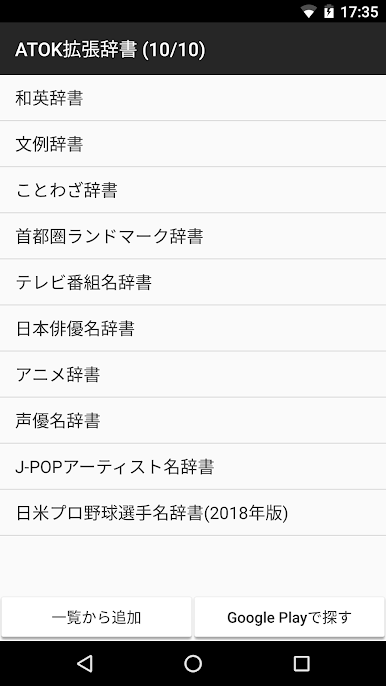
· ATOK setting of [ATOK cloud services] - [ATOK extended dictionary] - and select Add from the list].
· To so do not use a dictionary, from the menu to open the dictionary name in the list (long press) Long tap to, and select Delete.
▼ operating environment and compatible models ▼
http://www.justsystems.com/jp/products/atok_android/spec.html?spec=system
▼ online manual ▼
http://www.justsystems.com/jp/links/atok/android/manual.html
▼ Frequently Asked Questions (FAQ) ▼
http://support.justsystems.com/jp/products/atok_android/#faq
Warring States era of warlords name has been recorded.
· [Kenshin Uesugi] Kenshin Uesugi
· [Yukimura Sanada] Yukimura Sanada
· [Shingen Takeda] Shingen Takeda
· [Naoe inherit I guess] Naoe Kanetsugu
· [Motonari Mori] Motonari Mori
◆ and ATOK extended dictionary
Using together and ATOK, added the words that can be converted will be the input is more comfortable.
ATOK number of extended dictionary that can be used in the body are as follows.
· ATOK for Android: 10 pieces
· ATOK for Android Passport version: 10
· ATOK for Android trial version: two
· ATOK for Android medical dictionary set: 10
· ATOK for Android medical dictionary set trial version: two
· ATOK for au (au Smart Pass): 10
· ATOK for amazing obtained (Dokomosugo obtained content): 10
· ATOK for App Pass (Softbank App Pass): 10 pieces
※ Pre-Installed ATOK, you can not use the ATOK for Android [Professional].
※ In the ATOK extended dictionary alone will not work.
◆ use the ATOK extended dictionary
· ATOK setting of [ATOK cloud services] - [ATOK extended dictionary] - and select Add from the list].
· To so do not use a dictionary, from the menu to open the dictionary name in the list (long press) Long tap to, and select Delete.
▼ operating environment and compatible models ▼
http://www.justsystems.com/jp/products/atok_android/spec.html?spec=system
▼ online manual ▼
http://www.justsystems.com/jp/links/atok/android/manual.html
▼ Frequently Asked Questions (FAQ) ▼
http://support.justsystems.com/jp/products/atok_android/#faq
在電腦上遊玩戦国武将名辞書 . 輕易上手.
-
在您的電腦上下載並安裝BlueStacks
-
完成Google登入後即可訪問Play商店,或等你需要訪問Play商店十再登入
-
在右上角的搜索欄中尋找 戦国武将名辞書
-
點擊以從搜索結果中安裝 戦国武将名辞書
-
完成Google登入(如果您跳過了步驟2),以安裝 戦国武将名辞書
-
在首頁畫面中點擊 戦国武将名辞書 圖標來啟動遊戲

