


Dominican Networks
5억명 이상의 게이머가 신뢰하는 안드로이드 게임 플랫폼 BlueStacks으로 PC에서 플레이하세요.

Run Dominican Networks on PC or Mac
Let BlueStacks turn your PC, Mac, or laptop into the perfect home for Dominican Networks, a fun Entertainment app from RCTVHD.
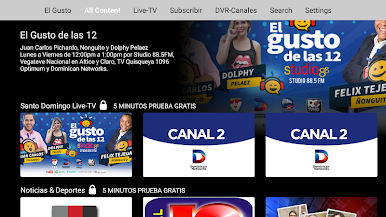
Dominican Networks feels like a straight‑up hub for Dominican TV and culture. It lays out live channels and a bunch of on demand sections in a simple grid, so it is easy to hop from news to a concert, then over to movies or a religion TV segment without fuss. The whole thing leans hard into Dominican content, which is the point, and there are bits labeled as exclusive that are not the usual reruns. Music shows and live concerts are the fun surprise, since they make the app feel lively even when it is just playing in the background. Most of it is Spanish first, so menus and show titles will read familiar to anyone used to Television Dominicana en vivo. Subtitles are not guaranteed, so English‑only viewers should expect to browse a little.
Running it on a PC through BlueStacks makes browsing nicer. A mouse and a bigger screen take the pressure off tiny phone menus, and flipping between live TV and other sections feels quicker. Streams spin up fast when the connection is solid, picture quality holds well, and audio comes through clean without blasting the highs. Someone who wants a steady diet of Dominican news, faith programming, concerts, and movies in one place will get exactly that. It is the kind of app that can sit open while cooking, studying, or just catching up on what is happening back home.
BlueStacks gives you the much-needed freedom to experience your favorite apps on a bigger screen. Get it now.








PC에서 Dominican Networks 플레이해보세요.
-
BlueStacks 다운로드하고 설치
-
Google Play 스토어에 로그인 하기(나중에 진행가능)
-
오른쪽 상단 코너에 Dominican Networks 검색
-
검색 결과 중 Dominican Networks 선택하여 설치
-
구글 로그인 진행(만약 2단계를 지나갔을 경우) 후 Dominican Networks 설치
-
메인 홈화면에서 Dominican Networks 선택하여 실행

