
1C대형 키보드는 Lite
5억명 이상의 게이머가 신뢰하는 안드로이드 게임 플랫폼 BlueStacks으로 PC에서 플레이하세요.

Run 1C Big Keyboard Lite on PC or Mac
Why limit yourself to your small screen on the phone? Run 1C Big Keyboard Lite, an app by Mahjong Brain Puzzles, best experienced on your PC or Mac with BlueStacks, the world’s #1 Android emulator.
About the App
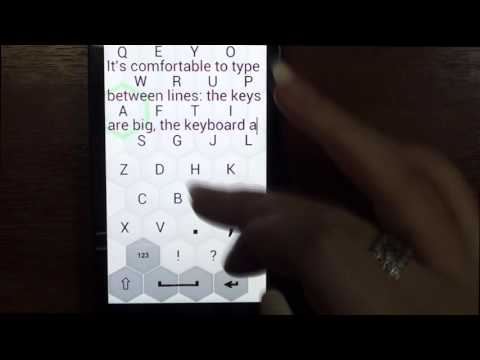
Ever wished your keyboard had bigger keys, especially when your fingers aren’t exactly tiny or your eyes aren’t as sharp as they used to be? 1C Big Keyboard Lite from Mahjong Brain Puzzles is all about making typing on your phone or tablet a whole lot easier—and honestly, more comfortable. It’s designed for folks who want less squinting, way fewer typos, and keys that are actually, well, big! If you’ve struggled with cramped keyboards or tiny buttons, this one’s a breath of fresh air.
App Features
-
Super-Sized Buttons:
No more hunting for the right letter or squinting to spot the space bar. With the entire screen dedicated to the keyboard, each key is basically impossible to miss—great for those of us with large hands or anyone tired of autocorrect drama. -
Full-Screen Layout (for Real):
Turn on the 100% display mode, and your entire screen becomes one giant, easy-to-tap keyboard. It’s not just a slogan; you really do get every pixel working for your fingers. -
Easy-to-Learn QWERTY:
Though the keys are massive, the familiar QWERTY layout means you won’t have to relearn how to type. If you know your way around a regular keyboard, you’ll feel right at home here. -
Multilingual Support:
Switching between languages? You’re covered. 1C Big Keyboard Lite supports English, Spanish, German, Russian, French, Portuguese, Korean, Hindi, Arabic, and many more. No need to dig through settings—just select and go. -
Less Eye Strain:
Big, clear keys mean you don’t have to peer at your screen for every letter. It just feels less stressful on your eyes, especially during those late-night texting sessions. -
Ideal for Small Screens:
If you’re using a smaller phone or a compact device, this keyboard makes the most out of your limited space. You get full functionality without feeling cramped. -
Great Across Devices (Including via BlueStacks):
Want the big-key experience on a larger display? The keyboard adapts smoothly, whether you’re typing on your phone or using BlueStacks on your computer. -
Mistake-Reducing Design:
The app’s roomy buttons are there to keep your typos to a minimum, which means less backspacing and more confident typing. -
Perfect for All Ages:
Made for those who aren’t fans of squinting or fumbling on tiny screens—though honestly, anyone after a stress-free typing experience can enjoy it (or maybe help a parent out!).
Ready to experience 1C Big Keyboard Lite on a bigger screen, in all its glory? Download BlueStacks now.


PC에서 1C대형 키보드는 Lite 플레이해보세요.
-
BlueStacks 다운로드하고 설치
-
Google Play 스토어에 로그인 하기(나중에 진행가능)
-
오른쪽 상단 코너에 1C대형 키보드는 Lite 검색
-
검색 결과 중 1C대형 키보드는 Lite 선택하여 설치
-
구글 로그인 진행(만약 2단계를 지나갔을 경우) 후 1C대형 키보드는 Lite 설치
-
메인 홈화면에서 1C대형 키보드는 Lite 선택하여 실행