


Light Alarm Clock
도구 | sssprog
5억명 이상의 게이머가 신뢰하는 안드로이드 게임 플랫폼 BlueStacks으로 PC에서 플레이하세요.

개요
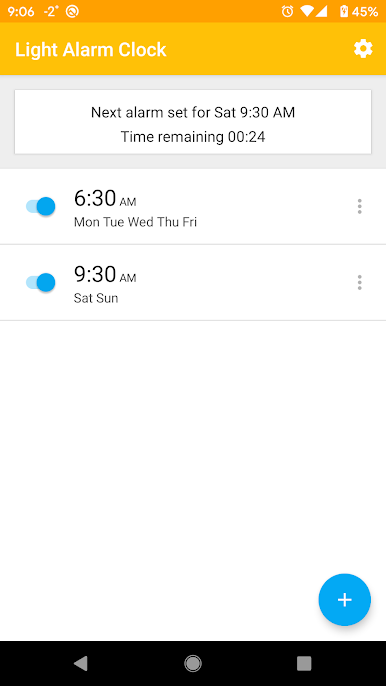
Light Alarm Clock will wake you up gently in the most natural way with light and sound.
Features:
- One-time and repeated alarms
- Main alarm sound
- Vibration during main alarm sound
- Pre-alarm sound, that starts before main alarm sound and plays music with increasing volume
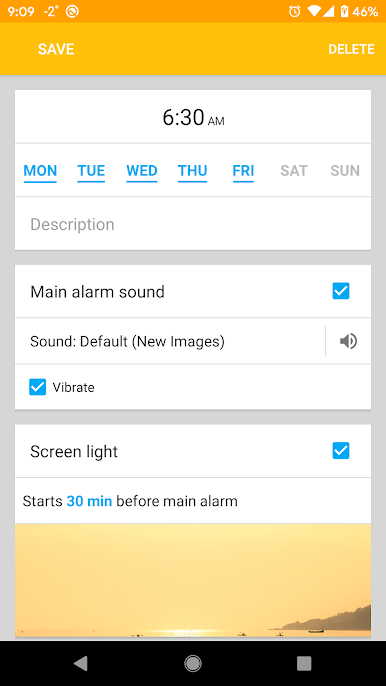
- Screen light with increasing brightness. You can choose color of light or set an image instead of color.
- LED camera light
- You can choose multiple tracks for alarm sounds, every time the alarm starts, next track will be played.
- A few options for dismiss/snooze functionality
- Next alarm time widget
All parameters of an alarm can be turned on/off and tuned to suit your needs.
How the application works:
Time that you set for every alarm is the time at which main alarm sound starts. Vibration also starts at this time, if corresponding option is set.
For "pre-alarm sound", "screen light" and "flash light" you specify time intervals, that mean that this action starts N minutes (specified interval) before main alarm time. For example, if alarm is set for 8:00 and screen light is enabled with interval set to 30 minutes, than screen light starts at 7:30 and main alarm begins to play at 8:00.
If battery level is lower than specified in the app's settings, then pre-alarm sound and screen light won't be turned on until main alarm time. You can disable this behaviour in the settings.
Features:
- One-time and repeated alarms
- Main alarm sound
- Vibration during main alarm sound
- Pre-alarm sound, that starts before main alarm sound and plays music with increasing volume
- Screen light with increasing brightness. You can choose color of light or set an image instead of color.
- LED camera light
- You can choose multiple tracks for alarm sounds, every time the alarm starts, next track will be played.
- A few options for dismiss/snooze functionality
- Next alarm time widget
All parameters of an alarm can be turned on/off and tuned to suit your needs.
How the application works:
Time that you set for every alarm is the time at which main alarm sound starts. Vibration also starts at this time, if corresponding option is set.
For "pre-alarm sound", "screen light" and "flash light" you specify time intervals, that mean that this action starts N minutes (specified interval) before main alarm time. For example, if alarm is set for 8:00 and screen light is enabled with interval set to 30 minutes, than screen light starts at 7:30 and main alarm begins to play at 8:00.
If battery level is lower than specified in the app's settings, then pre-alarm sound and screen light won't be turned on until main alarm time. You can disable this behaviour in the settings.

PC에서 Light Alarm Clock 플레이해보세요.
-
BlueStacks 다운로드하고 설치
-
Google Play 스토어에 로그인 하기(나중에 진행가능)
-
오른쪽 상단 코너에 Light Alarm Clock 검색
-
검색 결과 중 Light Alarm Clock 선택하여 설치
-
구글 로그인 진행(만약 2단계를 지나갔을 경우) 후 Light Alarm Clock 설치
-
메인 홈화면에서 Light Alarm Clock 선택하여 실행

