


속도계 GPS HUD
도구 | WonderTech Studio
5억명 이상의 게이머가 신뢰하는 안드로이드 게임 플랫폼 BlueStacks으로 PC에서 플레이하세요.

Play Speedometer – GPS Speedometer on PC
Speedometer – GPS Speedometer app is a free speedometer app that turns your Android phone into a simple and accurate digital speedometer. Whether you need a GPS speedometer for car or a bike speedometer, this free speedometer app helps you track speed, distance, and travel time with ease.
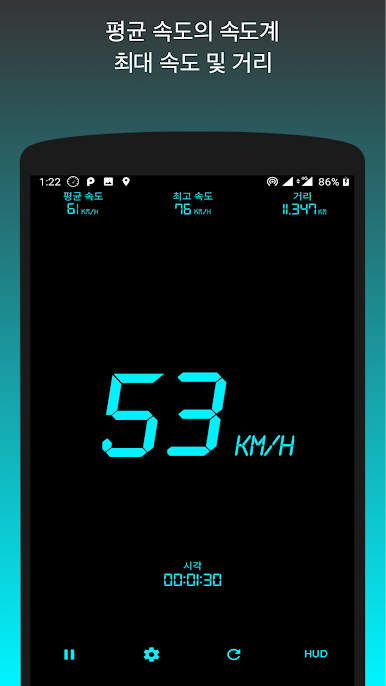
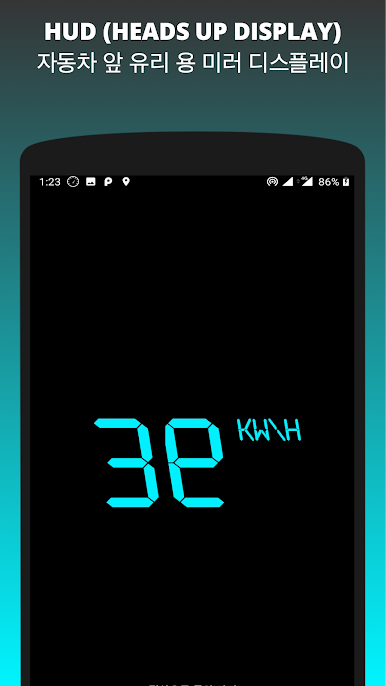
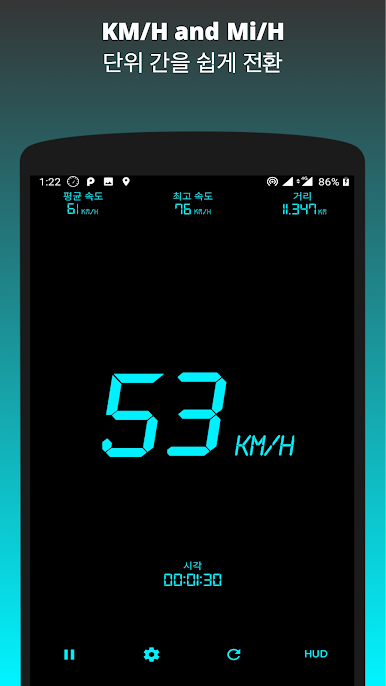
This GPS speedometer app also works as an MPH tracker and odometer, showing your current speed in both MPH and KMH. You can save trips to view details like maximum speed, average speed, total distance, and travel time. It is the perfect speedometer app for driving, cycling, or walking, with a clear digital HUD (heads-up display) style.
⭐ Features:
• GPS Speedometer – measure real-time speed using GPS
• MPH Tracker – switch between MPH and KMH anytime
• Save Trip – store trip data with max speed, avg speed, distance, and time
• Odometer – calculate total distance covered
• Bike Speedometer – track cycling speed and distance
• Car Speedometer – measure speed while driving
• Speed Tracker – shows current, max, and average speed
• Speedometer App Free – easy to use with GPS tracking, MPH tracker and odometer.
• Digital Speedometer HUD – clear and modern display
The Speedometer GPS app uses your phone’s built-in GPS sensor. Accuracy depends on your device and GPS signal quality. In open areas, the GPS speedometer works with high accuracy, but speed readings may vary in tunnels or areas with weak signals.
📌 Disclaimer:
This speedometer app is designed for informational purposes. It is not intended to replace a car’s built-in speedometer. Accuracy may vary based on device and location conditions.
⚠️ Safety Warning:
Do not operate the app while driving. Always focus on the road. If you need to change settings or check your MPH tracker, park your car safely first. Using mobile phones while driving can be dangerous for you and others.
Download Speedometer today and enjoy a free, reliable digital speedometer app with trip saving for car and bike speed tracking.
This GPS speedometer app also works as an MPH tracker and odometer, showing your current speed in both MPH and KMH. You can save trips to view details like maximum speed, average speed, total distance, and travel time. It is the perfect speedometer app for driving, cycling, or walking, with a clear digital HUD (heads-up display) style.
⭐ Features:
• GPS Speedometer – measure real-time speed using GPS
• MPH Tracker – switch between MPH and KMH anytime
• Save Trip – store trip data with max speed, avg speed, distance, and time
• Odometer – calculate total distance covered
• Bike Speedometer – track cycling speed and distance
• Car Speedometer – measure speed while driving
• Speed Tracker – shows current, max, and average speed
• Speedometer App Free – easy to use with GPS tracking, MPH tracker and odometer.
• Digital Speedometer HUD – clear and modern display
The Speedometer GPS app uses your phone’s built-in GPS sensor. Accuracy depends on your device and GPS signal quality. In open areas, the GPS speedometer works with high accuracy, but speed readings may vary in tunnels or areas with weak signals.
📌 Disclaimer:
This speedometer app is designed for informational purposes. It is not intended to replace a car’s built-in speedometer. Accuracy may vary based on device and location conditions.
⚠️ Safety Warning:
Do not operate the app while driving. Always focus on the road. If you need to change settings or check your MPH tracker, park your car safely first. Using mobile phones while driving can be dangerous for you and others.
Download Speedometer today and enjoy a free, reliable digital speedometer app with trip saving for car and bike speed tracking.
PC에서 속도계 GPS HUD 플레이해보세요.
-
BlueStacks 다운로드하고 설치
-
Google Play 스토어에 로그인 하기(나중에 진행가능)
-
오른쪽 상단 코너에 속도계 GPS HUD 검색
-
검색 결과 중 속도계 GPS HUD 선택하여 설치
-
구글 로그인 진행(만약 2단계를 지나갔을 경우) 후 속도계 GPS HUD 설치
-
메인 홈화면에서 속도계 GPS HUD 선택하여 실행

