


SnoreClock - 코를 고시나요?
건강 및 피트니스 | Ralph Schiffhauer
5억명 이상의 게이머가 신뢰하는 안드로이드 게임 플랫폼 BlueStacks으로 PC에서 플레이하세요.

Play SnoreClock - Do you snore? on PC
Do you snore?
Find out with SnoreClock – the smart snoring recorder trusted by millions of users.
Place your phone beside your bed, press the red button, and sleep.
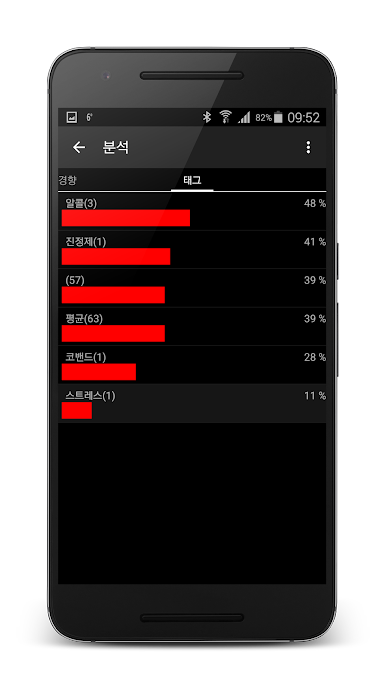
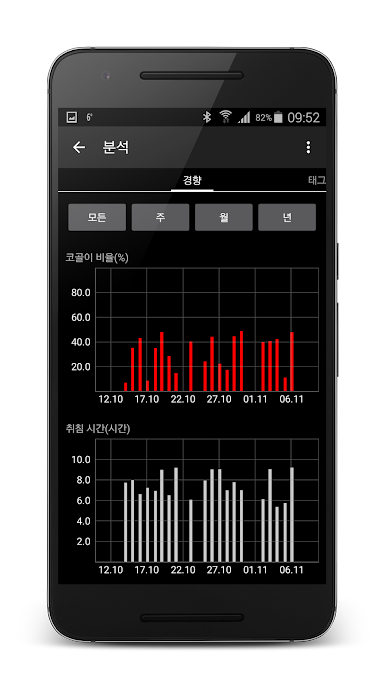
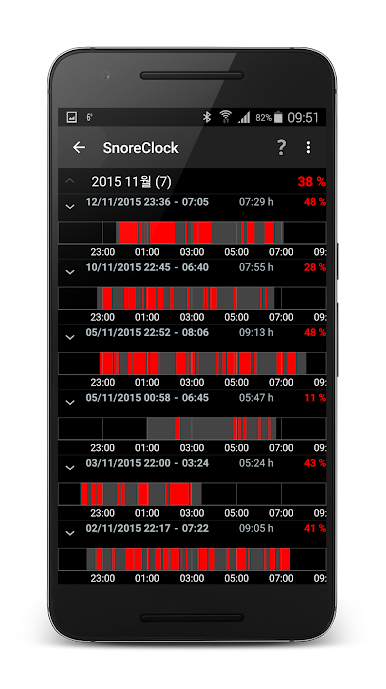
In the morning, see exactly when and how often you snored.
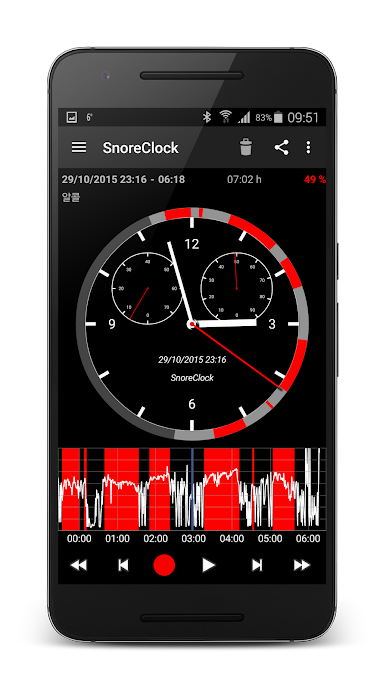
SnoreClock records the whole night and highlights likely snoring with red bars.
Understand your sleep – quickly, clearly, and effortlessly.
Check:
• if you snore
• if your partner snores
• if you talk in your sleep
• if something disturbs your rest – and more
Rotate your phone to landscape mode to explore the night graph. Pinch to zoom and drag to move.
Features:
1) Records all sounds while you sleep
2) Smart snoring detection with high accuracy
3) Shows red bars for likely snoring
4) Evaluate the effect of anti-snoring remedies
5) Displays volume over time
6) Records up to 11 hours
7) Works in background mode
Plus Version (one-time purchase or subscription)
• No ads
• Record to SD card
• Sound or vibration alert on snoring
• Share audio files
• Backup your statistics
• And more
→ Manage or cancel anytime in Google Play.
Quick Start:
1) Place the phone near your bed
2) Plug in the charger if needed
3) Press the red button to start
4) Stop in the morning to view results
5) Use landscape mode to explore and listen
Need help?
Use the Help menu inside the app for documentation or to contact support.
Health Disclaimer
SnoreClock is designed to detect and monitor snoring patterns for general informational and self-awareness purposes only.
It is not a medical device and does not diagnose, treat, cure, or prevent any medical condition, nor does it provide medical advice.
Always seek professional medical advice regarding your health, sleep, or any medical condition.
Find out with SnoreClock – the smart snoring recorder trusted by millions of users.
Place your phone beside your bed, press the red button, and sleep.
In the morning, see exactly when and how often you snored.
SnoreClock records the whole night and highlights likely snoring with red bars.
Understand your sleep – quickly, clearly, and effortlessly.
Check:
• if you snore
• if your partner snores
• if you talk in your sleep
• if something disturbs your rest – and more
Rotate your phone to landscape mode to explore the night graph. Pinch to zoom and drag to move.
Features:
1) Records all sounds while you sleep
2) Smart snoring detection with high accuracy
3) Shows red bars for likely snoring
4) Evaluate the effect of anti-snoring remedies
5) Displays volume over time
6) Records up to 11 hours
7) Works in background mode
Plus Version (one-time purchase or subscription)
• No ads
• Record to SD card
• Sound or vibration alert on snoring
• Share audio files
• Backup your statistics
• And more
→ Manage or cancel anytime in Google Play.
Quick Start:
1) Place the phone near your bed
2) Plug in the charger if needed
3) Press the red button to start
4) Stop in the morning to view results
5) Use landscape mode to explore and listen
Need help?
Use the Help menu inside the app for documentation or to contact support.
Health Disclaimer
SnoreClock is designed to detect and monitor snoring patterns for general informational and self-awareness purposes only.
It is not a medical device and does not diagnose, treat, cure, or prevent any medical condition, nor does it provide medical advice.
Always seek professional medical advice regarding your health, sleep, or any medical condition.
PC에서 SnoreClock - 코를 고시나요? 플레이해보세요.
-
BlueStacks 다운로드하고 설치
-
Google Play 스토어에 로그인 하기(나중에 진행가능)
-
오른쪽 상단 코너에 SnoreClock - 코를 고시나요? 검색
-
검색 결과 중 SnoreClock - 코를 고시나요? 선택하여 설치
-
구글 로그인 진행(만약 2단계를 지나갔을 경우) 후 SnoreClock - 코를 고시나요? 설치
-
메인 홈화면에서 SnoreClock - 코를 고시나요? 선택하여 실행

