


gerenciador de senhas simples
Jogue no PC com BlueStacks - A Plataforma de Jogos Android, confiada por mais de 500 milhões de jogadores.

Página modificada em: Nov 26, 2025
Play Cloud Keyring on PC
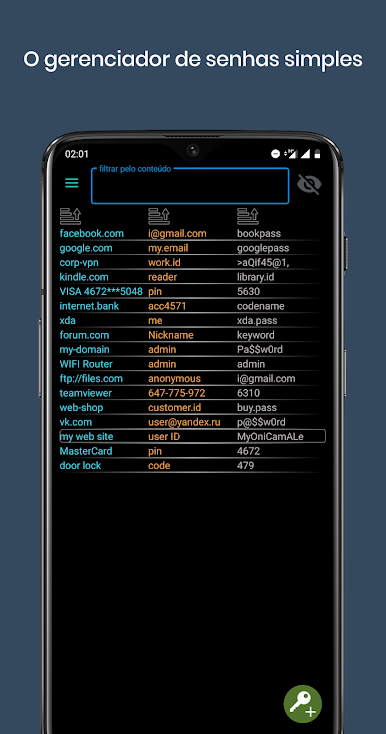
The Master-Key is a password invented by yourself for the protection of your data. It can be any sequence of letters, digits or numbers at your choice. Please, do not forget your master key to avoid the loss of your data due to inability to decrypt the database.
All you need to remember is the Master Key of your choice, which must be entered at startup. Master Key is used to encrypt the password database and to restrict unauthorized access to your personal data. It is not stored anywhere and is only used for encryption and decryption purposes. If the database was previously encrypted with one master key it will not be successfully decrypted with another one. Please, do not forget your Master Key!
Jogue gerenciador de senhas simples no PC. É fácil começar.
-
Baixe e instale o BlueStacks no seu PC
-
Conclua o login do Google para acessar a Play Store ou faça isso mais tarde
-
Procure por gerenciador de senhas simples na barra de pesquisa no canto superior direito
-
Clique para instalar gerenciador de senhas simples a partir dos resultados da pesquisa
-
Conclua o login do Google (caso você pulou a etapa 2) para instalar o gerenciador de senhas simples
-
Clique no ícone do gerenciador de senhas simples na tela inicial para começar a jogar

