


핑크퐁 인기 동화
교육 | The Pinkfong Company
5억명 이상의 게이머가 신뢰하는 안드로이드 게임 플랫폼 BlueStacks으로 PC에서 플레이하세요.

Play 핑크퐁 인기 동화 on PC
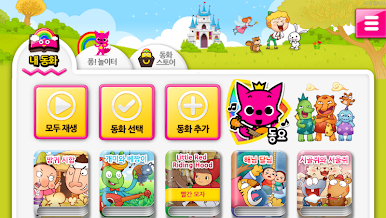
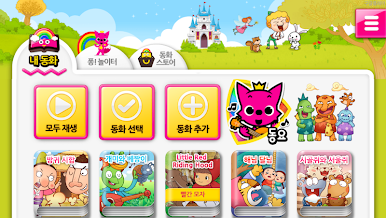
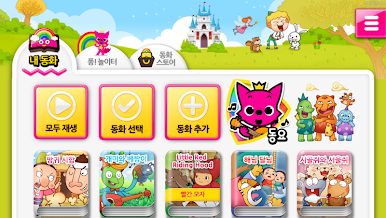
- Pinkfong anytime, anywhere with your smartphone! Meet popular fairy tales! -
Features of Pinkfong's popular fairy tale
- Many popular fairy tales such as traditional fairy tales, Aesop stories, world masterpieces, and creative fairy tales are included!
- Includes a musical English masterpiece series where you can enjoy classic fairy tales with songs for children who are just starting to learn English.
- Built-in continuous play function so that you can watch purchased fairy tales continuously!
- All fairy tales are animated so that even children who have difficulty reading books can easily see them.
- Subtitles included in all fairy tales.
- Can be used on tablets.
Pinkfong! The ability to use external storage is included so that you can download many popular songs and various contents without limiting the capacity. (You are requesting permission to read and write to external storage to use external storage.)
New fairy tales are constantly updated. Please look forward to!
- Information on access rights
- In accordance with Article 22-2 of the Information and Communications Network Act (Agreement on Access Rights), which came into effect on March 23, 2017, the necessary access rights when using the app service are provided as follows.
- Each permission is requested to activate the function when using the app rather than collecting your detailed personal information.
- In the case of selective access, you can use the app even if you do not agree to the permission.
'Required access'
Photo/Video/File: Access this function to save or load photo or video content.
Device ID and communication history: On first launch, this feature is accessed to optimize the use of app services.
'How to revoke access'
- Android 6.0 or higher: Settings - Apps - Select permission items - Permission list - Select consent or withdrawal of access
- Under Android 6.0: Upgrade the operating system to revoke access or delete the app
- In the case of Android versions below 6.0, individual consent to items is not possible, so we are receiving mandatory access consent for all items, and you can revoke access in the above way.
Features of Pinkfong's popular fairy tale
- Many popular fairy tales such as traditional fairy tales, Aesop stories, world masterpieces, and creative fairy tales are included!
- Includes a musical English masterpiece series where you can enjoy classic fairy tales with songs for children who are just starting to learn English.
- Built-in continuous play function so that you can watch purchased fairy tales continuously!
- All fairy tales are animated so that even children who have difficulty reading books can easily see them.
- Subtitles included in all fairy tales.
- Can be used on tablets.
Pinkfong! The ability to use external storage is included so that you can download many popular songs and various contents without limiting the capacity. (You are requesting permission to read and write to external storage to use external storage.)
New fairy tales are constantly updated. Please look forward to!
- Information on access rights
- In accordance with Article 22-2 of the Information and Communications Network Act (Agreement on Access Rights), which came into effect on March 23, 2017, the necessary access rights when using the app service are provided as follows.
- Each permission is requested to activate the function when using the app rather than collecting your detailed personal information.
- In the case of selective access, you can use the app even if you do not agree to the permission.
'Required access'
Photo/Video/File: Access this function to save or load photo or video content.
Device ID and communication history: On first launch, this feature is accessed to optimize the use of app services.
'How to revoke access'
- Android 6.0 or higher: Settings - Apps - Select permission items - Permission list - Select consent or withdrawal of access
- Under Android 6.0: Upgrade the operating system to revoke access or delete the app
- In the case of Android versions below 6.0, individual consent to items is not possible, so we are receiving mandatory access consent for all items, and you can revoke access in the above way.






PC에서 핑크퐁 인기 동화 플레이해보세요.
-
BlueStacks 다운로드하고 설치
-
Google Play 스토어에 로그인 하기(나중에 진행가능)
-
오른쪽 상단 코너에 핑크퐁 인기 동화 검색
-
검색 결과 중 핑크퐁 인기 동화 선택하여 설치
-
구글 로그인 진행(만약 2단계를 지나갔을 경우) 후 핑크퐁 인기 동화 설치
-
메인 홈화면에서 핑크퐁 인기 동화 선택하여 실행

