


Detexify
5억명 이상의 게이머가 신뢰하는 안드로이드 게임 플랫폼 BlueStacks으로 PC에서 플레이하세요.

Run Detexify on PC or Mac
Get freedom from your phone’s obvious limitations. Use Detexify, made by Olivier Marty, a Productivity app on your PC or Mac with BlueStacks, and level up your experience.
About the App
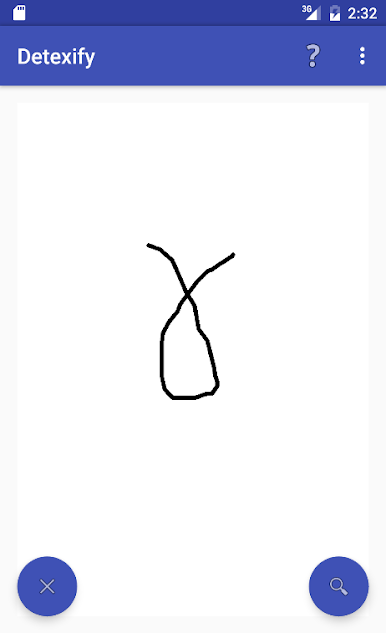
Ever get stuck trying to remember that one tricky LaTeX symbol? Detexify, crafted by Olivier Marty, is here to help. Just draw what you’re looking for—doesn’t matter if your lines aren’t perfect—and the app will guess which LaTeX symbols you might mean. It’s a handy tool for students, researchers, or anyone who deals with scientific writing and doesn’t always have the LaTeX codes memorized. No more endless searches or scrolling through long symbol lists; you just sketch it out and Detexify takes care of the rest.
App Features
-
Draw and Discover
Scribble any symbol with your finger or a stylus, and Detexify figures out the closest LaTeX options—pretty satisfying for those “what’s that symbol called again?” moments. -
Quick LaTeX Commands
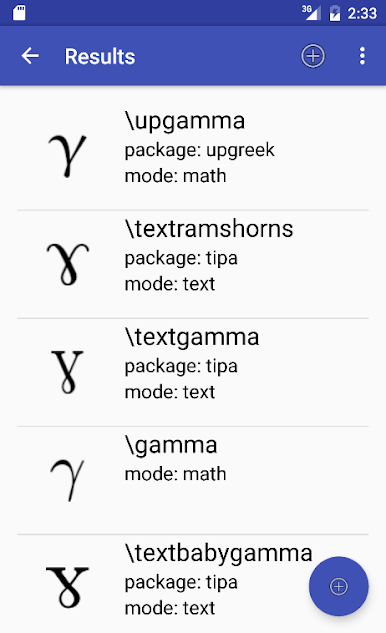
Alongside every suggested match, the app shows exactly which command you’ll need to type in LaTeX. No more guesswork—or accidental mistakes. -
See What Package You Need
Not every symbol is available by default in LaTeX. Detexify tells you which package to use if you’re aiming for something a bit more specialized. -
Mode Information
Find out at a glance if the symbol you found works in math mode, text mode, or both—so you can format everything just right. -
No Need to Be an Artist
Your sketches don’t have to be perfect. The app’s recognition system gets what you mean, even from rushed drawings. -
Character Lookup on Bigger Screens
If you’re running Detexify through BlueStacks, drawing and checking symbols on a computer keyboard or with a mouse feels extra smooth.
Let Detexify take the confusion out of finding LaTeX symbols, and get on with what you were doing—writing math, science, or anything in between.
BlueStacks brings your apps to life on a bigger screen—seamless and straightforward.
PC에서 Detexify 플레이해보세요.
-
BlueStacks 다운로드하고 설치
-
Google Play 스토어에 로그인 하기(나중에 진행가능)
-
오른쪽 상단 코너에 Detexify 검색
-
검색 결과 중 Detexify 선택하여 설치
-
구글 로그인 진행(만약 2단계를 지나갔을 경우) 후 Detexify 설치
-
메인 홈화면에서 Detexify 선택하여 실행

