


Gacha Club
เล่นบน PC ผ่าน BlueStacks - Android Gaming Platform ที่ได้รับความไว้วางใจจากเกมเมอร์ 500 ล้านคนทั่วโลก

Page Modified on: Aug 15, 2023
เล่น Gacha Club บน PC และ Mac
Gacha Club เป็นเกมแนวสวมบทบาทอย่างง่าย พัฒนาโดย Lunime BlueStacks แอพเพลเยอร์เป็นแพลทฟอร์มที่ให้คุณสามารถเล่นเกม Android บนเครื่อง PC หรือ MAC เพื่อประสบการณ์การเล่นเกมที่เหนือระดับ
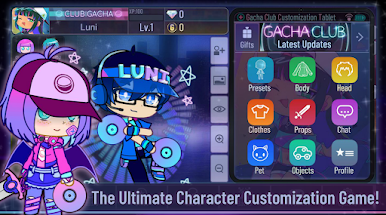
ยินดีต้อนรับสู่โลกของ Gacha Club โลกที่ให้คุณได้สร้างตัวละครสไตล์อนิเมะและแต่งตัวตามแนวแฟชั่นที่คุณชื่นชอบ ไม่ว่าจะเป็นทรงผม เสื้อ ชุด อาวุธ และอื่น ๆ ที่มีให้เลือกและปรับรายละเอียดได้มากกว่าพันแบบ หรือจะนำเข้าตัวละครแบบเพื่อนของคุณมาใช้ก็ได้เช่นกัน!
สนุกไปกับสตูดิโอโหมดที่จะปล่อยให้คุณเพิ่มตัวละครลงบนฉากได้มากถึง 10 ตัว รวมไปถึงสัตว์เลี้ยงที่คุณชื่นชอบ สิ่งของต่าง ๆ หรือจะเป็นการเปลี่ยนฉากพื้นหลังก็ได้เช่นกัน สร้างบทสนทนาของทุกอย่างในฉากได้ด้วยกล่องคำพูด และสร้างผู้บรรยายเพื่อให้ฉากสามารถดำเนินเนื้อเรื่องได้อย่างสมบูรณ์แบบ
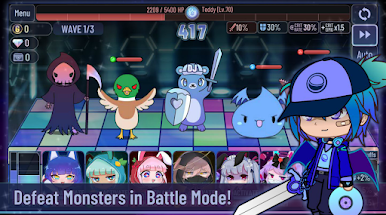
สุ่มกาชาเพื่อหาหน่วยการต่อสู้ที่มีกว่า 180 หน่วย และสัตว์เลี้ยงที่ช่วยเพิ่มค่าพลังกว่าอีก 150 แบบ ซึ่งเราสามารถเพิ่มพลังให้กับพวกเขาได้โดยการใช้วัตถุดิบต่าง ๆ และเมื่อพวกเขาแข็งแกร่งพอ เราก็ส่งพวกเขาเข้าต่อสู้ได้ในทั้ง 4 โหมด โหมดเนื้อเรื่อง โหมดฝึกซ้อม โหมดหอคอย และโหมดความมืดแห่งการกลืนกิน
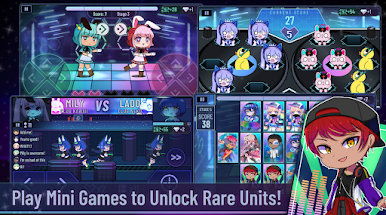
หรือหากคุณอยากพักสมองจากการต่อสู้ ก็สามารถมาสนุกไปกับมินิเกมที่มีให้เลือกเล่นมากมายเพื่อเก็บรวบรวมเพชรและไบต์แล้วนำไปสุ่มกาชาเพื่อให้ได้ตัวละครที่คุณต้องการได้อย่างลืมเวลา ดาวน์โหลดเกม Gacha Club บน PC และ MAC ใน BlueStacks ได้แล้ววันนี้
คุณสามารถ เล่น Gacha Club ผ่าน browser บนเครื่อง PC หรือมือถือได้โดยไม่ต้องดาวน์โหลด คลิกแล้วเล่นเเลย!




เล่น Gacha Club บน PC ได้ง่ายกว่า
-
ดาวน์โหลดและติดตั้ง BlueStacks บน PC ของคุณ
-
ลงชื่อเข้าใช้แอคเคาท์ Google เพื่อเข้าสู่ Play Store หรือทำในภายหลัง
-
ค้นหา Gacha Club ในช่องค้นหาด้านขวาบนของโปรแกรม
-
คลิกเพื่อติดตั้ง Gacha Club จากผลการค้นหา
-
ลงชื่อเข้าใช้บัญชี Google Account (หากยังไม่ได้ทำในขั้นที่ 2) เพื่อติดตั้ง Gacha Club
-
คลิกที่ไอคอน Gacha Club ในหน้าจอเพื่อเริ่มเล่น

