


Internetinis Lietuvos radijas
Jouez sur PC avec BlueStacks - la plate-forme de jeu Android, approuvée par + 500M de joueurs.

Page Modifiée le: Jun 17, 2024
Run Lithuanian radio stations on PC or Mac
Get freedom from your phone’s obvious limitations. Use Lithuanian radio stations, made by exampleZ9, a Music & Audio app on your PC or Mac with BlueStacks, and level up your experience.
About the App
If you’re curious about what’s playing on Lithuanian airwaves or just want a taste of local sounds, Lithuanian radio stations is your all-access pass. This Music & Audio app from exampleZ9 makes it a breeze to discover everything from energetic pop beats to soothing talk and niche channels—yep, all in one spot. Whether you miss home, want to practice the language, or are simply in the mood for a little something different, the app brings a vibrant lineup of Lithuanian stations right to your device (or even through BlueStacks on your computer).
App Features
-
Tons of Stations
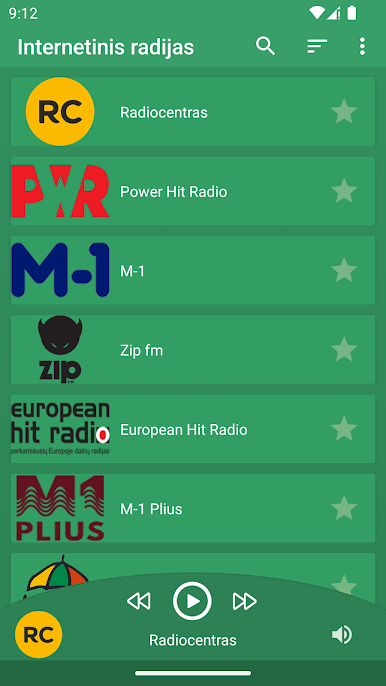
Scroll through a seriously wide selection—there’s Radiocentras, Power Hit Radio, LRT radijas, ZIP fm, European Hit Radio, and well, that’s just scratching the surface. From news, classic rock, and relaxing music to dance hits and regional gems, it’s all there. -
One Tap Listening
No complicated setup. Find your favorite or try something new—select a station and you’re tuning in instantly. -
All Genres on Deck
Into chill-out sounds, top 40 hits, indie discoveries, or talk radio? You’ll find your thing here. There’s even specialty channels like Vaikų radijas for kids, classic stations, and alternatives like FUZZ radijas and Xfm. -
Easy Browsing
The station list is clean, so it’s easy to spot old favorites or stumble onto something you’d never expect. No fuss, no clutter—just the good stuff. -
Multitasking Friendly
Listening on the go? The app works smoothly in the background, so you can keep the music or news going while checking messages or browsing. -
Seamless Computer Access
Feel like catching up on the latest from Lithuania on a bigger screen? Load the app up with BlueStacks and enjoy all the stations from your laptop or desktop. -
Up-to-Date Selection
The lineup includes popular choices like M-1, LRT Klasika, Gold fm, and more niche finds like Sveikatos radijas and Tonite Radio—something for every kind of mood and listener.
No matter if you’re new to Lithuanian music or are looking for a slice of home, Lithuanian radio stations gives you an easy way to browse and enjoy the country’s radio scene, wherever you are.
BlueStacks brings your apps to life on a bigger screen—seamless and straightforward.
Jouez à Internetinis Lietuvos radijas sur PC. C'est facile de commencer.
-
Téléchargez et installez BlueStacks sur votre PC
-
Connectez-vous à Google pour accéder au Play Store ou faites-le plus tard
-
Recherchez Internetinis Lietuvos radijas dans la barre de recherche dans le coin supérieur droit
-
Cliquez pour installer Internetinis Lietuvos radijas à partir des résultats de la recherche
-
Connectez-vous à Google (si vous avez ignoré l'étape 2) pour installer Internetinis Lietuvos radijas
-
Cliquez sur l'icône Internetinis Lietuvos radijas sur l'écran d'accueil pour commencer à jouer

