


Girl Games: Unicorn Cooking
Jouez sur PC avec BlueStacks - la plate-forme de jeu Android, approuvée par + 500M de joueurs.

Page Modifiée le: Nov 13, 2025
Jouez Girl Games: Unicorn Cooking sur PC
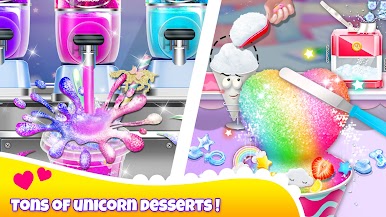
One of the fantastic features of this game is the diverse selection of unicorn-themed foods, which are updated with new recipes every month. You'll have the chance to create some incredible unicorn rainbow desserts and experiment with a variety of realistic cooking tools, food materials, and decorations. This game is ideal for anyone who loves to cook and wants to explore new recipes and foods.
Playing Unicorn Chef couldn't be easier or more intuitive. Simply use the interactive controls to play the game and try out different tools to make your dishes. Mix up different ingredients to create unique flavors and colors, and adorn your foods with gorgeous sprinkles, candies, fruits, straws, and glitter. And if you're a fan of all things rainbow, be sure to eat your desserts to experience the ultimate unicorn magic.
When you've finished preparing your meal, don't forget to tidy up and clean the table to wrap up the game. Unicorn Chef is perfect for anyone who loves to cook, try out new recipes, and enjoy some fun and excitement. So why wait? Download Unicorn Chef now and start creating your very own delicious unicorn-themed foods!



Jouez à Girl Games: Unicorn Cooking sur PC. C'est facile de commencer.
-
Téléchargez et installez BlueStacks sur votre PC
-
Connectez-vous à Google pour accéder au Play Store ou faites-le plus tard
-
Recherchez Girl Games: Unicorn Cooking dans la barre de recherche dans le coin supérieur droit
-
Cliquez pour installer Girl Games: Unicorn Cooking à partir des résultats de la recherche
-
Connectez-vous à Google (si vous avez ignoré l'étape 2) pour installer Girl Games: Unicorn Cooking
-
Cliquez sur l'icône Girl Games: Unicorn Cooking sur l'écran d'accueil pour commencer à jouer

