


Read More: A Reading Tracker
Jouez sur PC avec BlueStacks - la plate-forme de jeu Android, approuvée par + 500M de joueurs.

Page Modifiée le: Nov 23, 2025
Run Read More: A Reading Tracker on PC or Mac
Upgrade your experience. Try Read More: A Reading Tracker, the fantastic Productivity app from Shunan, from the comfort of your laptop, PC, or Mac, only on BlueStacks.
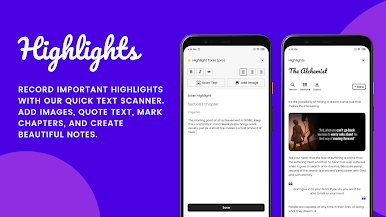
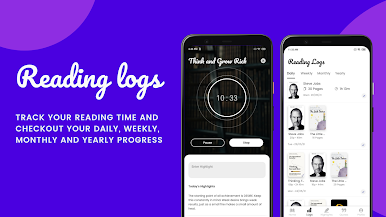
So with Read More, the whole idea is to keep track of what you’re reading, nothing more complicated than that. It’s not packed with books or stuff to read — it just lets people log their reading and save quotes that stand out to them. It’s pretty straightforward, which makes it easy to use both on phones and with BlueStacks on PC if someone wants a bigger screen or to type a bit faster.
A few things stand out: there’s a daily reading target that’s totally flexible, so it doesn’t push people to rush books or go for speed records… it just nudges them to read at a pace they actually enjoy. Everything about it is simple — there’s a reading log that tracks progress by week or month, and it’s kind of satisfying to look back and see the list grow. There’s also space for a read later list, so whenever someone hears about a book they want to try next, they can just chuck it in there and move on. When a book’s done, it goes into a finished list, which is a nice reminder of what’s been achieved over time.
People say the best bit is probably being able to keep favorite lines or quotes, which is great for anyone who likes to hang onto words that hit home or just wants to remember something good. There aren’t a ton of extra features, but that’s intentional — it lets users spend time reading, rather than poking around menus. On PC through BlueStacks, organizing everything or typing longer quotes feels even smoother than on a phone, honestly. It’s the kind of app that just sits in the background but ends up making reading easier to manage — which, for a lot of readers, might be exactly what they’re looking for.
BlueStacks brings your apps to life on a bigger screen—seamless and straightforward.


Jouez à Read More: A Reading Tracker sur PC. C'est facile de commencer.
-
Téléchargez et installez BlueStacks sur votre PC
-
Connectez-vous à Google pour accéder au Play Store ou faites-le plus tard
-
Recherchez Read More: A Reading Tracker dans la barre de recherche dans le coin supérieur droit
-
Cliquez pour installer Read More: A Reading Tracker à partir des résultats de la recherche
-
Connectez-vous à Google (si vous avez ignoré l'étape 2) pour installer Read More: A Reading Tracker
-
Cliquez sur l'icône Read More: A Reading Tracker sur l'écran d'accueil pour commencer à jouer

