


มายโฮม - ดีไซน์ฝัน
เล่นบน PC ผ่าน BlueStacks - Android Gaming Platform ที่ได้รับความไว้วางใจจากเกมเมอร์ 500 ล้านคนทั่วโลก

Page Modified on: Nov 25, 2025
เล่น มายโฮม - ดีไซน์ฝัน on PC
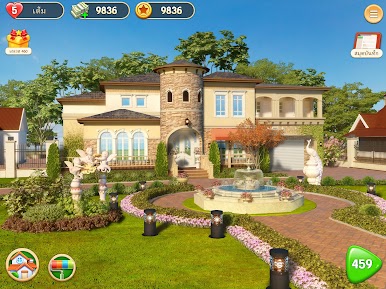
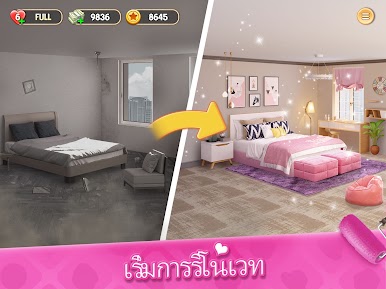
เล่นเกมเรียงสีฟรีตอนนี้เเพื่อตกกแต่งบ้านในฝัน! สไตล์หลากหลายจากกการรวมเฟอร์นิเจอร์กำลังรอคุณอยู่! อย่าลืมแวะไปที่บ้านเจ้าของทีดินหรือเพื่อนสนิทของคุณเพื่อทักทายพูดคุยเกี่ยวกับบ้านในฝัน!
มาดาวน์โหลดเลยตอนนี้! ฟีเจอร์ในเกม:
* ดีไซน์บ้าน: เล่นได้ไม่รู้จบ. เล่นสไตน์ไหนก็ได้แล้วแต่คุณจะจัดการา!
* ด่านในเกมที่น่าตื่นเต้น: ด่านพร้อมบูสเตอร์สุดเจ๋งเป็นร้อยๆด่าน. ด่านยิ่งเยอะยิ่งสนุก!
* เรื่องราวของคุณเอง: ทุกเรื่องราวจะโฟกัสที่คุณ! ดำเนินเรื่องราวไปขณะที่ดีไซน์บ้านในฝันของคุณ!
* ตัวละครแสนสดใส: ตัวละครมีเอกลักษณ์และสนุกสนาน! เพื่อนสนิทของคุณ, เจ้าของที่ดินใจดีและเซอไพรส์อีกมากมาย!
* บ้านมากมายหลายหลัง: ไม่พอใจกับการแต่งบ้านหลังเดียวหรือเปล่า? เรามีบ้านอีกมากมายหลายหลังให้คุณดีไซน์!
ถึงเวลาโชว์ความสามารถในการดีไซน์! มาเป็นคนคุมและทำให้บ้านในฝันมีชีวิตขึ้นตอนนี้เลย!
อยากได้ข้อมูลใหม่ล่าสุดไหม? เข้าร่วมกลุ่มระดับอินเตอร์ของเราเลย:
Facebook: https://www.facebook.com/MyHomeMyDreams
Twitter: https://twitter.com/MyHomeMyDreams
Instagram: https://www.instagram.com/myhome.mydreams













เล่น มายโฮม - ดีไซน์ฝัน บน PC ได้ง่ายกว่า
-
ดาวน์โหลดและติดตั้ง BlueStacks บน PC ของคุณ
-
ลงชื่อเข้าใช้แอคเคาท์ Google เพื่อเข้าสู่ Play Store หรือทำในภายหลัง
-
ค้นหา มายโฮม - ดีไซน์ฝัน ในช่องค้นหาด้านขวาบนของโปรแกรม
-
คลิกเพื่อติดตั้ง มายโฮม - ดีไซน์ฝัน จากผลการค้นหา
-
ลงชื่อเข้าใช้บัญชี Google Account (หากยังไม่ได้ทำในขั้นที่ 2) เพื่อติดตั้ง มายโฮม - ดีไซน์ฝัน
-
คลิกที่ไอคอน มายโฮม - ดีไซน์ฝัน ในหน้าจอเพื่อเริ่มเล่น

