


Coin Pusher Carnival
Spiele auf dem PC mit BlueStacks - der Android-Gaming-Plattform, der über 500 Millionen Spieler vertrauen.

Seite geändert am: May 24, 2024
Play Coin Pusher Carnival on PC or Mac
Bring your A-game to Coin Pusher Carnival, the Casual game sensation from Neworld Games. Give your gameplay the much-needed boost with precise game controls, high FPS graphics, and top-tier features on your PC or Mac with BlueStacks.
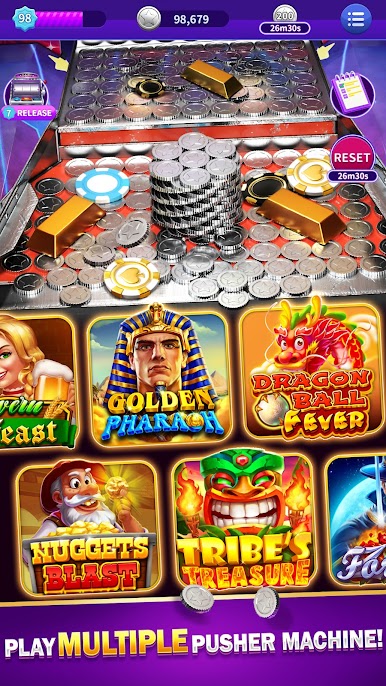
Coin Pusher Carnival is exactly what it sounds like, a digital version of that noisy arcade coin machine where stacks wobble, teeter, and finally slide over the edge. Drop a coin, watch the physics do their thing, then chase jackpots and prize chips as they tumble forward. It feels physical in a neat way, coins pile up into little ridges, towers lean, and one well placed drop can send a whole row spilling into the tray. There are plenty of freebies and boosts flying around, so it is not stingy, and the game leans into that satisfying chain reaction feeling rather than stress. Big wins pop up with flashy jackpots, special prizes fill a collection bar, and that Mega Bonus with coin towers is the big showpiece when the board tips into chaos.
It plays well on PC with BlueStacks too, since the mouse makes placement more precise and the bigger screen helps judge edges and gaps. Sessions can be short or go long without pressure, just drop, nudge, collect, repeat. The physics sell the whole thing, coins do not snap unrealistically, they slide and bump in ways that look right, which makes the next push feel earned. If someone wants a simple arcade fix with plenty of coins, generous win rates, and that classic clink clink sound, this scratches the itch without asking for much brain power.
Make your gaming sessions memorable with precise controls that give you an edge in close combats and visuals that pop up, bringing every character to life.




Spiele Coin Pusher Carnival auf dem PC. Der Einstieg ist einfach.
-
Lade BlueStacks herunter und installiere es auf deinem PC
-
Schließe die Google-Anmeldung ab, um auf den Play Store zuzugreifen, oder mache es später
-
Suche in der Suchleiste oben rechts nach Coin Pusher Carnival
-
Klicke hier, um Coin Pusher Carnival aus den Suchergebnissen zu installieren
-
Schließe die Google-Anmeldung ab (wenn du Schritt 2 übersprungen hast), um Coin Pusher Carnival zu installieren.
-
Klicke auf dem Startbildschirm auf das Coin Pusher Carnival Symbol, um mit dem Spielen zu beginnen

