


Lichtwecker
Spiele auf dem PC mit BlueStacks - der Android-Gaming-Plattform, der über 500 Millionen Spieler vertrauen.

Seite geändert am: Dec 08, 2025
Übersicht
Features
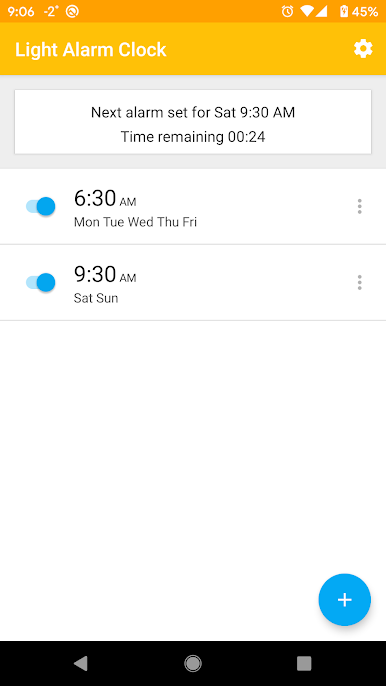
- One-time and repeated alarms
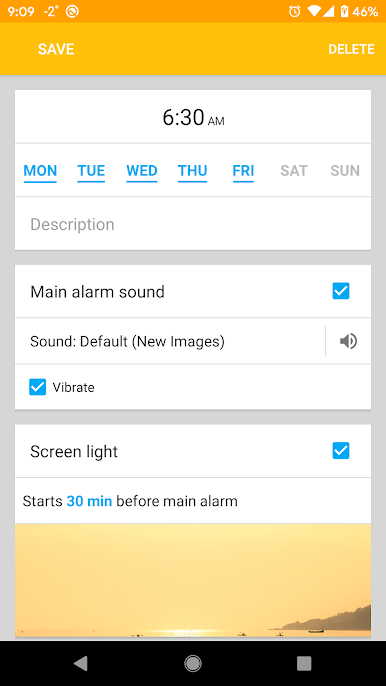
- Main alarm sound
- Vibration during main alarm sound
- Pre-alarm sound, that starts before main alarm sound and goes increasing volume
- Screen light with increasing brightness. You can choose color of light or set image instead of color.
- LED camera light
- You can choose multiple tracks for an alarm sound, in such a case every time the alarm starts, next track will play.
- A few options for dismiss/snooze functionality
All parameters of an alarm can be turned on/off and have some other settings, which makes every alarm highly customizable.
How the application works:
Time that you set for every alarm is the time at which main alarm sound starts. At this time also starts vibration, if corresponding option is chosen.
For "pre-alarm sound", "screen light" and "flash light" you specify time intervals, that mean that this action starts N minutes (specified interval) before main alarm time. For example, if alarm is set at 8:00 and screen light is enabled with interval set to 30 minutes, than screen light starts at 7:30 and main alarm begins to play at 8:00.
If battery level is lower than specified in the app's settings, then pre-alarm sound and screen light won't be turned on until main alarm time. To turn off that checking set min battery level to 0.
If you have some questions about application's login, write to me, I'll try to improve this description.

Spiele Lichtwecker auf dem PC. Der Einstieg ist einfach.
-
Lade BlueStacks herunter und installiere es auf deinem PC
-
Schließe die Google-Anmeldung ab, um auf den Play Store zuzugreifen, oder mache es später
-
Suche in der Suchleiste oben rechts nach Lichtwecker
-
Klicke hier, um Lichtwecker aus den Suchergebnissen zu installieren
-
Schließe die Google-Anmeldung ab (wenn du Schritt 2 übersprungen hast), um Lichtwecker zu installieren.
-
Klicke auf dem Startbildschirm auf das Lichtwecker Symbol, um mit dem Spielen zu beginnen

