


BTS for KATANA-AIR
500M + oyuncunun güvendiği Android Oyun Platformu, BlueStacks ile PC'de oynayın.

Sayfa Değiştirilme tarihi: Feb 25, 2025
Play BTS for KATANA-AIR on PC
●Connect the BOSS KATANA-AIR series and your Android mobile devices via Bluetooth to use this app.
* BOSS KATANA-AIR/KATANA-AIR EX is necessary to use this app.
* Set up the Bluetooth connection in the Connection window displayed after the app is launched.
* When using on Android 6.0 or later, please turn Android Location mode on.
● BOSS TONE STUDIO (BTS) incorporates convenient functions; ‘Download Function of Additional Tones (Livesets)’, ‘Tone Edit Function’, and ‘Tone Librarian Function’.
●Version 2.0 adds a Session feature that lets you enjoy a Katana-air session with YouTube videos, music, and music stored on your smart device.
●This app provides an integrated access to the BOSS TONE EXCHANGE. Support share your original Livesets and download users Livesets around the world.
*An active internet connection is required to access the BOSS TONE EXCHANGE.
* This app requires Katana-air system program version 2.0.0 or later. Katana-air EX can be used as is.
https://www.boss.info/global/products/katana-air/downloads/
●Manual and FAQ
https://www.boss.info/global/products/katana-air/support/
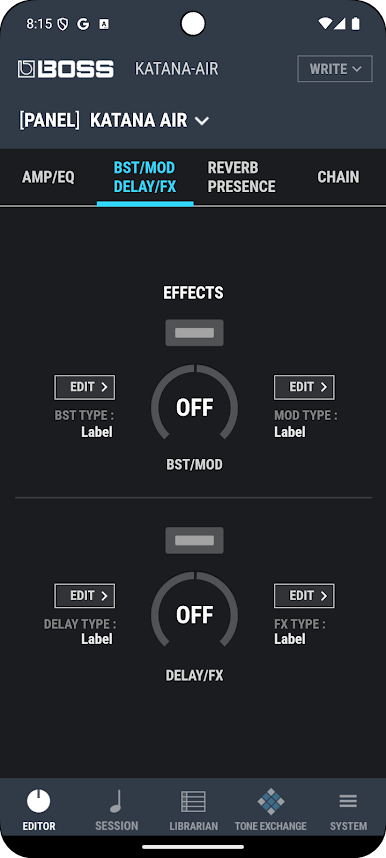
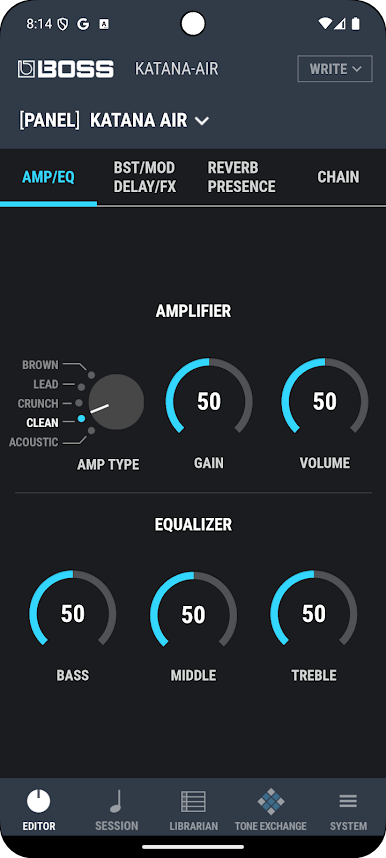
BTS for KATANA-AIR oyununu PC'de oyna. Başlamak çok kolay.
-
BlueStacks'i PC'nize İndirin ve Yükleyin
-
Play Store'a erişmek için Google girişi yapın ya da daha sonraya bırakın.
-
Sağ üst köşeye BTS for KATANA-AIR yazarak arayın.
-
BTS for KATANA-AIR uygulamasını arama sonuçlarından indirmek için tıklayın.
-
(iEğer Adım 2'yi atladıysanız) BTS for KATANA-AIR uygulamasını yüklemek için Google'a giriş yapın.
-
Oynatmaya başlatmak için ekrandaki BTS for KATANA-AIR ikonuna tıklayın.

