


VanMoof
Spiele auf dem PC mit BlueStacks - der Android-Gaming-Plattform, der über 500 Millionen Spieler vertrauen.

Seite geändert am: Dec 8, 2025
Play VanMoof on PC
No matter where you are in the app, it will assist you with your smoothest ride yet:
Home
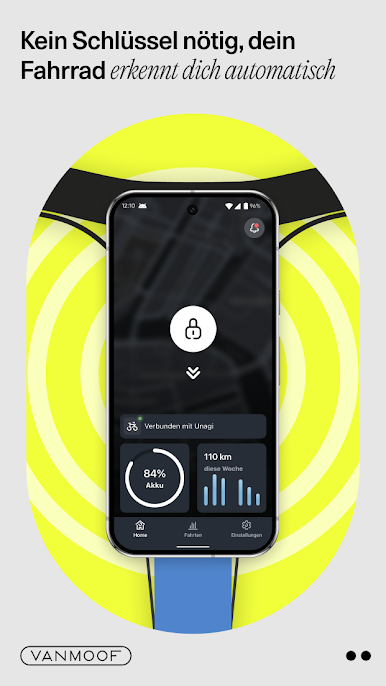
• No keys are needed, your bike smartly recognizes you. Unlock your bike with just a tap or create a personal unlock code to easily unlock your bike without your phone.
• Check how much battery your bike has (and Powerbank if you have one).
• View your current speed, distance, and ride duration on your in-app live dashboard.
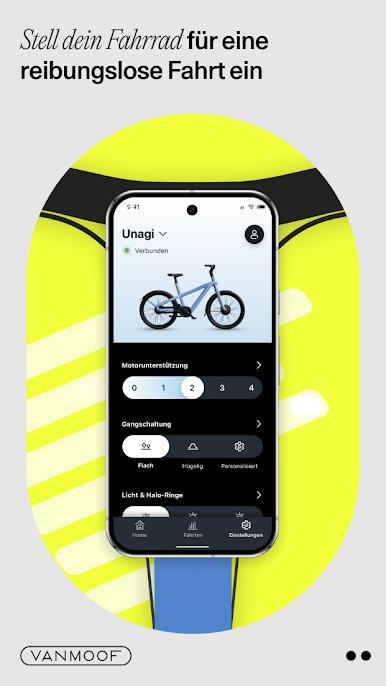
• Adjust your bike settings instantly on the home screen. You can change your motor assistance, gears, lights, bell sound, and other bike sounds.
Rides
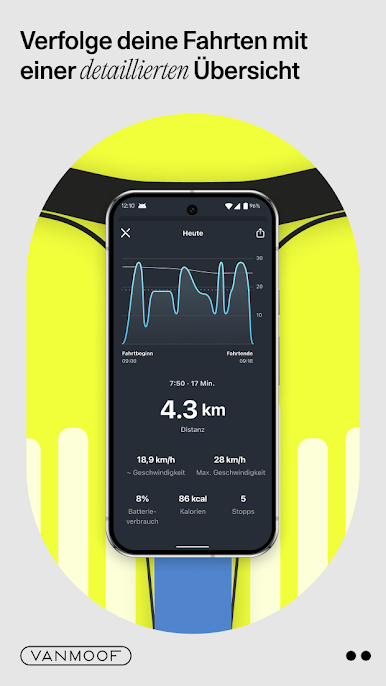
• Look back at every trip with a detailed ride overview.
• You can view every journey, including the time, distance, maximum and average speed, if you stopped, and how much battery it cost.
• See how you compare to other VanMoof riders in your city and across the World.
Garage
• Find all of your bike information, change your bike settings, and view your My VanMoof profile.
• Share your bike with your friends and family.
• Mark your bike as missing and send in the Bike Hunters.
• If your bike has Apple Find My, you can see the current status.
Supported bike models
• VanMoof S5 & A5
• VanMoof S4 & X4
• VanMoof S3 & X3
• VanMoof S2 & X2
• VanMoof Electrified S & X
• VanMoof Smart S & X
• VanMoof Smartbike
Disclaimer: App features are dependent on your bike model.

Spiele VanMoof auf dem PC. Der Einstieg ist einfach.
-
Lade BlueStacks herunter und installiere es auf deinem PC
-
Schließe die Google-Anmeldung ab, um auf den Play Store zuzugreifen, oder mache es später
-
Suche in der Suchleiste oben rechts nach VanMoof
-
Klicke hier, um VanMoof aus den Suchergebnissen zu installieren
-
Schließe die Google-Anmeldung ab (wenn du Schritt 2 übersprungen hast), um VanMoof zu installieren.
-
Klicke auf dem Startbildschirm auf das VanMoof Symbol, um mit dem Spielen zu beginnen

