


Skysmart Решения: ГДЗ на изи
Играйте на ПК с BlueStacks – игровой платформе для приложений на Android. Нас выбирают более 500 млн. игроков.

Страница изменена: Mar 15, 2024
Run Skysmart Решения: ГДЗ на изи on PC or Mac
What’s better than using Skysmart Решения: ГДЗ на изи by AGATON LIMITED? Well, try it on a big screen, on your PC or Mac, with BlueStacks to see the difference.
About the App
Skysmart Решения: ГДЗ на изи from AGATON LIMITED is an Education app that helps students and parents quickly check homework and understand tricky assignments. Snap a photo of a task from a textbook and get GDZ with step‑by‑step reasoning, not just a final answer. It’s built to make schoolwork feel a little less stressful and a lot more doable.
App Features
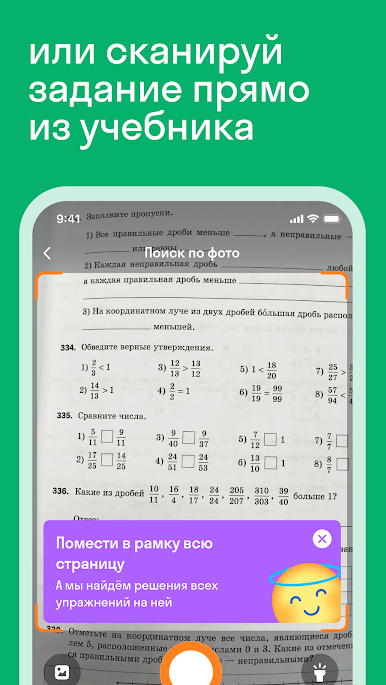
- Snap-to-Solve: Take a picture of a textbook exercise right in the app and get matching GDZ for Math, Russian, and English in seconds.
- Grades 1–11 Coverage: From early elementary to high school, the app includes materials across the full range of classes.
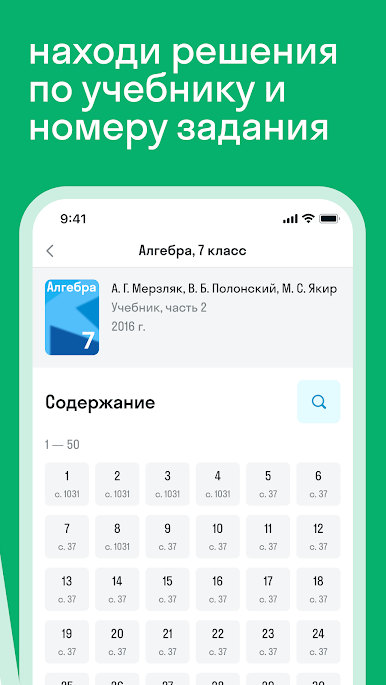
- Popular Textbooks: Find solutions tied to well-known authors and series for Mathematics, Algebra, Geometry, Russian, and English, so you’re likely covered by the books used at school.
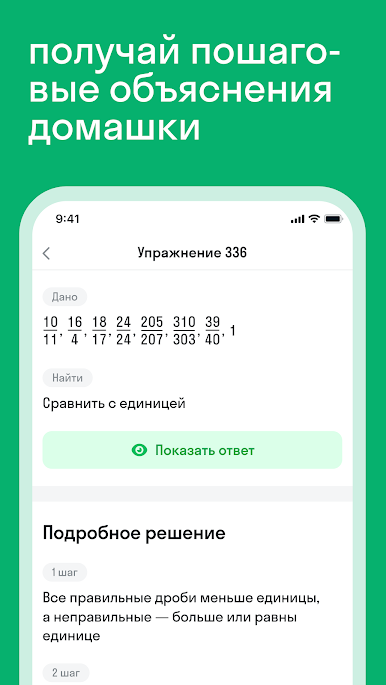
- Clear Explanations: See how an answer is reached step by step—great for understanding rules, formulas, and sentence structure, not just copying results.
- Fast, Simple Navigation: No complicated setup. Pick your subject and class, search by book or snap a page, and get right to the solution.
- Math, Russian, and English Help: Work through equations, word problems, grammar, and vocabulary with examples that match the school program.
- Study Support for Parents: Use it as a reliable helper to check homework, spot mistakes, and explain methods without hunting through multiple sites.
- Friendly Interface: Clean screens, readable steps, and an assistant that points you to the right section keep everything straightforward.
- Works on Bigger Screens: Prefer using a computer? You can run Skysmart Решения: ГДЗ на изи on your PC or Mac with BlueStacks for easier reading and multitasking.
BlueStacks gives you the much-needed freedom to experience your favorite apps on a bigger screen. Get it now.


Играйте в игру Skysmart Решения: ГДЗ на изи на ПК. Это легко и просто.
-
Скачайте и установите BlueStacks на ПК.
-
Войдите в аккаунт Google, чтобы получить доступ к Google Play, или сделайте это позже.
-
В поле поиска, которое находится в правой части экрана, введите название игры – Skysmart Решения: ГДЗ на изи.
-
Среди результатов поиска найдите игру Skysmart Решения: ГДЗ на изи и нажмите на кнопку "Установить".
-
Завершите авторизацию в Google (если вы пропустили этот шаг в начале) и установите игру Skysmart Решения: ГДЗ на изи.
-
Нажмите на ярлык игры Skysmart Решения: ГДЗ на изи на главном экране, чтобы начать играть.

