


Unofficial Zabbix Agent
Chơi trên PC với BlueStacks - Nền tảng chơi game Android, được hơn 500 triệu game thủ tin tưởng.

Trang đã được sửa đổi vào: Sep 8, 2025
Run Unofficial Zabbix Agent on PC or Mac
Let BlueStacks turn your PC, Mac, or laptop into the perfect home for Unofficial Zabbix Agent, a fun Tools app from dentier.
About the App
Ever wondered what’s really going on with your Android device behind the scenes? Unofficial Zabbix Agent, brought to you by dentier, gives you the inside scoop on all sorts of technical details, straight from your phone or tablet. Whether you’re a Zabbix enthusiast, an IT pro, or just a curious user, this app puts tons of useful stats and monitoring right at your fingertips—no need to guess what’s happening under the hood. It’s simple, lightweight, and made to keep you in the know. And if you want to get even more out of it, using it on your computer through BlueStacks can be a super handy move.
App Features
-
Live Device Monitoring
Get up-to-the-minute info on battery health, status, temperature, and charging source—all in plain view, so there are no surprises if your phone is about to die or overheat. -
Network Insights
Curious about your current carrier, WiFi status, or whether you’re roaming? The app tracks signal strength, MAC addresses, SSID, and even data usage—plus mobile and WiFi signal levels—so you’ll know how your device is connected at any point. -
System Details
Peek into system details like CPU load, the number of active cores, memory stats, system time, kernel version, and system uptime. It’s like having your own mini dashboard showing off everything your device is doing. -
App and Process Stats
Check which apps are running or in the foreground (where supported), monitor process CPU and memory use (requires root for some features), and keep tabs on how busy your phone is—even if you can’t see it just from a quick glance. -
Location & Sensors
See precise GPS information, with location, altitude, and accuracy (as long as the app’s in the foreground). You can also read sensor data like light, proximity, and temperature values, letting you monitor your device’s environment. -
Connectivity & Traffic Monitor
Dive into network details—see connectivity type (2G, 3G, 4G), track how much data or how many packets your device is sending and receiving, and check if you’re on the move with roaming info. -
Custom Data Collection
Got something unique you’d like to track? Add your own user parameters and custom scripts right in the app settings, letting you monitor exactly what matters to you. -
Thermal & Hardware Stats
Get lists of thermal sensors, their types, and current values so you can keep tabs on device heat or hardware trends at a glance.
Just don’t forget—if you need continuous background operation, some tweaks might be required due to system restrictions. And disabling battery optimization keeps things running smoother.
Eager to take your app experience to the next level? Start right away by downloading BlueStacks on your PC or Mac.
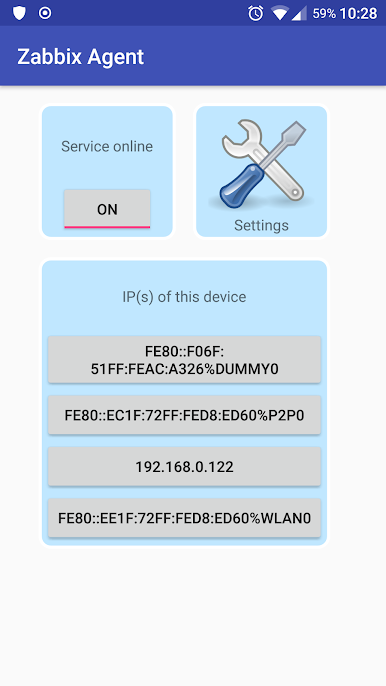
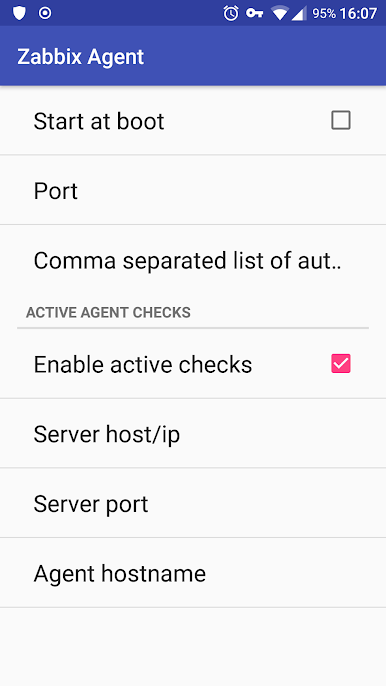
Chơi Unofficial Zabbix Agent trên PC. Rất dễ để bắt đầu
-
Tải và cài đặt BlueStacks trên máy của bạn
-
Hoàn tất đăng nhập vào Google để đến PlayStore, hoặc thực hiện sau
-
Tìm Unofficial Zabbix Agent trên thanh tìm kiếm ở góc phải màn hình
-
Nhấn vào để cài đặt Unofficial Zabbix Agent trong danh sách kết quả tìm kiếm
-
Hoàn tất đăng nhập Google (nếu bạn chưa làm bước 2) để cài đặt Unofficial Zabbix Agent
-
Nhấn vào icon Unofficial Zabbix Agent tại màn hình chính để bắt đầu chơi

