


Shuffle Music
Graj na PC z BlueStacks – Platforma gamingowa Android, która uzyskała zaufanie ponad 500 milionów graczy!

Strona zmodyfikowana w dniu: Oct 21, 2025
Play Shuffle Music on PC
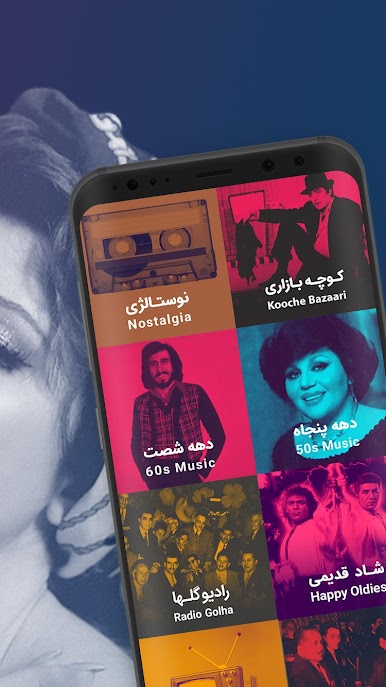
Shuffle’s music archive provides a variety of genres and styles for every taste. Whatever you like, from Pop music to rock, sonati (Persian classical), folklore, hip hop, rap, jazz, blues, soundtrack, classical music, electronic music, kids music and any other style. There are many channels in the home page of Shuffle app that will cover your taste. even if you couldn’t find your favorite channel just search for it, there are may other channels for you that can be reached through searching. Also you can search the name of your favorite Artist, Album or Track and Shuffle will play you the radio station of that specific music or artist. Again you will listen to a non stop chain of music that you will love.
You can listen to any musical artist on Shuffle. Mohammad Reza Shajarian, Homayoun Shajarian, Shahram Nazeri, Banan, Hayedeh, Mahasti, Leila Forouhar, Ebi, Dariush, Black Cats, Hamed Homayoun, Mohsen Ebrahimzadeh, Mohsen Yeganeh, Mohsen Chavooshi, Behnam Bani, Ehsan Khaje Amiri, Makan Band, Puzzle Band, Hamid Hirad, Amir Tataloo, Bahare Rahnama, Amin Habibi, Morteza Pashaie, Sirvan Khosravi, Chaartaar, Kaveh Yaghmaie, Hourosh Band, Keyvan Kalhor, Hosein Alizadeh, Salar Aghili, Alireza Ghorbani, Vahid Taj, Parvaz Homay, Bomrani Band, Yasin Torki and many other Persian and International artists.
Also you can find lots of categorizations in Shuffle. Viral tracks, new releases, trending, happy songs, instrumental music, dance music, gheri music, easy listening music, nostalgia, happy nostalgic songs, Arabic music, Afghan Music, Kurdish music, K-pop, Turkish music, Armenian music, Lori music, Gilaki Music, Radio Golha and Tajik music are just to name a few. All these channels are free to listen and you can even download and make them offline, again for free.




Zagraj w Shuffle Music na PC. To takie proste.
-
Pobierz i zainstaluj BlueStacks na PC
-
Zakończ pomyślnie ustawienie Google, aby otrzymać dostęp do sklepu Play, albo zrób to później.
-
Wyszukaj Shuffle Music w pasku wyszukiwania w prawym górnym rogu.
-
Kliknij, aby zainstalować Shuffle Music z wyników wyszukiwania
-
Ukończ pomyślnie rejestrację Google (jeśli krok 2 został pominięty) aby zainstalować Shuffle Music
-
Klinij w ikonę Shuffle Music na ekranie startowym, aby zacząć grę

