


TeleVIP
Graj na PC z BlueStacks – Platforma gamingowa Android, która uzyskała zaufanie ponad 500 milionów graczy!

Strona zmodyfikowana w dniu: Nov 19, 2025
Run TeleVPN on PC or Mac
What’s better than using TeleVPN by Social Amusements? Well, try it on a big screen, on your PC or Mac, with BlueStacks to see the difference.
About the App
TeleVPN, brought to you by Social Amusements, puts a clever spin on the classic messaging experience. Think of it as Telegram with extra tricks up its sleeve, all streamlined in one handy app. You’ll find a bunch of practical features that help you chat, share, and organize your conversations with a little more control—and a few cool surprises along the way.
App Features
-
Built-in Smart Proxy
Stay connected even when networks get tricky. TeleVPN’s internal proxy system helps you access your chats smoothly, no extra setup needed. -
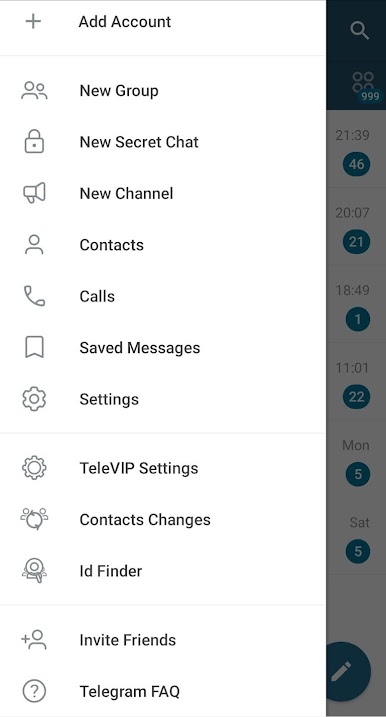
ID Finder
Can’t remember someone’s username? TeleVPN makes it easy to look up Telegram IDs, so tracking down contacts is way simpler. -
Forward Without Quoting
Share messages without including the original sender’s info. Just clean forwarding, so you have more privacy—and less clutter. -
Quick Archive Shortcuts
Instantly send conversations to your archive with a single tap. Great for clearing out the main chat list without saying goodbye to those messages. -
Contact Change Tracking
Wondering who switched their profile photo or username? This app lets you spot updates in your contacts, so you’re always in the know. -
Hidden Chat Section
Tuck away sensitive chats in a special hidden spot—easy to access for you, invisible to anyone snooping over your shoulder. -
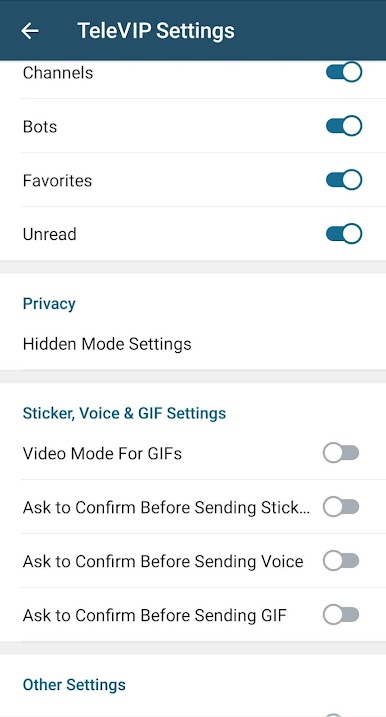
Message Confirmation Prompts
Accidentally sending a sticker, voice note, or gif? TeleVPN can give you a quick confirmation window before anything goes out. -
Customizable Tabs
Organize your chats with flexible tabs, making it easier to jump between conversations or focus on what really matters.
It’s designed for people who want that little bit extra in their conversations. And if you like a bigger screen, TeleVPN works smoothly on BlueStacks too.
Big screen. Bigger performance. Use BlueStacks on your PC or Mac to run your favorite apps.


Zagraj w TeleVIP na PC. To takie proste.
-
Pobierz i zainstaluj BlueStacks na PC
-
Zakończ pomyślnie ustawienie Google, aby otrzymać dostęp do sklepu Play, albo zrób to później.
-
Wyszukaj TeleVIP w pasku wyszukiwania w prawym górnym rogu.
-
Kliknij, aby zainstalować TeleVIP z wyników wyszukiwania
-
Ukończ pomyślnie rejestrację Google (jeśli krok 2 został pominięty) aby zainstalować TeleVIP
-
Klinij w ikonę TeleVIP na ekranie startowym, aby zacząć grę

