


Falla-Group Voice Chat Rooms
BlueStacksを使ってPCでプレイ - 5憶以上のユーザーが愛用している高機能Androidゲーミングプラットフォーム

Run Falla-Group Voice Chat Rooms on PC or Mac
What’s better than using Falla-Group Voice Chat Rooms by 香港歡娛互動網絡科技有限公司? Well, try it on a big screen, on your PC or Mac, with BlueStacks to see the difference.
About the App
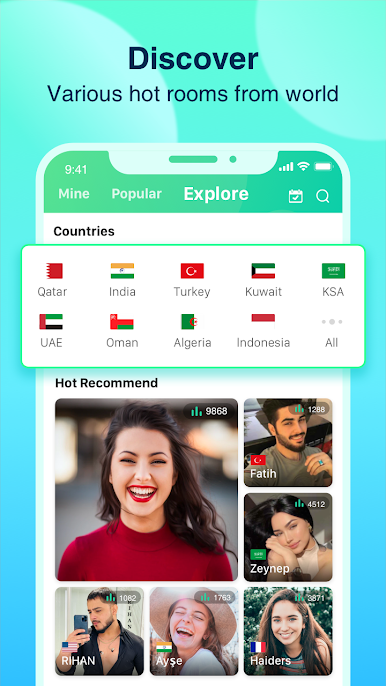
Falla-Group Voice Chat Rooms is your spot to meet people and chat about just about anything—live, with your voice. Whether you’re into games, music, fun parties, or making friends from all over the world, this Entertainment app gives you a place to hang out and connect. Got an open mic night in mind? Or maybe you just want a relaxed chat with someone new? This space makes it easy and effortless, especially when you’re using BlueStacks.
App Features
-
Real-Time Group Voice Chat
Jump into group conversations with folks from over 40 different countries. The voice chat is seriously smooth, so you won’t miss a beat in any conversation. -
Open Chat Rooms for Every Topic
Browse a bunch of chat rooms on every topic you can think of—games, virtual parties, birthday celebrations, weddings, and unique stuff like the war drum game. -
Send Fun, Flashy Gifts
Throw a little sparkle into your chats by sending virtual gifts with cool effects that pop right up. It’s a playful way to show some love or just get the party vibe going. -
Private Messaging
Connect one-on-one with friends thanks to private messaging. Want to share a voice memo, send a quick photo, or just drop a text? You can do all that without a hitch. -
Totally Free & Easy
No need to count your minutes or pay extra for crystal-clear voice chat. Everything runs over the Internet—just sign in and start talking. -
Global Community
Find people from all walks of life, whether you’re there just to chat or to make lasting friendships. There’s always someone new to talk to—and new parties popping up. -
Flexible and Social
Pop into any room, join a random chat, or organize your own get-together without a big learning curve. You set the pace and mood.
Switch to BlueStacks and make the most of your apps on your PC or Mac.








Falla-Group Voice Chat RoomsをPCでプレイ
-
BlueStacksをダウンロードしてPCにインストールします。
-
GoogleにサインインしてGoogle Play ストアにアクセスします。(こちらの操作は後で行っても問題ありません)
-
右上の検索バーにFalla-Group Voice Chat Roomsを入力して検索します。
-
クリックして検索結果からFalla-Group Voice Chat Roomsをインストールします。
-
Googleサインインを完了してFalla-Group Voice Chat Roomsをインストールします。※手順2を飛ばしていた場合
-
ホーム画面にてFalla-Group Voice Chat Roomsのアイコンをクリックしてアプリを起動します。

