


このページには広告が含まれます
萌酒ボックス
シミュレーション | SMILEAXE CO.,LTD.
BlueStacksを使ってPCでプレイ - 5憶以上のユーザーが愛用している高機能Androidゲーミングプラットフォーム

PCで萌酒ボックスをプレイ
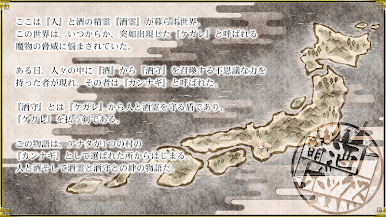
人と酒、酒霊と酒守との絆の物語。
『萌酒ボックス』
酒との出会いや発見がある新たなファンタジーが始動!
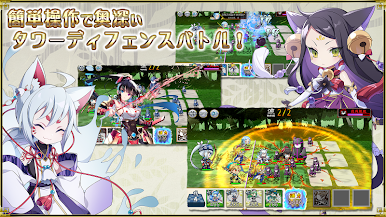
■簡単操作で奥深いタワーディフェンスバトル
個性豊かな『酒守(サカモリ)』たちを編成して冒険に出発!
状況に合わせたチーム編成、瞬間的な状況判断で、次々に出現するケガレを討ち払え!
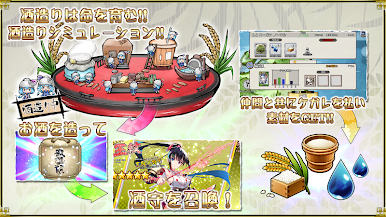
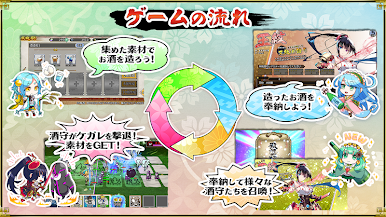
■世界初の酒造りシミュレーション
バトル後の報酬で様々な素材をゲット!
集めた素材を使用して『お酒』を造ります。
素材の組み合わせなどで、いろんな『お酒』ができあがるぞ。
他にも『料理』を作る事もできるから、様々な地域の料理も覚えるキッカケにもなるぞ。
■酒守を召喚
完成した『お酒』を御社(オヤシロ)に奉納する事で、新たな『酒守』を召喚!
どんどんお酒を造って、仲間を増やし、戦力を強化して、新たなエリアに挑め!
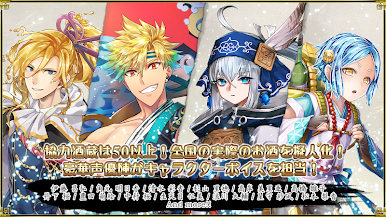
■全国50以上の酒蔵が協力
日本全国に実際にある酒蔵様に協力を頂き、様々な日本酒の銘柄を擬人化!
キャラクターは続々追加予定!地元のお酒や、好きなお酒が擬人化される日が来るかも!?新たなお酒との出会いに繋がる……かもしれない。
■豪華声優陣がキャラクターボイスを担当
伊藤 昌弘 / 角元 明日香 / 清水 彩香 / 杉山 里穂 / 高岸 美里亜 / 高橋 雛子 / 丹下 桜 / 豊田 萌絵 / 中村 桜 / 生天目 仁美 / 浪川 大輔 / 星守 紗凪 / 松本 梨香
(五十音順・敬称略)
■萌酒ボックス公式Twitter(@moeshubox)
https://twitter.com/moeshubox
■萌酒ボックス公式サイトURL
https://moeshu.jp/
■価格
アプリ本体:(無料)
※一部有料コンテンツがございます。
ご利用の際には利用規約を必ずご確認ください。
『萌酒ボックス』
酒との出会いや発見がある新たなファンタジーが始動!
■簡単操作で奥深いタワーディフェンスバトル
個性豊かな『酒守(サカモリ)』たちを編成して冒険に出発!
状況に合わせたチーム編成、瞬間的な状況判断で、次々に出現するケガレを討ち払え!
■世界初の酒造りシミュレーション
バトル後の報酬で様々な素材をゲット!
集めた素材を使用して『お酒』を造ります。
素材の組み合わせなどで、いろんな『お酒』ができあがるぞ。
他にも『料理』を作る事もできるから、様々な地域の料理も覚えるキッカケにもなるぞ。
■酒守を召喚
完成した『お酒』を御社(オヤシロ)に奉納する事で、新たな『酒守』を召喚!
どんどんお酒を造って、仲間を増やし、戦力を強化して、新たなエリアに挑め!
■全国50以上の酒蔵が協力
日本全国に実際にある酒蔵様に協力を頂き、様々な日本酒の銘柄を擬人化!
キャラクターは続々追加予定!地元のお酒や、好きなお酒が擬人化される日が来るかも!?新たなお酒との出会いに繋がる……かもしれない。
■豪華声優陣がキャラクターボイスを担当
伊藤 昌弘 / 角元 明日香 / 清水 彩香 / 杉山 里穂 / 高岸 美里亜 / 高橋 雛子 / 丹下 桜 / 豊田 萌絵 / 中村 桜 / 生天目 仁美 / 浪川 大輔 / 星守 紗凪 / 松本 梨香
(五十音順・敬称略)
■萌酒ボックス公式Twitter(@moeshubox)
https://twitter.com/moeshubox
■萌酒ボックス公式サイトURL
https://moeshu.jp/
■価格
アプリ本体:(無料)
※一部有料コンテンツがございます。
ご利用の際には利用規約を必ずご確認ください。


萌酒ボックスをPCでプレイ
-
BlueStacksをダウンロードしてPCにインストールします。
-
GoogleにサインインしてGoogle Play ストアにアクセスします。(こちらの操作は後で行っても問題ありません)
-
右上の検索バーに萌酒ボックスを入力して検索します。
-
クリックして検索結果から萌酒ボックスをインストールします。
-
Googleサインインを完了して萌酒ボックスをインストールします。※手順2を飛ばしていた場合
-
ホーム画面にて萌酒ボックスのアイコンをクリックしてアプリを起動します。

