このページには広告が含まれます
Volcanoes&Earthquakes UPGRADE

Volcanoes&Earthquakes UPGRADE

教育 | VolcanoDiscovery

BlueStacksを使ってPCでプレイ - 5憶以上のユーザーが愛用している高機能Androidゲーミングプラットフォーム

ページ更新日: Nov 4, 2025

Run Volcanoes&Earthquakes UPGRADE on PC or Mac

Multitask effortlessly on your PC or Mac as you try out Volcanoes&Earthquakes UPGRADE, a Education app by VolcanoDiscovery on BlueStacks.

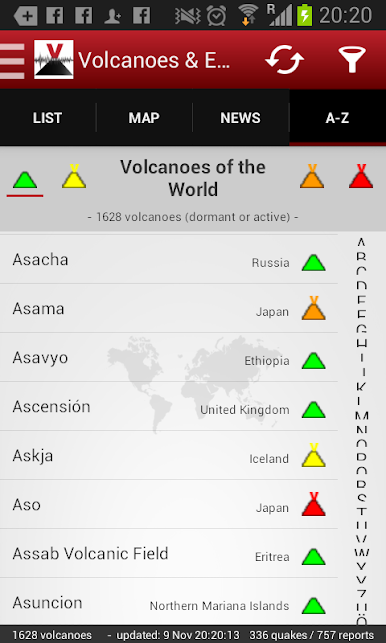
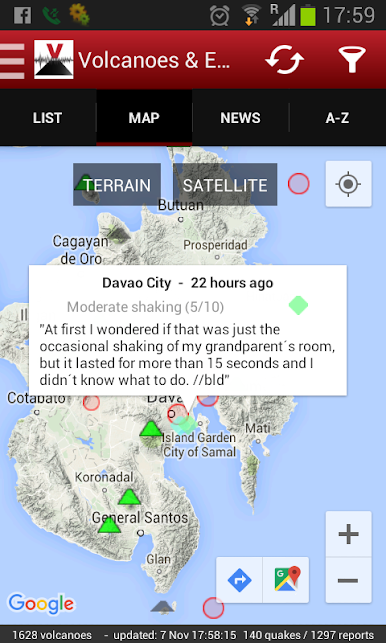
Volcanoes&Earthquakes UPGRADE is not a separate app to play with, it is more like a key that unlocks the good stuff in the free Volcanoes & Earthquakes app. Install it once and the main app switches into advanced mode. The biggest changes are simple but useful. No ads, faster notifications, and a few extras that make following seismic activity feel smoother and more complete. Alerts can be tuned down to magnitude 2 if someone wants early pings, and the feed can include small quakes around magnitude 1 for up to a week, which is great for seeing clusters that would usually get missed. There is also a handy list of quakes the user might have actually felt, which makes the data feel less abstract and more about what happens on the ground.

On a PC with BlueStacks, the map has room to breathe and the side panels are easier to read without pinching around. Clicking through events, zooming, and keeping the timeline open while checking another window just feels calmer. It is not flashy or noisy, it is a clean tool that stays out of the way and delivers quick alerts. The upgrade is a one time buy, and it keeps unlocking new features as they get added, so there is no chasing extra purchases later. Setup is mostly just install the upgrade and open the main app, it detects it and enables everything. For anyone who likes tracking quakes in near real time or lives in an active region, this makes the app a lot more practical day to day.

BlueStacks gives you the much-needed freedom to experience your favorite apps on a bigger screen. Get it now.

Volcanoes&Earthquakes UPGRADEをPCでプレイ

  • BlueStacksをダウンロードしてPCにインストールします。

  • GoogleにサインインしてGoogle Play ストアにアクセスします。(こちらの操作は後で行っても問題ありません)

  • 右上の検索バーにVolcanoes&Earthquakes UPGRADEを入力して検索します。

  • クリックして検索結果からVolcanoes&Earthquakes UPGRADEをインストールします。

  • Googleサインインを完了してVolcanoes&Earthquakes UPGRADEをインストールします。※手順2を飛ばしていた場合

  • ホーム画面にてVolcanoes&Earthquakes UPGRADEのアイコンをクリックしてアプリを起動します。

動画の視聴