


このページには広告が含まれます
剣が刻
アドベンチャー | Xiimoon
BlueStacksを使ってPCでプレイ - 5憶以上のユーザーが愛用している高機能Androidゲーミングプラットフォーム

PCで剣が刻をプレイ
◇◆あらすじ◆◇
「現世」と「常夜」が相反し存在する「中津国」
現世の住人たちは、常夜の住人マレビトの侵略により、戦乱や災禍に見舞われ危機に瀕していた。
ある夏の日、主人公(あなた)は刀神に導かれ中津国にタイムスリップしてしまう。
自らがマレビトを封印する力「神降ろし」を持つことを知った主人公は、数多の心強い仲間と
出会いを重ね、自らの宿命を知ることとなる……
▼絢爛豪華な和風伝奇
時は一六三三年。日出づる国、中津国。
史実上の有名な人物から、空想上の妖怪までもが
あなたの仲間となり生活を共にします。
▼豪華クリエイターが再集結
和風伝奇ADVの金字塔『剣が君』のクリエイターが再集結!
和の世界観をプロフェッショナルが作り上げます。
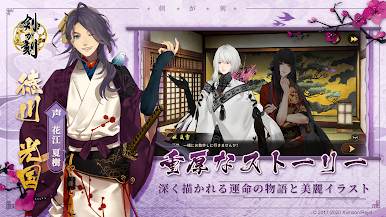
▼100万文字以上のシナリオ
女性向けゲームにはなかった波乱に満ちた驚愕の展開。
それぞれのキャラクターを個別に掘り下げる厚みのあるサブストーリー。
異なる種族と手を取り合って主人公(あなた)は中津国を救えるのか!?
▼可愛いSDキャラクター
全キャラクターに可愛いSDキャラクターが存在します。
色々な『当番』を割り振って、固有のアクションを見て楽しもう。
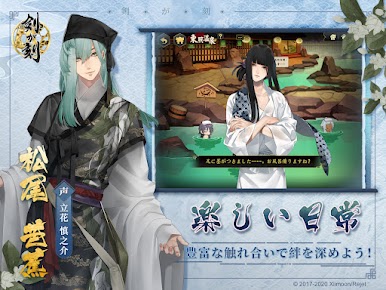
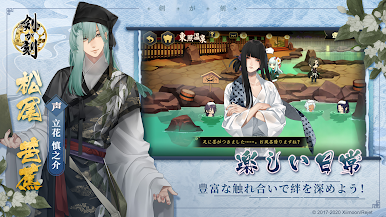
▼絆を深めるスキンシップ機能
『台所』『温泉』それぞれのキャラクターと
より親密になっていくシステムで絆を深め、
キャラクターの貴方だけに向けてくれる微笑みを見てみよう。
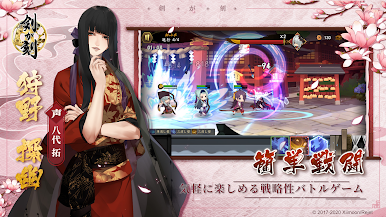
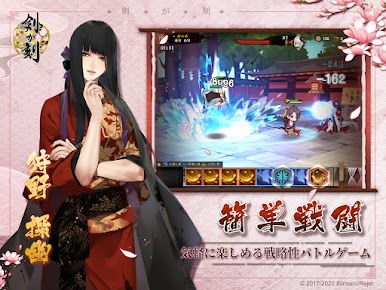
▼簡単バトル!
ブロックを消してゲージを貯め、必殺技を放て!!
お気に入りのキャラクターを編成して「中津国」を救おう!
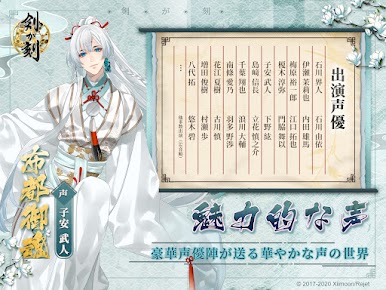
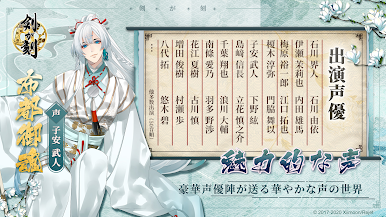
▼声の出演
萩嵐雪(声:石川界人)
葵(声:石川由依)
芝右衛門狸(声:伊瀬茉莉也)
浪(声:内田雄馬)
沙牟奢允(声:梅原裕一郎)
鶴間大吉(声:江口拓也)
周(声:榎木淳弥)
琉胡(声:門脇舞以)
異天津霊剣布都御魂(声:子安武人)
付喪(声:下野紘)
鴇羽(声:島﨑信長)
松尾芭蕉(声:立花慎之介)
橘道生(声:千葉翔也)
繋々(声:浪川大輔)
珠(声:南條愛乃)
鬼菱(声:羽多野渉)
徳川光国(声:花江夏樹)
叉梵(声:古川慎)
狗牙丸(声:増田俊樹)
歌京音丸(声:村瀬歩)
狩野探幽(声:八代拓)
深美萌夏(声:悠木碧)
他多数出演
(声優50音順)
◆◇◆公式情報◆◇◆
【公式サイト】 https://www.kengatoki.com/
【公式Twitter】 @kengatoki
「現世」と「常夜」が相反し存在する「中津国」
現世の住人たちは、常夜の住人マレビトの侵略により、戦乱や災禍に見舞われ危機に瀕していた。
ある夏の日、主人公(あなた)は刀神に導かれ中津国にタイムスリップしてしまう。
自らがマレビトを封印する力「神降ろし」を持つことを知った主人公は、数多の心強い仲間と
出会いを重ね、自らの宿命を知ることとなる……
▼絢爛豪華な和風伝奇
時は一六三三年。日出づる国、中津国。
史実上の有名な人物から、空想上の妖怪までもが
あなたの仲間となり生活を共にします。
▼豪華クリエイターが再集結
和風伝奇ADVの金字塔『剣が君』のクリエイターが再集結!
和の世界観をプロフェッショナルが作り上げます。
▼100万文字以上のシナリオ
女性向けゲームにはなかった波乱に満ちた驚愕の展開。
それぞれのキャラクターを個別に掘り下げる厚みのあるサブストーリー。
異なる種族と手を取り合って主人公(あなた)は中津国を救えるのか!?
▼可愛いSDキャラクター
全キャラクターに可愛いSDキャラクターが存在します。
色々な『当番』を割り振って、固有のアクションを見て楽しもう。
▼絆を深めるスキンシップ機能
『台所』『温泉』それぞれのキャラクターと
より親密になっていくシステムで絆を深め、
キャラクターの貴方だけに向けてくれる微笑みを見てみよう。
▼簡単バトル!
ブロックを消してゲージを貯め、必殺技を放て!!
お気に入りのキャラクターを編成して「中津国」を救おう!
▼声の出演
萩嵐雪(声:石川界人)
葵(声:石川由依)
芝右衛門狸(声:伊瀬茉莉也)
浪(声:内田雄馬)
沙牟奢允(声:梅原裕一郎)
鶴間大吉(声:江口拓也)
周(声:榎木淳弥)
琉胡(声:門脇舞以)
異天津霊剣布都御魂(声:子安武人)
付喪(声:下野紘)
鴇羽(声:島﨑信長)
松尾芭蕉(声:立花慎之介)
橘道生(声:千葉翔也)
繋々(声:浪川大輔)
珠(声:南條愛乃)
鬼菱(声:羽多野渉)
徳川光国(声:花江夏樹)
叉梵(声:古川慎)
狗牙丸(声:増田俊樹)
歌京音丸(声:村瀬歩)
狩野探幽(声:八代拓)
深美萌夏(声:悠木碧)
他多数出演
(声優50音順)
◆◇◆公式情報◆◇◆
【公式サイト】 https://www.kengatoki.com/
【公式Twitter】 @kengatoki













剣が刻をPCでプレイ
-
BlueStacksをダウンロードしてPCにインストールします。
-
GoogleにサインインしてGoogle Play ストアにアクセスします。(こちらの操作は後で行っても問題ありません)
-
右上の検索バーに剣が刻を入力して検索します。
-
クリックして検索結果から剣が刻をインストールします。
-
Googleサインインを完了して剣が刻をインストールします。※手順2を飛ばしていた場合
-
ホーム画面にて剣が刻のアイコンをクリックしてアプリを起動します。

