


このページには広告が含まれます
虹色カノジョ2d
シミュレーション | VITALIFY, INC.
BlueStacksを使ってPCでプレイ - 5憶以上のユーザーが愛用している高機能Androidゲーミングプラットフォーム

PCで虹色カノジョ2dをプレイ
あの「虹色カノジョ」がパワーアップ!
新アバター「MR(モーションレア)」でニジカノがより表情豊かに!
新タイプやコレクション要素も追加され、より深く楽しめるようになった「虹色カノジョ2d」で、ニジカノとの生活を楽しもう!
■人気声優3人のボイス着せ替え■
前作から引き続き、明坂聡美、南條愛乃、加隈亜衣の豪華人気声優を起用!
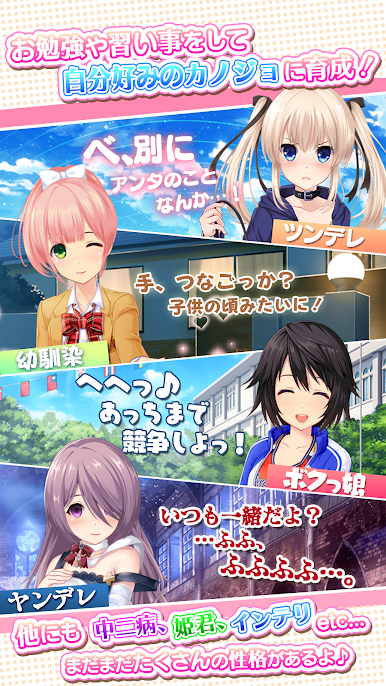
幼馴染、甘えん坊、ツンデレなど変幻自在な性格のボイスを楽しもう!
■遊び方の一部を紹介!■
「キセカエ」
服・髪・アクセ、顔を含めると14箇所もアバターを変更可能!
MRアバターならニジカノが動く!!
豊富なアバターであなた好みの美少女に変身させよう!
「お勉強」
ニジカノの個性を変えるにはお勉強をしよう!
個性を変化するとセリフが変化するよ!
タイプも増えて更に自分の理想のカノジョが育成可能に!
■ゲーム概要■
七色財閥が技術の粋を集めて創りだした謎のアプリ「虹色カノジョ2d」をインストールすると、突然美少女が飛び出してきた!?
被験者として選ばれたあなたは、謎の5人の少女と2匹のサポートを受けながら飛び出して来たニジカノと一緒に住むことに!
前作『虹色カノジョ』をベースに、Live2Dを利用したモーション付きアバター「MRアバター」の追加や新性格タイプ「お姉さん」の実装など、更なる進化を遂げた育成恋愛シミュレーションです!性格、服装、髪型、ボイスなど、様々な要素を組み合わせて理想のニジカノを作り上げ、育ててあげてください。
Powered by Live2D
新アバター「MR(モーションレア)」でニジカノがより表情豊かに!
新タイプやコレクション要素も追加され、より深く楽しめるようになった「虹色カノジョ2d」で、ニジカノとの生活を楽しもう!
■人気声優3人のボイス着せ替え■
前作から引き続き、明坂聡美、南條愛乃、加隈亜衣の豪華人気声優を起用!
幼馴染、甘えん坊、ツンデレなど変幻自在な性格のボイスを楽しもう!
■遊び方の一部を紹介!■
「キセカエ」
服・髪・アクセ、顔を含めると14箇所もアバターを変更可能!
MRアバターならニジカノが動く!!
豊富なアバターであなた好みの美少女に変身させよう!
「お勉強」
ニジカノの個性を変えるにはお勉強をしよう!
個性を変化するとセリフが変化するよ!
タイプも増えて更に自分の理想のカノジョが育成可能に!
■ゲーム概要■
七色財閥が技術の粋を集めて創りだした謎のアプリ「虹色カノジョ2d」をインストールすると、突然美少女が飛び出してきた!?
被験者として選ばれたあなたは、謎の5人の少女と2匹のサポートを受けながら飛び出して来たニジカノと一緒に住むことに!
前作『虹色カノジョ』をベースに、Live2Dを利用したモーション付きアバター「MRアバター」の追加や新性格タイプ「お姉さん」の実装など、更なる進化を遂げた育成恋愛シミュレーションです!性格、服装、髪型、ボイスなど、様々な要素を組み合わせて理想のニジカノを作り上げ、育ててあげてください。
Powered by Live2D








虹色カノジョ2dをPCでプレイ
-
BlueStacksをダウンロードしてPCにインストールします。
-
GoogleにサインインしてGoogle Play ストアにアクセスします。(こちらの操作は後で行っても問題ありません)
-
右上の検索バーに虹色カノジョ2dを入力して検索します。
-
クリックして検索結果から虹色カノジョ2dをインストールします。
-
Googleサインインを完了して虹色カノジョ2dをインストールします。※手順2を飛ばしていた場合
-
ホーム画面にて虹色カノジョ2dのアイコンをクリックしてアプリを起動します。

