


このページには広告が含まれます
トミカ あちこちアドベンチャー
教育 | 株式会社タカラトミーアイビス
BlueStacksを使ってPCでプレイ - 5憶以上のユーザーが愛用している高機能Androidゲーミングプラットフォーム

PCでトミカ あちこちアドベンチャーをプレイ
3Dでトミカの世界観を完全再現--
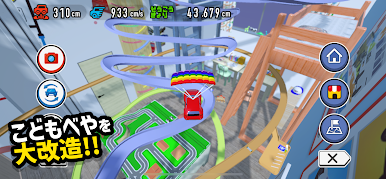
トミカを自由自在に操作して「リビング」・「こどもべや」をあちこち走りまわろう!
家具の間をスイスイすり抜け、床に散らばったおもちゃをガンガン跳ね飛ばす!二階を目指して階段を一気に駆け上がれ!
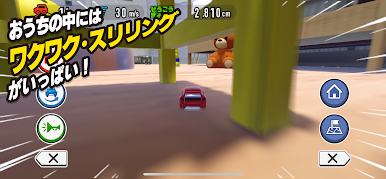
おうちの中にはワクワク・スリリングがいっぱい!
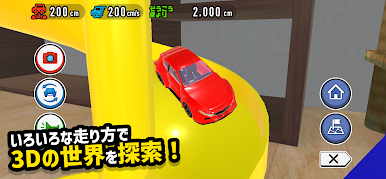
●いろいろな走り方で、3Dの世界を探索!
スワイプでトミカが走り出す!素早いフリックでトミカがダッシュ!
ジャンプ!ドリフト!大回転!
得意な走り方を見つけて、自由自在にキミだけのフィールドを探検しよう!
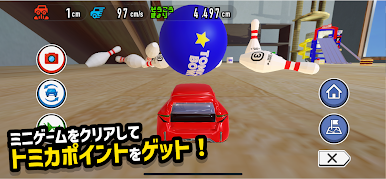
●フィールド内のミニゲームをクリアしてトミカポイントをゲット!
ゲーム内では「トミカボウリング」や、ネズミのおもちゃをつかまえる「トミカ チューチューゲット」、ゴールを目指してタイムアタックをする「トミカターゲット」があるよ!
クリアするとトミカポイントがゲットできて、貯まったトミカポイントでトミカのカスタマイズに必要な素材と交換可能!
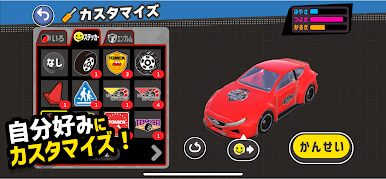
●カスタマイズ!マイトミカ!
カスタマイズ素材は「いろ」、「ステッカー」、「エンブレム」。コレクションしたトミカを自分好みにカスタマイズして、キミだけのトミカをみんなに自慢しちゃおう!
トミカあちこちアドベンチャーで子どもも大人もエキサイティングな冒険をはじめよう!
●○●○保護者の方に知ってほしい!●○●○
「トミカあちこちアドベンチャー」は、3Dの世界をトミカの目線になって冒険するアクションゲームです。
子どもたちの想像力や探求心を最大限に引き出し、工夫次第で遊び方は無限に広がります。
現実世界ではちょっぴり勇気がいる遊び方も、3Dならではの特性を活かし、子どもたちの「こんなことやってみたい!」を実現させます。
ぜひご家族で体験してみてください。
●○●○他にもこんな機能が!●○●○
・ペアレンタルゲート機能
お子さまが誤って課金したり、不要にアプリ外のWEBサイトにアクセスしたりすることを防止します。
・タイマー機能
使いすぎを防止するタイマーを設定できます。安心してご利用になれます。
●注意事項とお知らせ
1.本アプリのダウンロード後、個別のコンテンツは別途ダウンロードが必要です。Wi-Fi通信を利用したダウンロードをお勧めいたします。
2.アプリに関するご質問やご意見、不具合のご連絡は、ゲームメニュー「せってい」内にある「お問い合わせ」からご連絡ください。
●対応OS:Android 10以降
トミカを自由自在に操作して「リビング」・「こどもべや」をあちこち走りまわろう!
家具の間をスイスイすり抜け、床に散らばったおもちゃをガンガン跳ね飛ばす!二階を目指して階段を一気に駆け上がれ!
おうちの中にはワクワク・スリリングがいっぱい!
●いろいろな走り方で、3Dの世界を探索!
スワイプでトミカが走り出す!素早いフリックでトミカがダッシュ!
ジャンプ!ドリフト!大回転!
得意な走り方を見つけて、自由自在にキミだけのフィールドを探検しよう!
●フィールド内のミニゲームをクリアしてトミカポイントをゲット!
ゲーム内では「トミカボウリング」や、ネズミのおもちゃをつかまえる「トミカ チューチューゲット」、ゴールを目指してタイムアタックをする「トミカターゲット」があるよ!
クリアするとトミカポイントがゲットできて、貯まったトミカポイントでトミカのカスタマイズに必要な素材と交換可能!
●カスタマイズ!マイトミカ!
カスタマイズ素材は「いろ」、「ステッカー」、「エンブレム」。コレクションしたトミカを自分好みにカスタマイズして、キミだけのトミカをみんなに自慢しちゃおう!
トミカあちこちアドベンチャーで子どもも大人もエキサイティングな冒険をはじめよう!
●○●○保護者の方に知ってほしい!●○●○
「トミカあちこちアドベンチャー」は、3Dの世界をトミカの目線になって冒険するアクションゲームです。
子どもたちの想像力や探求心を最大限に引き出し、工夫次第で遊び方は無限に広がります。
現実世界ではちょっぴり勇気がいる遊び方も、3Dならではの特性を活かし、子どもたちの「こんなことやってみたい!」を実現させます。
ぜひご家族で体験してみてください。
●○●○他にもこんな機能が!●○●○
・ペアレンタルゲート機能
お子さまが誤って課金したり、不要にアプリ外のWEBサイトにアクセスしたりすることを防止します。
・タイマー機能
使いすぎを防止するタイマーを設定できます。安心してご利用になれます。
●注意事項とお知らせ
1.本アプリのダウンロード後、個別のコンテンツは別途ダウンロードが必要です。Wi-Fi通信を利用したダウンロードをお勧めいたします。
2.アプリに関するご質問やご意見、不具合のご連絡は、ゲームメニュー「せってい」内にある「お問い合わせ」からご連絡ください。
●対応OS:Android 10以降
トミカ あちこちアドベンチャーをPCでプレイ
-
BlueStacksをダウンロードしてPCにインストールします。
-
GoogleにサインインしてGoogle Play ストアにアクセスします。(こちらの操作は後で行っても問題ありません)
-
右上の検索バーにトミカ あちこちアドベンチャーを入力して検索します。
-
クリックして検索結果からトミカ あちこちアドベンチャーをインストールします。
-
Googleサインインを完了してトミカ あちこちアドベンチャーをインストールします。※手順2を飛ばしていた場合
-
ホーム画面にてトミカ あちこちアドベンチャーのアイコンをクリックしてアプリを起動します。

