


Hockey Beasts: Online Hockey
Play on PC with BlueStacks – the Android Gaming Platform, trusted by 500M+ gamers.

Page Modified on: Sep 23, 2026
Play Hockey Beasts: Online Hockey on PC
Pick your favourite squad: from stubborn bulls and speedy monkeys to crocodiles, elephants, giraffes, and other rink-ready beasts. Every team plays differently, so choosing a character is not just about looks. Some are quick and agile, others rely on strength, reach, or a more patient approach.
The controls are simple enough to understand from the first match, but winning consistently takes timing, positioning, and a good read of your opponent. It is easy to play, hard to master, and built around short matches that are just as enjoyable during a relaxed solo session as they are in a competitive multiplayer game.
Expect expressive cartoon characters, colorful arenas, messy rebounds, awkward collisions, and goals that sometimes feel brilliant and sometimes completely accidental.

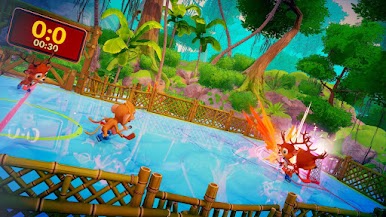




Play Hockey Beasts: Online Hockey on PC. It’s easy to get started.
-
Download and install BlueStacks on your PC
-
Complete Google sign-in to access the Play Store, or do it later
-
Look for Hockey Beasts: Online Hockey in the search bar at the top right corner
-
Click to install Hockey Beasts: Online Hockey from the search results
-
Complete Google sign-in (if you skipped step 2) to install Hockey Beasts: Online Hockey
-
Click the Hockey Beasts: Online Hockey icon on the home screen to start playing

