


NBA 2K HQ
Play on PC with BlueStacks – the Android Gaming Platform, trusted by 500M+ gamers.

Page Modified on: Aug 21, 2026
Play NBA 2K HQ on PC
MyPLAYER BUILDER
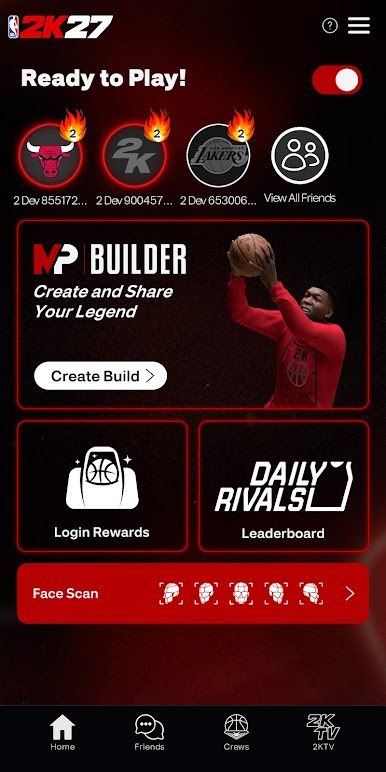
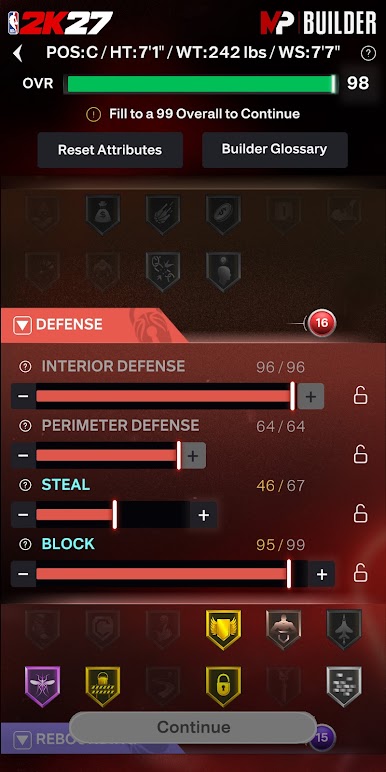
Shape your game wherever you go. Access the full NBA 2K27 MyPLAYER Builder directly in-app and upload builds you create on NBA 2K HQ right onto your home console setup. Then, share them from anywhere via QR codes.
SOCIAL AND CREW INTEGRATION
Tap into your squad 24/7 with full Crew management and NBA 2K’s social features. With both real-time messaging and Crew management, NBA 2K HQ puts the NBA 2K social experience in the palm of your hand.
DAILY REWARDS
Start your day with a fresh drop! NBA 2K HQ features mobile-exclusive daily login rewards!
PROGRESSION TRACKING
Stay in the moment by viewing your progress and rank in real-time. NBA 2K HQ features continuous tracking for Daily Leaderboards and Crew Rewards so you can focus on your climb to the top.
FACE SCAN
The new-and-improved Face Scan features a quicker, more accurate scanning process with high-fidelity texture quality–all designed to place you right into your very own basketball fantasy. Your game. Your look.
Requires internet connection and Android 11.0 or above (Minimum API level 30)
Do Not Sell or Share My Personal Information: https://www.take2games.com/ccpa
Use of this application is governed by the Terms of Service (ToS) found at www.take2games.com/legal. Online and certain special features require an internet connection, may not be available to all users or at all times, and may be terminated, modified, or offered under different terms without notice. For more information on the availability of online features and services visit https://bit.ly/2K-Online-Services-Status.
Play NBA 2K HQ on PC. It’s easy to get started.
-
Download and install BlueStacks on your PC
-
Complete Google sign-in to access the Play Store, or do it later
-
Look for NBA 2K HQ in the search bar at the top right corner
-
Click to install NBA 2K HQ from the search results
-
Complete Google sign-in (if you skipped step 2) to install NBA 2K HQ
-
Click the NBA 2K HQ icon on the home screen to start playing

