


Rummy City : Cozy & Classic
Play on PC with BlueStacks – the Android Gaming Platform, trusted by 500M+ gamers.

Page Modified on: Jul 22, 2026
Play Rummy City : Cozy & Classic on PC
Welcome to Rummy City, the premier destination for card game enthusiasts seeking a high-quality, relaxing, and fair gameplay experience. Dive into the world of strategic card play where skill meets comfort. Whether you are looking for a casual match to unwind or a competitive league to test your mastery, Rummy City offers a sophisticated platform built for players who appreciate the finer details.
✨ Key Highlights of Rummy City:
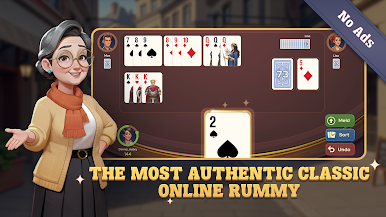
🎨 Elegant Interface: Enjoy a clean and sophisticated UI crafted for visual clarity. Our card designs are easy on the eyes, making long play sessions comfortable and enjoyable.
🌍 Global Community: Join real players from around the world in live, real-time matches. Our platform fosters a friendly and respectful community of Rummy lovers.
🚫 Pure & Uninterrupted: We believe in a focused gaming experience. Rummy City is entirely ad-free, allowing you to stay in the zone without any distractions.
⚖️ Fair & Secure: Integrity is our priority. We use a random number generator to ensure every hand dealt is honest and fair for everyone.
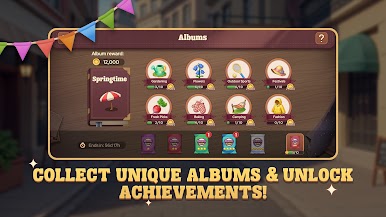
🏆 Strategic Challenges: Climb the ranks in our casual leagues, complete engaging daily missions, and fill your personal albums to earn exclusive rewards.
🧠 Smart Tools: Utilize our intuitive autosort feature to organize your hand instantly, helping you focus on your winning strategy.
Step into Rummy City today! Download now to enjoy a premium card game experience tailored for true fans of classic Rummy.
📋 Additional Information
Free to Play: Rummy City is free to download and play. Optional in-app purchases are available for players who wish to enhance their experience with extra coins.
Reliable Support: Access our detailed help guides and professional customer support team anytime for a smooth and worry-free journey.
⚖️ Legal & Privacy
Terms of Service: https://www.rummycity.com/terms.html
Privacy Policy: https://www.rummycity.com/privacy_policy.html
Virtual Assets Notice: Virtual Currencies and Goods provided within Rummy City are for entertainment only and cannot be exchanged for real cash or items of monetary value.


Play Rummy City : Cozy & Classic on PC. It’s easy to get started.
-
Download and install BlueStacks on your PC
-
Complete Google sign-in to access the Play Store, or do it later
-
Look for Rummy City : Cozy & Classic in the search bar at the top right corner
-
Click to install Rummy City : Cozy & Classic from the search results
-
Complete Google sign-in (if you skipped step 2) to install Rummy City : Cozy & Classic
-
Click the Rummy City : Cozy & Classic icon on the home screen to start playing

