


Funny Party mixmic
Play on PC with BlueStacks – the Android Gaming Platform, trusted by 500M+ gamers.

Page Modified on: Nov 9, 2026
Play Funny Party mixmic on PC
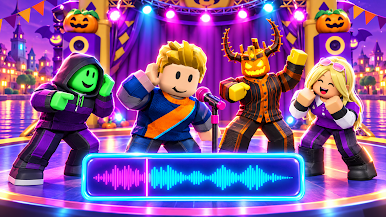
MiMik turns funny sounds into voice challenges. Listen to the original, mimic what you hear, and see how closely your voice matches. From a surprisingly good impression to a hilariously bad attempt, every round is a chance to make some noise.
🎤 LISTEN. MIMIC. GET YOUR SCORE.
Hear a sound, record your version, and check your result. Try again to improve your score or move on to your next challenge.
😂 FIND YOUR FUNNIEST VOICE
Experiment with your pitch, timing, and expression. Can you recreate the sound, or will you make something even funnier?
🔊 EXPLORE SOUND CHALLENGES
Take on meme sounds, animal noises, and character-style voices. Discover which sounds you can master and which ones leave you laughing.
⭐ KEEP GETTING BETTER
Practice your impressions, beat your previous scores, and aim for your best performance.
🎉 SHARE THE FUN
Take turns with friends and family, compare your attempts, and see who delivers the funniest impression.
Whether you love making silly voices or just want a quick laugh, your next voice challenge is waiting.
Ready? Mic on. Let’s hear your MiMik!
Microphone access is required to record your voice during challenges.




Play Funny Party mixmic on PC. It’s easy to get started.
-
Download and install BlueStacks on your PC
-
Complete Google sign-in to access the Play Store, or do it later
-
Look for Funny Party mixmic in the search bar at the top right corner
-
Click to install Funny Party mixmic from the search results
-
Complete Google sign-in (if you skipped step 2) to install Funny Party mixmic
-
Click the Funny Party mixmic icon on the home screen to start playing

