


CookieRun Classic
Play on PC with BlueStacks – the Android Gaming Platform, trusted by 500M+ gamers.

Page Modified on: Jun 25, 2026
Play CookieRun Classic on PC or Mac
Play CookieRun Classic by Devsisters Corporation on PC or Mac with BlueStacks. Use a bigger screen, mouse and keyboard controls, and smoother performance while you play.
About the Game
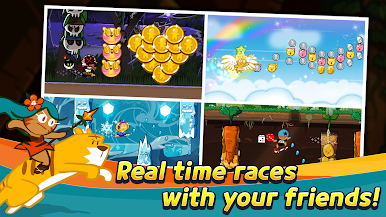
CookieRun Classic is a candy-coated Adventure where tiny Cookies make a big run for freedom. It’s quick to learn, playful, and packed with those “one more try” moments as you sprint through colorful stages, snag sweet boosts, and try to beat your best score. Want to chill for a few runs or chase the top spot? It’s built for both.
Game Features
-
Pick-up-and-run controls: Two simple inputs—jump and slide—keep the action smooth and snappy, so you’re focused on timing, not finger gymnastics.
-
A world made of sweets: Race through side-scrolling courses filled with crunchy traps and tasty goodies. Nail your routes, chain pickups, and keep that health bar happy.
-
K-inspired Cookies: Collect quirky runners inspired by Korean culture and cuisine. Each Cookie packs its own charm and playstyle, so your roster feels personal.
-
Cookies, Pets, and Treasures: Build clever combos by pairing Cookies with supportive Pets and equipping Treasures. Tinker with setups to squeeze out bigger scores.
-
Chase the leaderboard: Test your skills in competitive modes and aim for higher ranks. It’s all about crisp runs, smart loadouts, and a little nerve.
-
Steady variety: A broad cast of characters, helpful companions, and gear options keeps runs fresh, whether you’re score-hunting or experimenting.
-
Play your way: Enjoy smooth gameplay on mobile—or fire it up on BlueStacks if you’d like a bigger screen and comfy keyboard controls.
Get ready for a buttery smooth, high-performance gaming action only on BlueStacks.










Play CookieRun Classic on PC. It’s easy to get started.
-
Download and install BlueStacks on your PC
-
Complete Google sign-in to access the Play Store, or do it later
-
Look for CookieRun Classic in the search bar at the top right corner
-
Click to install CookieRun Classic from the search results
-
Complete Google sign-in (if you skipped step 2) to install CookieRun Classic
-
Click the CookieRun Classic icon on the home screen to start playing

