


Escape Tsunami: Find Brainrots
Play on PC with BlueStacks – the Android Gaming Platform, trusted by 500M+ gamers.

Page Modified on: Feb 5, 2026
Play Escape Tsunami: Find Brainrots on PC
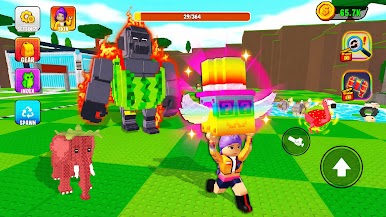
Collect rare MemeRot creatures, sneak like a thief, escape disasters, and build your ultimate Brainrot army.
🧠 Three insane game modes:
🔍 Find Brainrot
Explore maps full of secrets. Find hidden Brainrots, unlock rare collection, and discover secret MemeRot creatures.
🤫 Don’t Wake Brainrot
Use stealth skills to steal and catch brainrots without waking them. One wrong move and chaos begins!
🌊 Tsunami Escape for Brainrots
Run, jump and escape tsunami while carrying your Brainrots to safety. Only true survivors can survive till the end.
🚀 Features you’ll love:
- 500+ brainrots in collection
- Secret MemeRot characters to unlock
- Collect and upgrade Brainrots
- Build your ultimate Brainrot collection
- Steal, rob and catch in stealth gameplay
Can you survive, steal, collect and escape all modes?
Download Escape Tsunami: Find Brainrots now and start your brainrot journey!





Play Escape Tsunami: Find Brainrots on PC. It’s easy to get started.
-
Download and install BlueStacks on your PC
-
Complete Google sign-in to access the Play Store, or do it later
-
Look for Escape Tsunami: Find Brainrots in the search bar at the top right corner
-
Click to install Escape Tsunami: Find Brainrots from the search results
-
Complete Google sign-in (if you skipped step 2) to install Escape Tsunami: Find Brainrots
-
Click the Escape Tsunami: Find Brainrots icon on the home screen to start playing

