


PicPit
Play on PC with BlueStacks – the Android Gaming Platform, trusted by 500M+ gamers.

Page Modified on: Sep 3, 2026
Play PicPit on PC
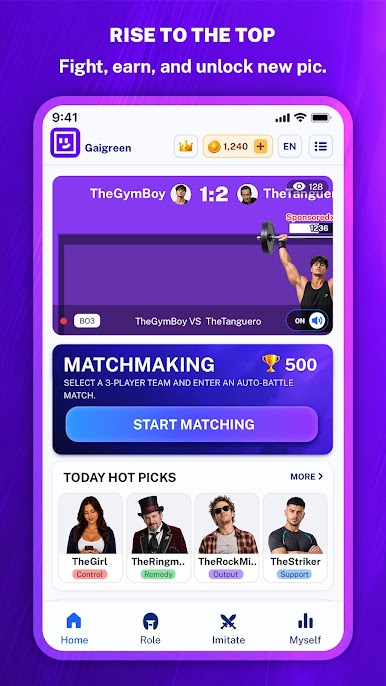
Pick your fighters, start the battle, and watch the action unfold right in front of you. Every match is short, fast, and full of surprises. One second your team may be losing, and the next second they might launch a giant attack, throw enemies across the stage, or make an unbelievable comeback.
Want to watch more battles? Join the live battle room and watch fights from other players. See different teams, crazy strategies, and unpredictable results from battles happening around the world.
Want to create your own matchup? Try the simulator mode. Choose any fighters you like, set up the battle, and see who comes out on top.
From classic 1V1 fights to chaotic 3V3 team battles, PicPit gives you more ways to enjoy every fight. Unlock more fighters, upgrade their skills, build different teams, and discover powerful battle combinations.
Game Features:
- Funny and chaotic battle simulator gameplay
- Watch live battles from other players
- Create your own matchups in simulator mode
- Classic 1V1 battles and exciting 3V3 team fights
- Lots of unique fighters to unlock
- Fast battles, perfect for quick play
- Crazy skills and unexpected comeback moments
- Simple controls and instant fun
- Endless team combinations to discover
Who will win the next battle?
Build your team, watch the fight, and find out in PicPit!
For more exciting battles, gameplay videos, and updates, visit our studio YouTube channel: 【https://www.youtube.com/@PicPitStudio】





Play PicPit on PC. It’s easy to get started.
-
Download and install BlueStacks on your PC
-
Complete Google sign-in to access the Play Store, or do it later
-
Look for PicPit in the search bar at the top right corner
-
Click to install PicPit from the search results
-
Complete Google sign-in (if you skipped step 2) to install PicPit
-
Click the PicPit icon on the home screen to start playing

