


Vibe Crush
Play on PC with BlueStacks – the Android Gaming Platform, trusted by 500M+ gamers.

Page Modified on: Oct 7, 2026
Play Vibe Crush on PC
♠ Fun Stack‑Matching Gameplay
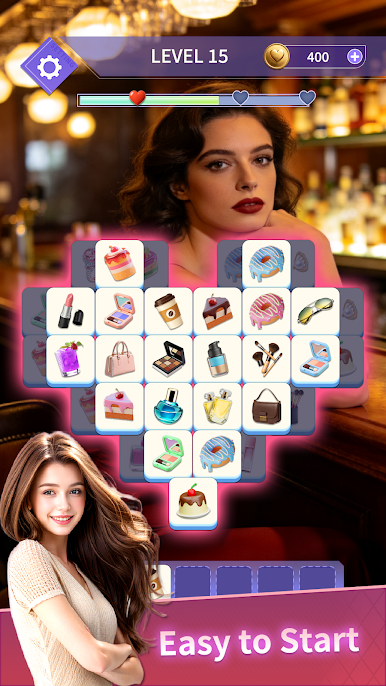
Enter exquisitely designed themed stages. Tap to select blocks with identical patterns and start your strategic matching challenge. Clear all blocks on screen to beat the level. Easy to get started, with difficulty rising gradually. Enjoy responsive and smooth controls, and get satisfying joy with every completed level.
♥ Stage‑Exclusive Character Assist
Before each challenge, pick one out of three distinctive characters to fight alongside you. Different stages feature rotating character rosters. Beat levels to unlock new characters and their exclusive rewards, bringing fresh expectations and choices to every playthrough.
♣ Character Collection Gallery
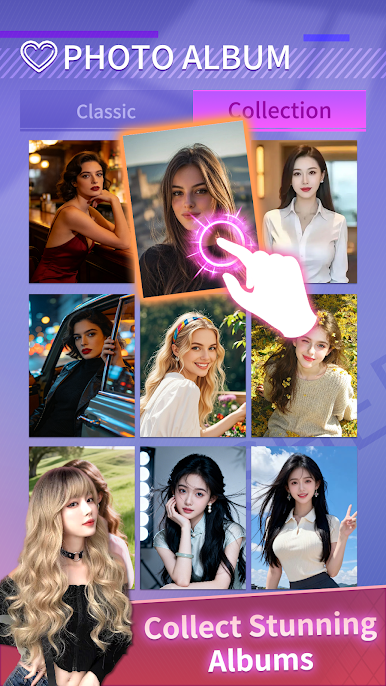
The built‑in character album lets you view both unlocked and locked characters anytime. Replay stages to discover rare hidden characters. You may preview and save character artworks when device functions permit. Keep completing levels and gradually fill up your personal character collection book.
Download Vibe Crush now and embark on a puzzle adventure full of matching challenges, character progression and collection fun!



Play Vibe Crush on PC. It’s easy to get started.
-
Download and install BlueStacks on your PC
-
Complete Google sign-in to access the Play Store, or do it later
-
Look for Vibe Crush in the search bar at the top right corner
-
Click to install Vibe Crush from the search results
-
Complete Google sign-in (if you skipped step 2) to install Vibe Crush
-
Click the Vibe Crush icon on the home screen to start playing

