


Rise Up: Balloon Game
Play on PC with BlueStacks – the Android Gaming Platform, trusted by 500M+ gamers.

Page Modified on: Aug 31, 2026
Main Rise Up: Balloon Game on PC
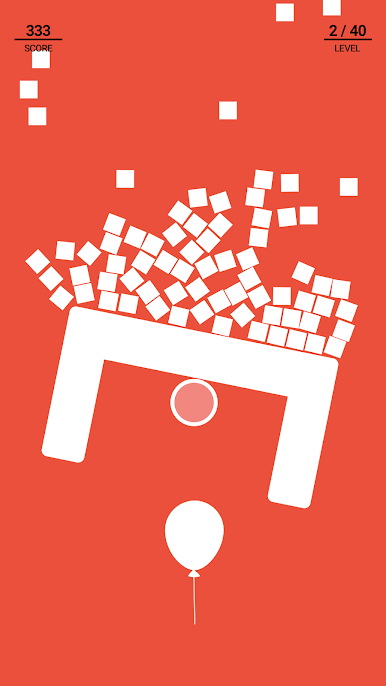
Picture this. You have a tiny balloon you need to protect. You need to push away all the pointy and heavy things that get in the way of your balloon going up. But it's not that easy. The sky is full of all kinds of strange things like blocks, beams, and triangles. If your balloon even touches one of these, it's all over. Exciting, right?
But it gets even better! The higher your balloon goes, the harder the game gets. The obstacles become trickier and more difficult to avoid. You can push everything out of the way, but watch out! If you send blocks flying everywhere, you will find it difficult to protect the balloon.
Why you’ll spend hours playing Rise Up:
- Tons of challenging game levels
- Classic balloon game style
- Ultimate test of your reflexes & quick thinking
- Perfect for on-the-go gaming
- Exciting gaming sessions
- Captivating 2D graphics and animation
- Fun game if you like balloons
Do you think you can get to level 100? Only the unique players can! Ready to give it a try? Let's play Rise Up and see how high you can go!






Play Rise Up: Balloon Game on PC. It’s easy to get started.
-
Download and install BlueStacks on your PC
-
Complete Google sign-in to access the Play Store, or do it later
-
Look for Rise Up: Balloon Game in the search bar at the top right corner
-
Click to install Rise Up: Balloon Game from the search results
-
Complete Google sign-in (if you skipped step 2) to install Rise Up: Balloon Game
-
Click the Rise Up: Balloon Game icon on the home screen to start playing

