


Solitaire Classic - Beauty
Play on PC with BlueStacks – the Android Gaming Platform, trusted by 500M+ gamers.

Page Modified on: Aug 3, 2026
Main Solitaire Classic - Beauty on PC
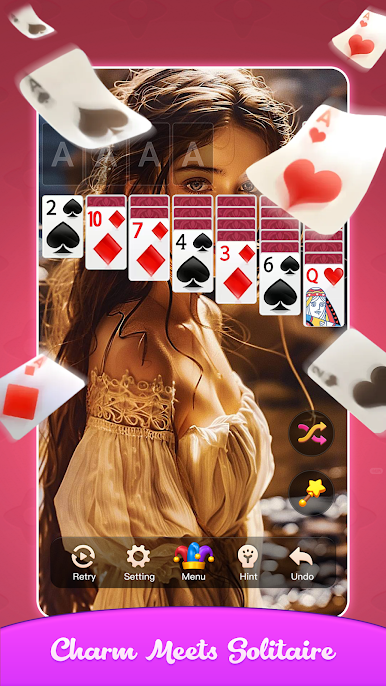
🃏 Classic & More
Klondike Solitaire – The traditional draw‑1 and draw‑3 modes you know and love.
Multiple Variations – Try Spider, FreeCell, TriPeaks, and Pyramid for fresh challenges.
Daily Deals – Every day brings a new shuffled layout. Never play the same game twice.
👑 Collect Gorgeous Beauties
Win games and complete achievements to earn keys.
Unlock hundreds of exclusive beauty portraits – from elegant ladies to fantasy heroines.
Each new picture adds charm to your personal collection album.
Rare and legendary images await the most dedicated players.
✨ Game Features
♥️ Smooth & Classic – Perfectly tuned drag‑and‑drop or tap controls. Auto‑complete option for effortless wins.
🎨 Customizable Looks – Choose from multiple card backs, table backgrounds, and beautiful themes.
🧘 Relaxing Experience – No time limits, no pressure. Play at your own pace and unwind.
📴 Offline Play – No internet? No problem. Enjoy solitaire anytime, anywhere.
🏆 Challenges & Stats – Track your wins, longest streaks, and complete special goals for bonus rewards.
💡 Smart Hints & Unlimited Undo – Stuck? Get a hint or undo moves freely. Perfect for beginners and experts alike.
🎁 Daily Rewards
Log in every day for free coins, extra hints, and a chance to unlock a limited‑edition beauty card!
Whether you are a solitaire veteran or new to card games, Solitaire Classic - Beauty offers the perfect blend of timeless fun and visual delight.
Download now and start your beautiful solitaire journey!




Play Solitaire Classic - Beauty on PC. It’s easy to get started.
-
Download and install BlueStacks on your PC
-
Complete Google sign-in to access the Play Store, or do it later
-
Look for Solitaire Classic - Beauty in the search bar at the top right corner
-
Click to install Solitaire Classic - Beauty from the search results
-
Complete Google sign-in (if you skipped step 2) to install Solitaire Classic - Beauty
-
Click the Solitaire Classic - Beauty icon on the home screen to start playing

