


Paint Camo: Hide & Seek 3D
Play on PC with BlueStacks – the Android Gaming Platform, trusted by 500M+ gamers.

Page Modified on: Sep 29, 2026
Play Paint Camo: Hide & Seek 3D on PC
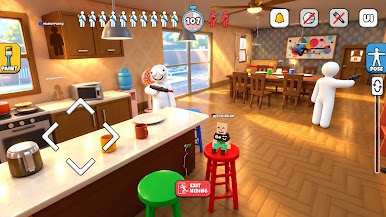
Paint Camo: Hide & Seek 3D combines classic hide and seek fun with interactive paint mechanics. Spray your body, match the background colors, and freeze in position to fool the hunter and survive the round!
Key Features:
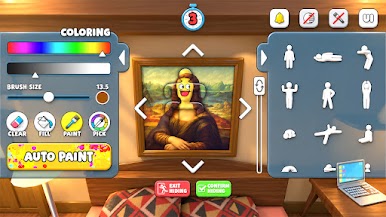
✅Paint Hide & Seek Mechanics: Use intuitive brush tools to spray your body with paint, matching the exact bricks, wood, and wallpaper behind you.
🧩Pose & Camouflage: Matching colors is only half the battle! Choose the perfect pose to blend right into barrels, candles, and furniture.
🎮Play as Hider or Hunter:
▸As a Hider: Find a clever spot, paint yourself into the wall, pose, and try not to get spotted before time runs out.
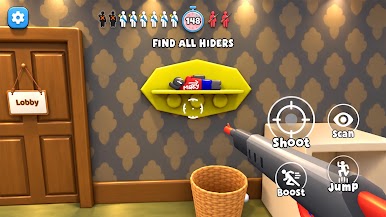
▸As a Hunter: Keep your eyes open, search for weird paint spots, and shoot down sneaky hiders hiding in plain sight!
🎨 Multiple Paint Maps: Challenge your hide & seek skills across detailed stages featuring complex patterns, textures, and lighting.
🔓Unlock Cool Rewards: Complete levels to unlock new paint colors, brushes, fun poses, and character skins.
Think you have the skills to paint, hide, and survive? Download Paint Camo: Hide & Seek 3D now and join the game!








Play Paint Camo: Hide & Seek 3D on PC. It’s easy to get started.
-
Download and install BlueStacks on your PC
-
Complete Google sign-in to access the Play Store, or do it later
-
Look for Paint Camo: Hide & Seek 3D in the search bar at the top right corner
-
Click to install Paint Camo: Hide & Seek 3D from the search results
-
Complete Google sign-in (if you skipped step 2) to install Paint Camo: Hide & Seek 3D
-
Click the Paint Camo: Hide & Seek 3D icon on the home screen to start playing

