


ヴァルキリーコネクト
Play on PC with BlueStacks – the Android Gaming Platform, trusted by 500M+ gamers.

Page Modified on: Aug 20, 2026
Play ヴァルキリーコネクト on PC
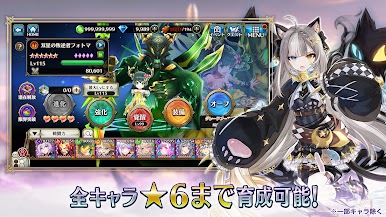
■ All characters can be trained up to 6 stars, so no misses!
■ Train your characters and enjoy cooperative battles!
[Game Introduction]
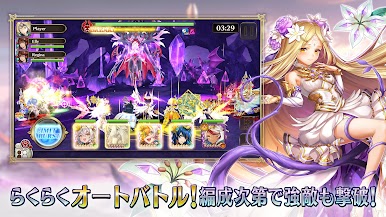
▼ Easy controls, deep battles!
Simply tap the skill buttons to control battles!
Master the timing and use your skills!
▼ Execute the deadly Limit Burst!
Wipe out all enemies with the maximum attack, the Limit Burst!
Powerful effects deliver an irresistible sense of exhilaration!
▼ Deep character development and customization!
Collect soul crystals and orbs to grow your characters!
Equip them with equipment to gain auto-activating skills!
▼ Fight together in Connect Battle!
Cooperative battles with friends in real time!
Join forces to take on the approaching giant boss!
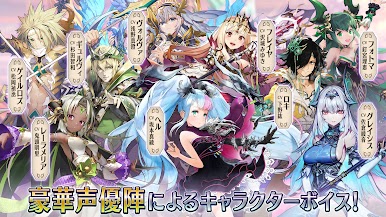
▼ Character voice acting by a stellar cast!
Featuring many popular voice actors!
Enjoy the story with character voice acting!
[Recommended for]
・People who enjoy character development
・Want to play role-playing games with their favorite characters
・Want to play cooperative role-playing games
・Love strategic role-playing games (RPGs)
・Fantasy elements are essential to role-playing games (RPGs)
・Prefer role-playing games (RPGs) over simulation games
・Play role-playing games with Norse mythology stories
・Love story-focused RPGs
・Want to enjoy a story in single-player mode
・The only fun games are RPGs with deep stories
・Looking for games with character-specific stories
[Recommended Devices]
Android 6.0 or higher
For more details, please visit the following website:
https://app.a-tm.co.jp/valkyrie-connect/

Play ヴァルキリーコネクト on PC. It’s easy to get started.
-
Download and install BlueStacks on your PC
-
Complete Google sign-in to access the Play Store, or do it later
-
Look for ヴァルキリーコネクト in the search bar at the top right corner
-
Click to install ヴァルキリーコネクト from the search results
-
Complete Google sign-in (if you skipped step 2) to install ヴァルキリーコネクト
-
Click the ヴァルキリーコネクト icon on the home screen to start playing

