Tomb Raider™
Tomb Raider™

Tomb Raider™

Action

| Feral Interactive

Play on PC with BlueStacks or from our cloud

  • Overview
  • Game Features
  • How to Play

Page Modified On: April 07, 2026

Play Tomb Raider™ on PC or Mac

Bring your A-game to Tomb Raider™, the Action game sensation from Feral Interactive. Give your gameplay the much-needed boost with precise game controls, high FPS graphics, and top-tier features on your PC or Mac with BlueStacks.

About the Game

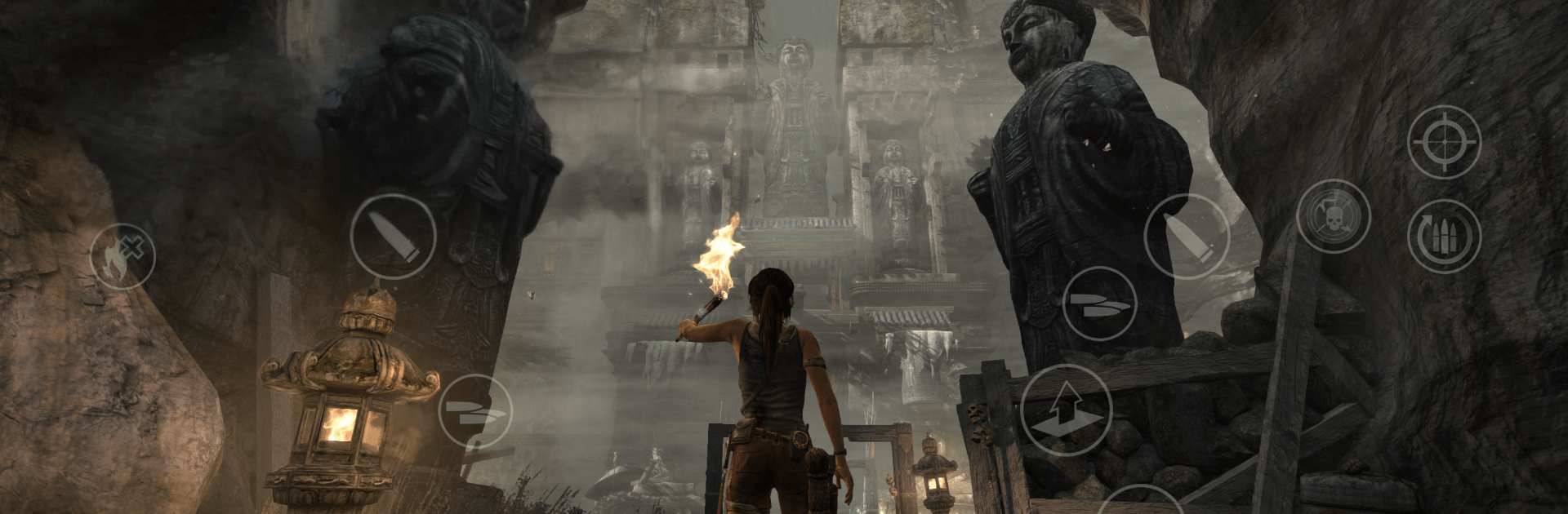
Tomb Raider™ retells Lara Croft’s gritty origin story as a young archaeologist stranded on the storm-lashed island of Yamatai. What starts as a rescue mission quickly turns into a fight to endure the wild, outsmart a ruthless cult, and uncover the island’s buried history. It’s a cinematic Action adventure brought to mobile by Feral Interactive, with the whole journey playable on touch, controller, or even keyboard and mouse through BlueStacks if that’s your style.

Game Features

  • Origins of a Legend: Step into Lara’s earliest days—scared, outmatched, and learning fast. Every scrape, tool, and hard choice shapes her into the adventurer you know.
  • Explore a Hostile Island: Caves, cliff faces, shipwrecks, and ancient temples hide paths, dangers, and shortcuts. Curiosity is rewarded, but the island pushes back.
  • Challenge Tombs & Puzzles: Optional tombs pack smart, physics-driven puzzles and clever platforming. Solve them to earn gear and secrets worth the risk.
  • Crafting and Progression: Scavenge materials, upgrade weapons, and unlock skills that turn makeshift survival tools into reliable lifesavers.
  • Tense Combat and Stealth: Pick your moment—bow shots from the shadows or loud, frantic firefights. Environmental traps and melee finishers keep encounters unpredictable.
  • Secrets, Relics, and Lore: Relics, documents, and murals piece together Yamatai’s past and the fanatics guarding it, filling in the mystery one find at a time.
  • Complete Package: Comes loaded with 12 DLC packs, adding skill boosts, weapon upgrades, a variety of Lara skins, and a bonus Challenge Tomb.
  • Controls Your Way: Smooth touchscreen play, full gamepad support, and solid keyboard-and-mouse compatibility when running via BlueStacks.
  • Mobile-Focused Options: Gyro aiming on supported devices and presets that let you favor performance or visuals, depending on what you prefer.

Get ready for a buttery smooth, high-performance gaming action only on BlueStacks.

Game Features

Enhancements

  • Macros
  • Multi Instance
  • Multi Instance Sync
  • Eco Mode
  • Enhancements
Macros

Macros

Skip the boring parts of a game. Play Tomb Raider™ with Macros and get the edge. Simply record a sequence of commands and execute them at any moment.
Multi Instance

Multi Instance

Why limit to one game on your phone when you can play many on your PC? Open multiple instances of Tomb Raider™ at once with Multi-Instance. Leverage the power of different accounts by doing more.
Multi Instance Sync

Multi Instance Sync

Get the best out of Tomb Raider™ with Multi-Instance Sync. Play the game from different accounts and build your own empire. Use Multi-instance sync to repeat the action in the main BlueStacks instance on all other instances.
Eco Mode

Eco Mode

Find the rarest heroes by making multiple summons in Tomb Raider™. And while you are at it, reduce your PC’s resource consumption with the Eco Mode. Farm efficiently. Get the best results.
Read More

How to Download and Play Tomb Raider™ on PC or Mac

  • Download and install BlueStacks on your PC or Mac

  • Complete Google sign-in to access the Play Store, or do it later

  • Look for Tomb Raider™ in the search bar at the top right corner

  • Click to install Tomb Raider™ from the search results

  • Complete Google sign-in (if you skipped step 2) to install Tomb Raider™

  • Click the Tomb Raider™ icon on the home screen to start playing

video
Watch Video

Minimum System Requirements

With BlueStacks 5, you can get started on a PC that fulfills the following requirements.

  • Operating System

    Microsoft Windows 7 or above, macOS 11 (Big Sur) or above

  • Processor

    Intel, AMD or Apple Silicon Processor

  • RAM

    at least 4GB

  • HDD

    10GB Free Disk Space

Note:

* You must be an Administrator on your PC. Up to date graphics drivers from Microsoft or the chipset vendor.

Tomb Raider™ - FAQs

  • How to play Tomb Raider™ on Windows PC & Mac?

    Play Tomb Raider™ on your PC or Mac by following these simple steps.

    • Click on 'Play Tomb Raider™ on PC’ to download BlueStacks
    • Install it and log-in to Google Play Store
    • Launch and play the game.
  • Why is BlueStacks the fastest and safest platform to play games on PC?

    BlueStacks respects your privacy and is always safe and secure to use. It does not carry any malware, spyware, or any sort of additional software that could harm your PC.

    It is engineered to optimize speed and performance for a seamless gaming experience.

  • What are Tomb Raider™ PC requirements?

    Minimum requirement to run Tomb Raider™ on your PC

    • OS: Microsoft Windows 7 or above MacOS 11 (Big Sur) or above
    • Processor: Intel, AMD or Apple Silicon Processor
    • RAM: Your PC must have at least 4GB of RAM. (Note that having 4GB or more disk space is not a substitute for RAM)
    • HDD: 10GB Free Disk Space.
    • You must be an Administrator on your PC.