Red Dead Redemption NETFLIX

Red Dead Redemption NETFLIX

Adventure

| Netflix, Inc.

Play on PC with BlueStacks or from our cloud

  • Overview
  • Game Features
  • How to Play

Page Modified On: December 02, 2025

Play Red Dead Redemption NETFLIX on PC or Mac

Explore a whole new adventure with Red Dead Redemption NETFLIX, a Adventure game created by Netflix, Inc.. Experience great gameplay with BlueStacks, the most popular gaming platform to play Android games on your PC or Mac.

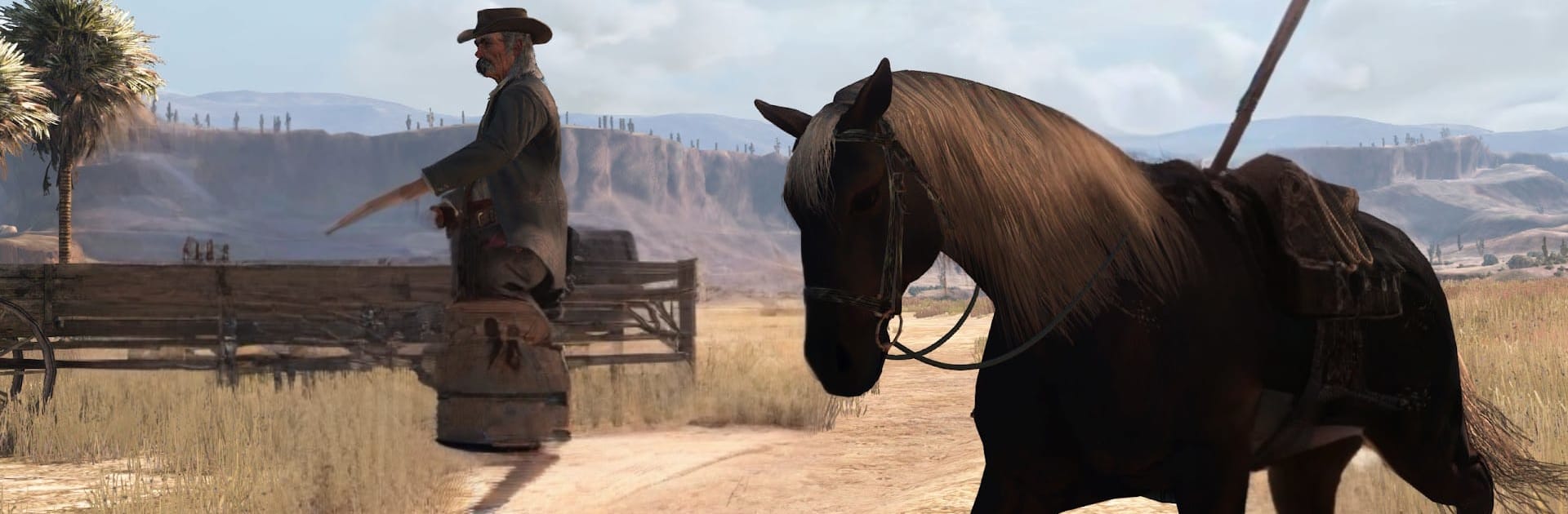
It is classic frontier drama with a controller in hand. The game drops the player into John Marston’s mess, chasing old gangmates across big stretches of desert and scrubby hills, from the American West down into Mexico. The pace breathes a bit, so one moment it is a quiet ride under a dusty sunset, then suddenly it is a shootout in a burned out town or a tense duel on the main street. Missions swing between gunfights, horse chases, bounties, herding, hunting, and a little cards or liar’s dice on the side. It is single player only, which fits the story focus, and a Netflix membership is required. This version packs the full campaign plus Undead Nightmare and the Game of the Year extras, so there is alot here.

Undead Nightmare is a whole mood shift. Towns fall to zombies, ammo matters, torches and holy water become tools, and those weird horses of the apocalypse can be found if someone explores. On PC with BlueStacks, mouse aim feels snappy and riding while shooting is much easier than touch, and custom keymapping or a paired controller keeps things comfy. The world tosses in random strangers and ambushes that make rides less empty, animals will jump the player when not expected, and outfits and challenges give side goals without turning it into a checklist grind. It can get slow between towns, and the game lets the player figure things out instead of nagging, but that is part of the pull.

Get ready for a buttery smooth, high-performance gaming action only on BlueStacks.

Game Features

Enhancements

  • Macros
  • Multi Instance
  • Multi Instance Sync
  • Script
  • Enhancements
Macros

Macros

Automate the predictable in Red Dead Redemption NETFLIX and transform your gameplay with Macros. Get access to inventive Macros in the BlueStacks Macro Community
Multi Instance

Multi Instance

Play Red Dead Redemption NETFLIX on one window. And chat with your friend on the other. Press CTRL + Shift + 8 to open the Multi-Instance Manager. And start creating fresh instances or clone an existing one.
Multi Instance Sync

Multi Instance Sync

Play Red Dead Redemption NETFLIX with the power of Multi-Instance Sync. Replicate what you are doing on the main instance on all other instances. Level up faster, play more.
Script

Script

Script your way to gaming glory in Red Dead Redemption NETFLIX with BlueStacks Script. Write and run a set of commands to automate repeated tasks. Trigger the command by assigning it to any key.
Read More

How to Download and Play Red Dead Redemption NETFLIX on PC or Mac

  • Download and install BlueStacks on your PC or Mac

  • Complete Google sign-in to access the Play Store, or do it later

  • Look for Red Dead Redemption NETFLIX in the search bar at the top right corner

  • Click to install Red Dead Redemption NETFLIX from the search results

  • Complete Google sign-in (if you skipped step 2) to install Red Dead Redemption NETFLIX

  • Click the Red Dead Redemption NETFLIX icon on the home screen to start playing

video
Watch Video

Minimum System Requirements

With BlueStacks 5, you can get started on a PC that fulfills the following requirements.

  • Operating System

    Microsoft Windows 7 or above, macOS 11 (Big Sur) or above

  • Processor

    Intel, AMD or Apple Silicon Processor

  • RAM

    at least 4GB

  • HDD

    10GB Free Disk Space

Note:

* You must be an Administrator on your PC. Up to date graphics drivers from Microsoft or the chipset vendor.

Red Dead Redemption NETFLIX - FAQs

  • How to play Red Dead Redemption NETFLIX on Windows PC & Mac?

    Play Red Dead Redemption NETFLIX on your PC or Mac by following these simple steps.

    • Click on 'Play Red Dead Redemption NETFLIX on PC’ to download BlueStacks
    • Install it and log-in to Google Play Store
    • Launch and play the game.
  • Why is BlueStacks the fastest and safest platform to play games on PC?

    BlueStacks respects your privacy and is always safe and secure to use. It does not carry any malware, spyware, or any sort of additional software that could harm your PC.

    It is engineered to optimize speed and performance for a seamless gaming experience.

  • What are Red Dead Redemption NETFLIX PC requirements?

    Minimum requirement to run Red Dead Redemption NETFLIX on your PC

    • OS: Microsoft Windows 7 or above MacOS 11 (Big Sur) or above
    • Processor: Intel, AMD or Apple Silicon Processor
    • RAM: Your PC must have at least 4GB of RAM. (Note that having 4GB or more disk space is not a substitute for RAM)
    • HDD: 10GB Free Disk Space.
    • You must be an Administrator on your PC.