Ice Bot: Sliding Block Puzzle

Ice Bot: Sliding Block Puzzle

Puzzle

| Dustyroom

Play on PC with BlueStacks or from our cloud

  • Overview
  • Game Features
  • How to Play

Page Modified On: April 02, 2026

Play Ice Bot: Sliding Block Puzzle on PC or Mac

Explore a whole new adventure with Ice Bot: Sliding Block Puzzle, a Puzzle game created by Dustyroom. Experience great gameplay with BlueStacks, the most popular gaming platform to play Android games on your PC or Mac.

About the Game

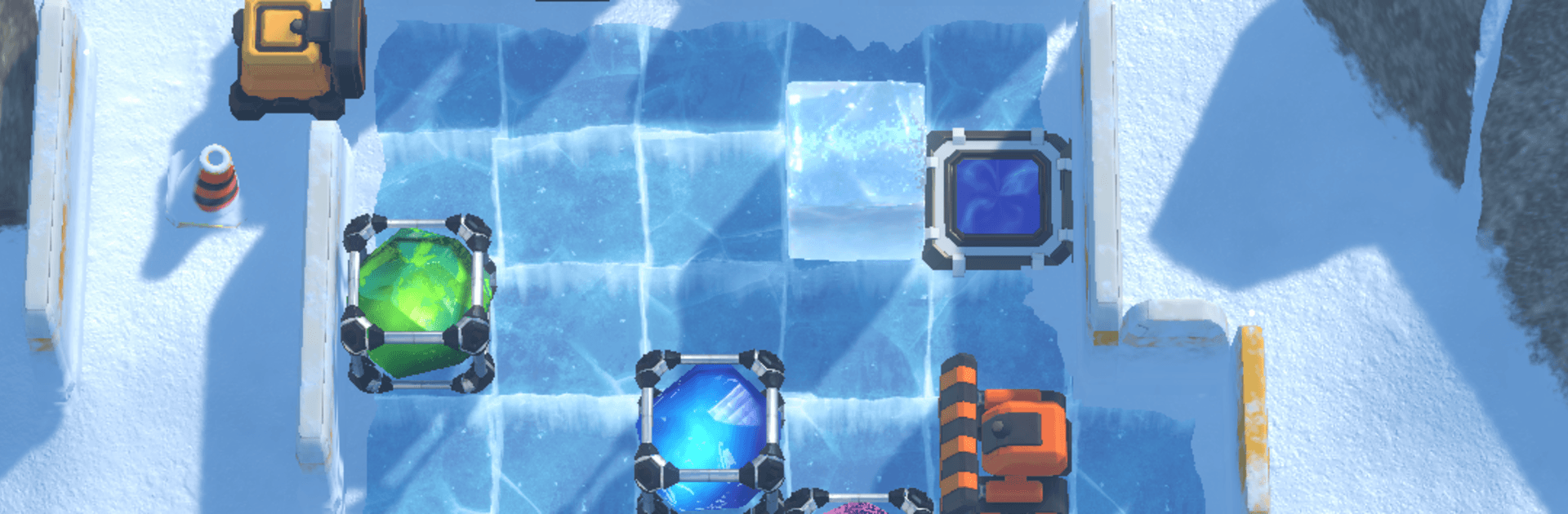
Ice Bot: Sliding Block Puzzle is a calm, clever Puzzle game from Dustyroom where every move matters. You guide a tiny robot across icy grids, nudging crystal blocks that won’t stop sliding until something gets in their way. It’s simple to pick up, surprisingly deep, and perfect for those moments when you want to think—really think.

Prefer playing on a bigger screen? It works great on BlueStacks if you want keyboard and mouse control on your PC.

Game Features

  • Handcrafted challenges: Over 60 carefully built levels—no random generators—so each puzzle feels intentional and fair.
  • Slide-and-stop movement: Push a block and it glides across ice until it hits a wall, another block, or a special device. Planning your stops is the whole game.
  • Fresh sokoban twist: Four special block types remix the rules—redirect with Pushers, clear space with Crushables, use Wildcards for any goal, or let Copy blocks mimic neighbors.
  • Three difficulty tiers: Start with gentle tutorials, then work up to brain-benders with optimal move counts for perfectionists.
  • Play at your pace: No timers, no pressure. Take your time to map out routes and chase that clean, elegant solution.
  • Unlimited undo: Test wild ideas, roll them back instantly, and refine without penalty.
  • Smart hint system: Stuck? Get a nudge that highlights a useful next push. Hints can be unlocked with optional rewarded videos or simple gem packs.
  • Skip and return: Bump into a tough stage? Skip it now, crack it later.
  • Accessible design: Colorblind mode swaps colors for clear patterns so pieces are easy to tell apart.
  • Cozy audio: Original, low-key music that keeps your head clear and your focus sharp—headphones recommended.
  • Offline-friendly: Puzzles are fully playable without a connection.
  • Fair and friendly: No mandatory ads, no paywall. Everything’s available from the start.

Make your gaming sessions memorable with precise controls that give you an edge in close combats and visuals that pop up, bringing every character to life.


Game Features

Enhancements

  • Macros
  • Multi Instance
  • Multi Instance Sync
  • Script
  • Enhancements
Macros

Macros

Automate the predictable in Ice Bot: Sliding Block Puzzle and transform your gameplay with Macros. Get access to inventive Macros in the BlueStacks Macro Community
Multi Instance

Multi Instance

Play Ice Bot: Sliding Block Puzzle on one window. And chat with your friend on the other. Press CTRL + Shift + 8 to open the Multi-Instance Manager. And start creating fresh instances or clone an existing one.
Multi Instance Sync

Multi Instance Sync

Play Ice Bot: Sliding Block Puzzle with the power of Multi-Instance Sync. Replicate what you are doing on the main instance on all other instances. Level up faster, play more.
Script

Script

Script your way to gaming glory in Ice Bot: Sliding Block Puzzle with BlueStacks Script. Write and run a set of commands to automate repeated tasks. Trigger the command by assigning it to any key.
Read More

How to Download and Play Ice Bot: Sliding Block Puzzle on PC or Mac

  • Download and install BlueStacks on your PC or Mac

  • Complete Google sign-in to access the Play Store, or do it later

  • Look for Ice Bot: Sliding Block Puzzle in the search bar at the top right corner

  • Click to install Ice Bot: Sliding Block Puzzle from the search results

  • Complete Google sign-in (if you skipped step 2) to install Ice Bot: Sliding Block Puzzle

  • Click the Ice Bot: Sliding Block Puzzle icon on the home screen to start playing

video
Watch Video

Minimum System Requirements

With BlueStacks 5, you can get started on a PC that fulfills the following requirements.

  • Operating System

    Microsoft Windows 7 or above, macOS 11 (Big Sur) or above

  • Processor

    Intel, AMD or Apple Silicon Processor

  • RAM

    at least 4GB

  • HDD

    10GB Free Disk Space

Note:

* You must be an Administrator on your PC. Up to date graphics drivers from Microsoft or the chipset vendor.

Ice Bot: Sliding Block Puzzle - FAQs

  • How to play Ice Bot: Sliding Block Puzzle on Windows PC & Mac?

    Play Ice Bot: Sliding Block Puzzle on your PC or Mac by following these simple steps.

    • Click on 'Play Ice Bot: Sliding Block Puzzle on PC’ to download BlueStacks
    • Install it and log-in to Google Play Store
    • Launch and play the game.
  • Why is BlueStacks the fastest and safest platform to play games on PC?

    BlueStacks respects your privacy and is always safe and secure to use. It does not carry any malware, spyware, or any sort of additional software that could harm your PC.

    It is engineered to optimize speed and performance for a seamless gaming experience.

  • What are Ice Bot: Sliding Block Puzzle PC requirements?

    Minimum requirement to run Ice Bot: Sliding Block Puzzle on your PC

    • OS: Microsoft Windows 7 or above MacOS 11 (Big Sur) or above
    • Processor: Intel, AMD or Apple Silicon Processor
    • RAM: Your PC must have at least 4GB of RAM. (Note that having 4GB or more disk space is not a substitute for RAM)
    • HDD: 10GB Free Disk Space.
    • You must be an Administrator on your PC.