Designer City 4
Designer City 4

Designer City 4

Simulation

| SGS - City Building Games

Play on PC with BlueStacks or from our cloud

  • Overview
  • Game Features
  • How to Play

Page Modified On: June 03, 2026

Play Designer City 4 on PC or Mac

Designer City 4 by SGS – City Building Games has plenty to keep you busy. BlueStacks lets you play it on PC or Mac with more screen space, better control, and fewer mobile limits.

About the Game

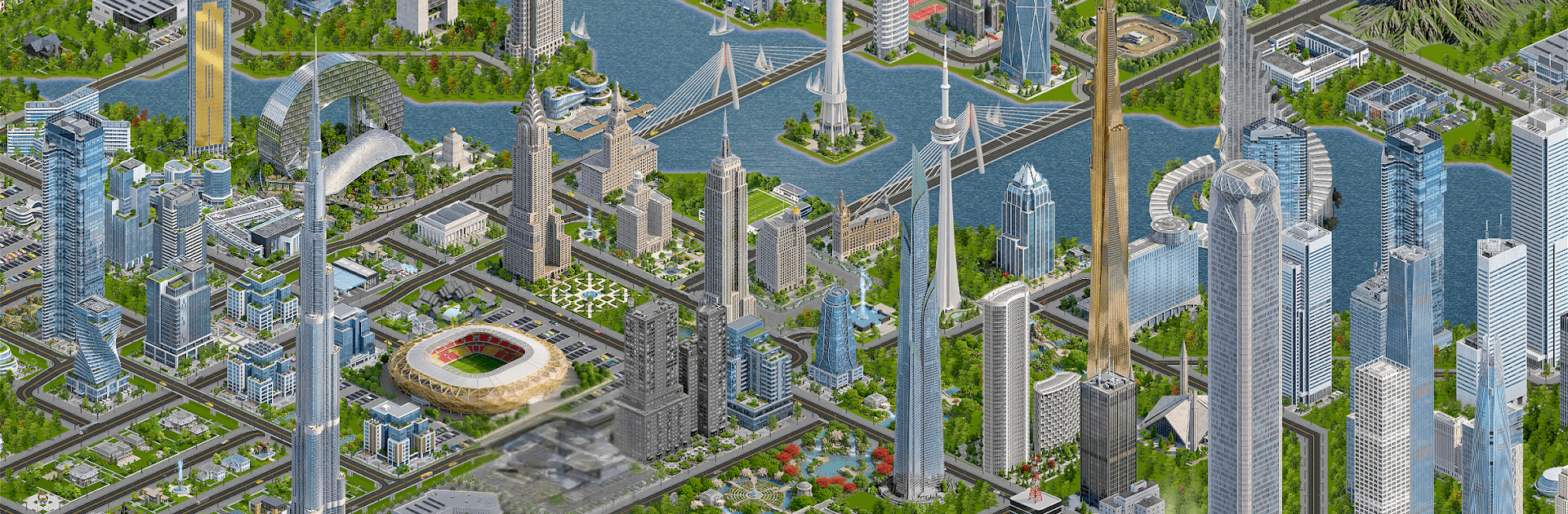
Designer City 4 is a city-building Simulation that lets your ideas turn into skylines. Start with a quiet patch of land and grow it into a sprawling metropolis, balancing the gritty details with big creative vision. If you like planning on a larger display, it runs smoothly on BlueStacks, too.

Game Features

  • Build Without Limits: Shape neighborhoods your way, from cozy suburbs to high-rise downtowns filled with real-world landmarks, sleek modern towers, and bold futuristic designs.
  • Deep City Simulation: Keep residents happy by balancing housing, jobs, transport, utilities, and public services. Every choice nudges your city’s economy, growth, and overall vibe.
  • Living, Breathing World: Watch day turn to night, see traffic patterns form and shift, and manage pollution as it spreads—your city isn’t static, it reacts to how you build.
  • Smart Policies and Ordinances: Use powerful city rules to guide development, tune services, set environmental standards, and focus growth where you want it.
  • Your Kind of Metropolis: Go green with renewable energy and parks, or build a dense, high-tech powerhouse fueled by industry and expansion—the path is yours.
  • Massive Maps, Thousands of Options: Work with huge buildable areas and a huge catalog of structures to unlock, combine, and customize for a skyline that feels uniquely yours.
  • Play at Your Pace: Enjoy it offline or online. No energy bars or forced wait timers—just pure planning, building, and tinkering whenever inspiration hits.

Start playing Designer City 4 on BlueStacks and get a smoother, more comfortable PC or Mac setup.


Game Features

Enhancements

  • Macros
  • Multi Instance
  • Multi Instance Sync
  • Script
  • Enhancements
Macros

Macros

Automate the predictable in Designer City 4 and transform your gameplay with Macros. Get access to inventive Macros in the BlueStacks Macro Community
Multi Instance

Multi Instance

Play Designer City 4 on one window. And chat with your friend on the other. Press CTRL + Shift + 8 to open the Multi-Instance Manager. And start creating fresh instances or clone an existing one.
Multi Instance Sync

Multi Instance Sync

Play Designer City 4 with the power of Multi-Instance Sync. Replicate what you are doing on the main instance on all other instances. Level up faster, play more.
Script

Script

Script your way to gaming glory in Designer City 4 with BlueStacks Script. Write and run a set of commands to automate repeated tasks. Trigger the command by assigning it to any key.
Read More

How to Download and Play Designer City 4 on PC or Mac

  • Download and install BlueStacks on your PC or Mac

  • Complete Google sign-in to access the Play Store, or do it later

  • Look for Designer City 4 in the search bar at the top right corner

  • Click to install Designer City 4 from the search results

  • Complete Google sign-in (if you skipped step 2) to install Designer City 4

  • Click the Designer City 4 icon on the home screen to start playing

video
Watch Video

Minimum System Requirements

With BlueStacks 5, you can get started on a PC that fulfills the following requirements.

  • Operating System

    Microsoft Windows 7 or above, macOS 11 (Big Sur) or above

  • Processor

    Intel, AMD or Apple Silicon Processor

  • RAM

    at least 4GB

  • HDD

    10GB Free Disk Space

Note:

* You must be an Administrator on your PC. Up to date graphics drivers from Microsoft or the chipset vendor.

Designer City 4 - FAQs

  • How to play Designer City 4 on Windows PC & Mac?

    Play Designer City 4 on your PC or Mac by following these simple steps.

    • Click on 'Play Designer City 4 on PC’ to download BlueStacks
    • Install it and log-in to Google Play Store
    • Launch and play the game.
  • Why is BlueStacks the fastest and safest platform to play games on PC?

    BlueStacks respects your privacy and is always safe and secure to use. It does not carry any malware, spyware, or any sort of additional software that could harm your PC.

    It is engineered to optimize speed and performance for a seamless gaming experience.

  • What are Designer City 4 PC requirements?

    Minimum requirement to run Designer City 4 on your PC

    • OS: Microsoft Windows 7 or above MacOS 11 (Big Sur) or above
    • Processor: Intel, AMD or Apple Silicon Processor
    • RAM: Your PC must have at least 4GB of RAM. (Note that having 4GB or more disk space is not a substitute for RAM)
    • HDD: 10GB Free Disk Space.
    • You must be an Administrator on your PC.