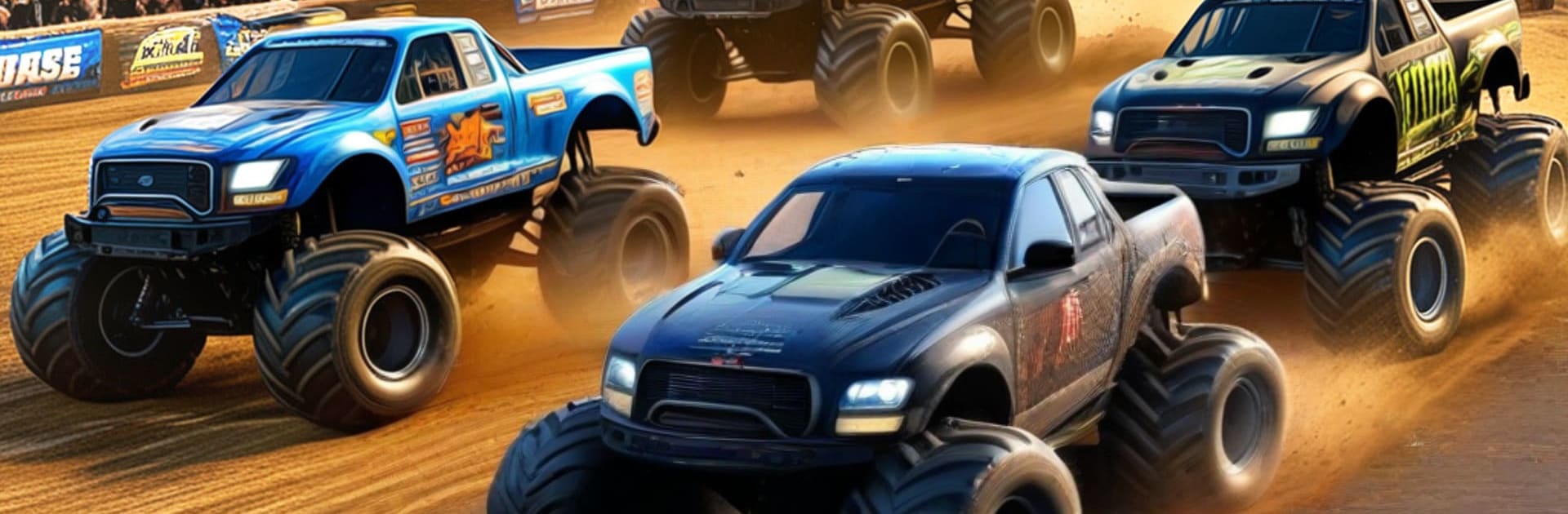
Grand Demolition Derby 2030

Grand Demolition Derby 2030

Simulation

| The Gamerz Hub

Play on PC with BlueStacks or from our cloud

  • Overview
  • Game Features
  • How to Play

Page Modified On: May 20, 2026

Play Grand Demolition Derby 2030 on PC or Mac

Explore a whole new adventure with Grand Demolition Derby 2030, a Simulation game created by The Gamerz Hub. Experience great gameplay with BlueStacks, the most popular gaming platform to play Android games on your PC or Mac.

About the Game

Grand Demolition Derby 2030 throws you into bumper-smashing mayhem where survival and style both matter. It’s a high-energy Simulation experience built around monster trucks, wild collisions, and gutsy jumps that’ll make your palms sweat a little. Expect chaotic arenas, stunt-heavy tracks, and plenty of rivals who don’t mind trading paint.

Game Features

  • Smash-Focused Derby Action: Trade hits, ram fenders, and send parts flying as you fight to keep your ride moving in metal-crunching showdowns.

  • Monster Trucks + Mega Ramps: Launch heavy rigs off towering ramps, stick ridiculous landings, and feel that satisfying thud when rubber meets track again.

  • Rivals That Hit Back: Go head-to-head in packed events where positioning, timing, and a well-placed nudge can be the difference between glory and a smoking hood.

  • Stunt and Race Tracks: Switch from tight arenas built for demolition to long tracks made for speed, jumps, and risky shortcuts.

  • Pick-Up-and-Play Controls: Easy steering and responsive throttle/brake let you focus on smashing, drifting, and hitting that perfect jump without wrestling the controls.

  • Damage That Matters: Every hard hit changes how your truck handles, so smart driving—and a little luck—goes a long way.

  • Big Moments, Big Screens: Want to see those crashes in all their messy detail? Fire it up on PC with BlueStacks and enjoy a wider view of the chaos.

  • Loud, Crunchy Feedback: Grumbling engines, screeching tires, and that oh-no-there-goes-the-bumper crunch make each impact feel extra satisfying.

Start your journey now. Download the game on BlueStacks, invite your friends, and march on a new adventure.


Game Features

Enhancements

  • Macros
  • Multi Instance
  • Multi Instance Sync
  • Script
  • Enhancements
Macros

Macros

Automate the predictable in Grand Demolition Derby 2030 and transform your gameplay with Macros. Get access to inventive Macros in the BlueStacks Macro Community
Multi Instance

Multi Instance

Play Grand Demolition Derby 2030 on one window. And chat with your friend on the other. Press CTRL + Shift + 8 to open the Multi-Instance Manager. And start creating fresh instances or clone an existing one.
Multi Instance Sync

Multi Instance Sync

Play Grand Demolition Derby 2030 with the power of Multi-Instance Sync. Replicate what you are doing on the main instance on all other instances. Level up faster, play more.
Script

Script

Script your way to gaming glory in Grand Demolition Derby 2030 with BlueStacks Script. Write and run a set of commands to automate repeated tasks. Trigger the command by assigning it to any key.
Read More

How to Download and Play Grand Demolition Derby 2030 on PC or Mac

  • Download and install BlueStacks on your PC or Mac

  • Complete Google sign-in to access the Play Store, or do it later

  • Look for Grand Demolition Derby 2030 in the search bar at the top right corner

  • Click to install Grand Demolition Derby 2030 from the search results

  • Complete Google sign-in (if you skipped step 2) to install Grand Demolition Derby 2030

  • Click the Grand Demolition Derby 2030 icon on the home screen to start playing

video
Watch Video

Minimum System Requirements

With BlueStacks 5, you can get started on a PC that fulfills the following requirements.

  • Operating System

    Microsoft Windows 7 or above, macOS 11 (Big Sur) or above

  • Processor

    Intel, AMD or Apple Silicon Processor

  • RAM

    at least 4GB

  • HDD

    10GB Free Disk Space

Note:

* You must be an Administrator on your PC. Up to date graphics drivers from Microsoft or the chipset vendor.

Grand Demolition Derby 2030 - FAQs

  • How to play Grand Demolition Derby 2030 on Windows PC & Mac?

    Play Grand Demolition Derby 2030 on your PC or Mac by following these simple steps.

    • Click on 'Play Grand Demolition Derby 2030 on PC’ to download BlueStacks
    • Install it and log-in to Google Play Store
    • Launch and play the game.
  • Why is BlueStacks the fastest and safest platform to play games on PC?

    BlueStacks respects your privacy and is always safe and secure to use. It does not carry any malware, spyware, or any sort of additional software that could harm your PC.

    It is engineered to optimize speed and performance for a seamless gaming experience.

  • What are Grand Demolition Derby 2030 PC requirements?

    Minimum requirement to run Grand Demolition Derby 2030 on your PC

    • OS: Microsoft Windows 7 or above MacOS 11 (Big Sur) or above
    • Processor: Intel, AMD or Apple Silicon Processor
    • RAM: Your PC must have at least 4GB of RAM. (Note that having 4GB or more disk space is not a substitute for RAM)
    • HDD: 10GB Free Disk Space.
    • You must be an Administrator on your PC.