Battle Royale GD
Battle Royale GD

Battle Royale GD

Action

| Monkey Play

Play on PC with BlueStacks or from our cloud

  • Overview
  • Game Features
  • How to Play

Page Modified On: August 17, 2026

Play Battle Royale GD on PC or Mac

Battle Royale GD brings the Action genre to life, and throws up exciting challenges for gamers. Developed by Monkey Play, this Android game is best experienced on BlueStacks, the World’s #1 app player for PC and Mac users.

About the Game

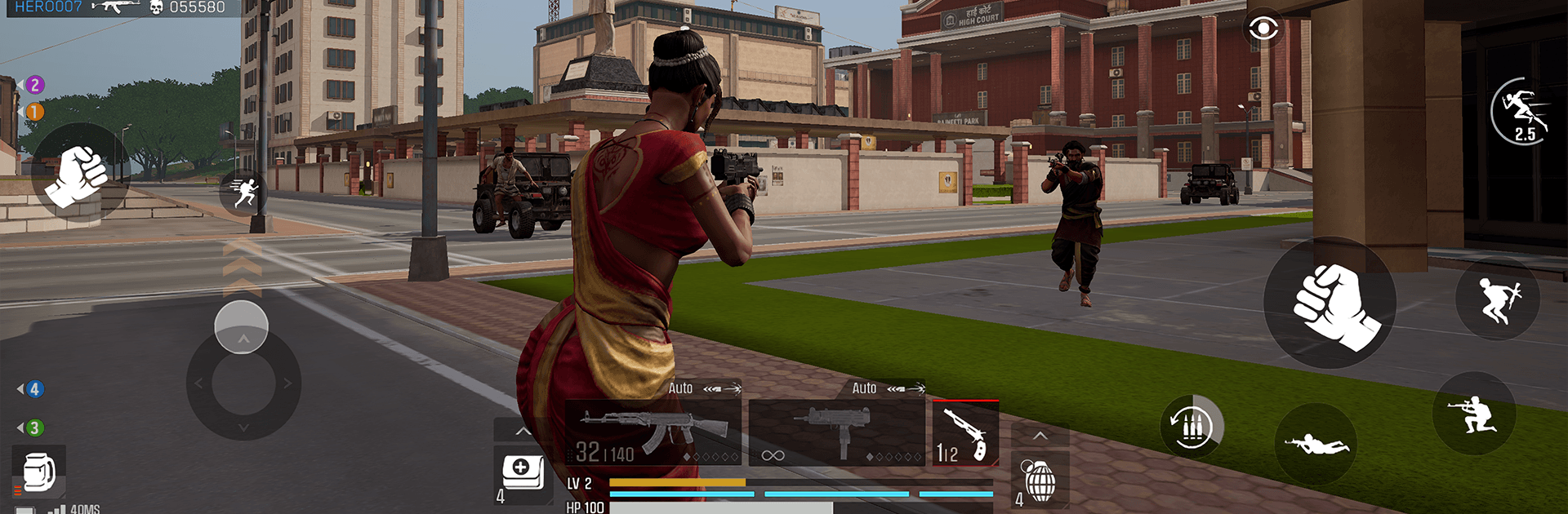
Battle Royale GD is an Action battle royale set in Sonepur, a gritty “City of Gold” inspired by the 2000s. You drop into a sprawling urban map packed with luxury towers, loud bazaars, and rooftops that suddenly turn into firing lines. Outthink, outshoot, and outlast everyone until your name’s the only one that matters.

Game Features

  • The City of Gold, Reimagined — Explore a dense Indian metropolis where polished high-rises loom over crowded markets. Every block hides angles, sightlines, and sneaky flank routes waiting to be abused.

  • Play Your Way — Go loud with relentless pushes or stalk quietly from shadow to shadow. Shift gears on the fly based on where you land, what you loot, and who’s hunting you.

  • Districts With Personality — Each zone hits different: the Financial District favors long shots, Kismat Market squeezes you into tight alleys, Chandi Chor Bazar packs you into brutal close quarters, Sonepur Terminus funnels squads through chokepoints, Manju Mall stacks fights across multiple floors, and Hotel Rajphool turns the roof into a throne worth holding.

  • Gear With Local Flavor — Scavenge weapons and equipment that feel grounded in the setting, then build a kit that fits your style—fast and flashy, or methodical and patient.

  • Vertical Combat Matters — Control stairwells, balconies, and skylines. Climbing to the high ground can flip a losing fight into a win if you time it right.

  • Solo, Winner Takes All — Drop in alone, claim key positions, and manage the chaos until there’s nobody left to challenge you.

  • Evolving Build — It’s early and still growing, so expect tweaks and fresh polish as feedback shapes what comes next.

  • PC-Friendly Option — Prefer playing on a bigger screen? Run Battle Royale GD with BlueStacks for crisp control and smooth, steady action.

Start playing Battle Royale GD on BlueStacks and get a smoother, more comfortable PC or Mac setup.


Game Features

Enhancements

  • Macros
  • Multi Instance
  • Multi Instance Sync
  • Eco Mode
  • Enhancements
Macros

Macros

Skip the boring parts of a game. Play Battle Royale GD with Macros and get the edge. Simply record a sequence of commands and execute them at any moment.
Multi Instance

Multi Instance

Why limit to one game on your phone when you can play many on your PC? Open multiple instances of Battle Royale GD at once with Multi-Instance. Leverage the power of different accounts by doing more.
Multi Instance Sync

Multi Instance Sync

Get the best out of Battle Royale GD with Multi-Instance Sync. Play the game from different accounts and build your own empire. Use Multi-instance sync to repeat the action in the main BlueStacks instance on all other instances.
Eco Mode

Eco Mode

Find the rarest heroes by making multiple summons in Battle Royale GD. And while you are at it, reduce your PC’s resource consumption with the Eco Mode. Farm efficiently. Get the best results.
Read More

How to Download and Play Battle Royale GD on PC or Mac

  • Download and install BlueStacks on your PC or Mac

  • Complete Google sign-in to access the Play Store, or do it later

  • Look for Battle Royale GD in the search bar at the top right corner

  • Click to install Battle Royale GD from the search results

  • Complete Google sign-in (if you skipped step 2) to install Battle Royale GD

  • Click the Battle Royale GD icon on the home screen to start playing

video
Watch Video

Minimum System Requirements

With BlueStacks 5, you can get started on a PC that fulfills the following requirements.

  • Operating System

    Microsoft Windows 7 or above, macOS 11 (Big Sur) or above

  • Processor

    Intel, AMD or Apple Silicon Processor

  • RAM

    at least 4GB

  • HDD

    10GB Free Disk Space

Note:

* You must be an Administrator on your PC. Up to date graphics drivers from Microsoft or the chipset vendor.

Battle Royale GD - FAQs

  • How to play Battle Royale GD on Windows PC & Mac?

    Play Battle Royale GD on your PC or Mac by following these simple steps.

    • Click on 'Play Battle Royale GD on PC’ to download BlueStacks
    • Install it and log-in to Google Play Store
    • Launch and play the game.
  • Why is BlueStacks the fastest and safest platform to play games on PC?

    BlueStacks respects your privacy and is always safe and secure to use. It does not carry any malware, spyware, or any sort of additional software that could harm your PC.

    It is engineered to optimize speed and performance for a seamless gaming experience.

  • What are Battle Royale GD PC requirements?

    Minimum requirement to run Battle Royale GD on your PC

    • OS: Microsoft Windows 7 or above MacOS 11 (Big Sur) or above
    • Processor: Intel, AMD or Apple Silicon Processor
    • RAM: Your PC must have at least 4GB of RAM. (Note that having 4GB or more disk space is not a substitute for RAM)
    • HDD: 10GB Free Disk Space.
    • You must be an Administrator on your PC.